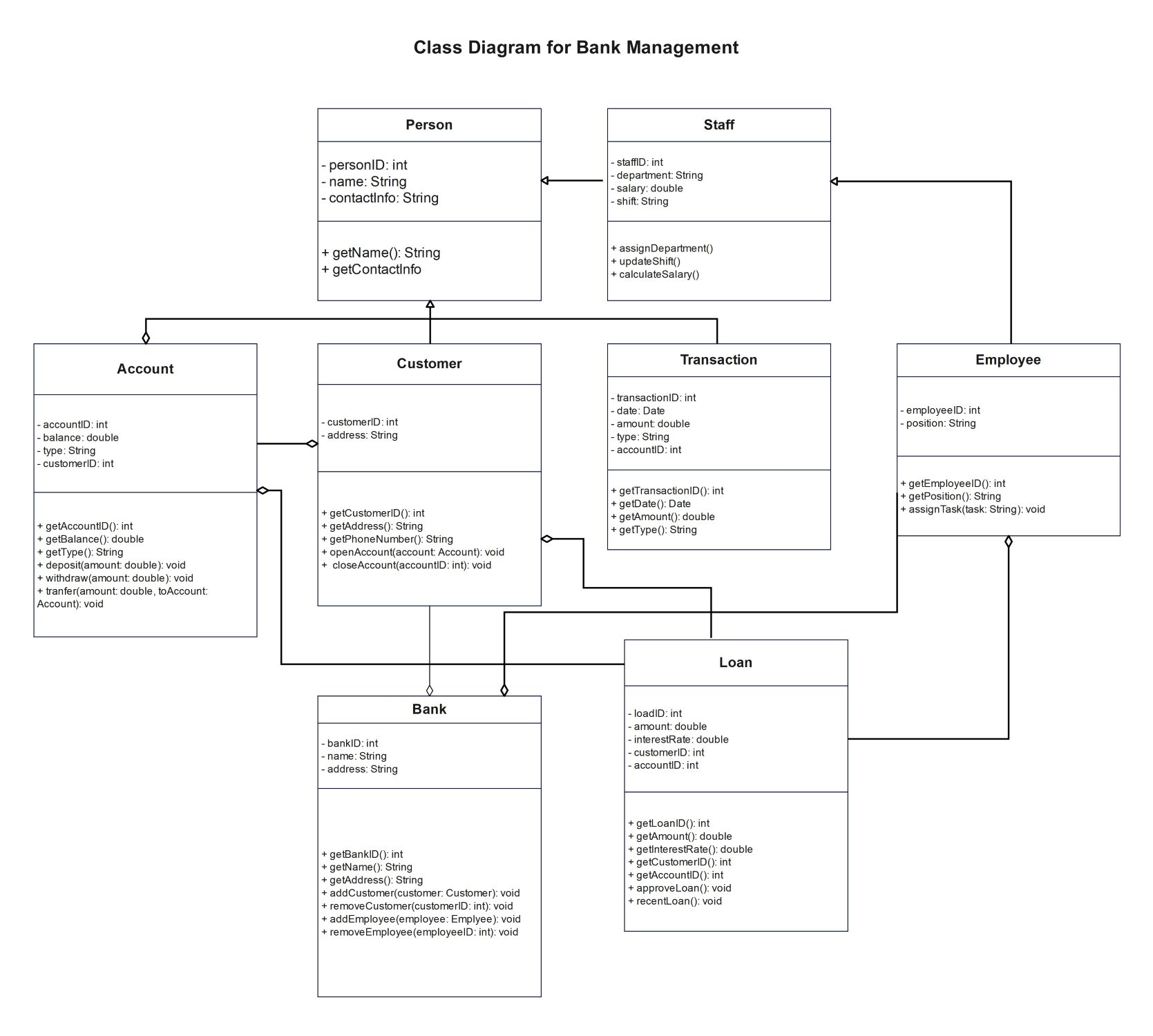
About this Class Diagram for Bank Management template
This class diagram template provides a blueprint for building a robust banking software system. It captures all necessary relationships between bank staff, customers, and financial accounts to ensure efficient operations and data management.
User Identity and Roles
The diagram defines the hierarchy of individuals within the banking ecosystem. It starts with a base Person class and branches into specific roles. This structure organizes staff details, employee positions, and customer contact information clearly.
- Person: Stores base data like ID and name.
- Staff: Tracks department, salary, and shift schedules.
- Customer: Manages customer IDs and residential address details.
- Employee: Handles specific employee positions and task assignments.
Financial Accounts and Credit
This section details how the system manages user wealth and credit lines. It includes logic for standard accounts and complex loan structures. These classes handle essential calculations like interest rates, balances, and formal loan approvals.
- Account: Manages balances, deposits, withdrawals, and account types.
- Loan: Tracks loan IDs, interest rates, and approval status.
- Account Integration: Connects account IDs to specific customer profiles.
Core Banking and Transactions
The central hub manages the entire institution and individual money movements. These classes track every financial event and manage the workforce. They ensure that all transactions are recorded with dates, amounts, and unique identifiers for security.
- Bank: Administers the list of customers and employees.
- Transaction: Logs specific details for every financial movement.
- Operation Methods: Includes functions for adding customers or transferring funds.
FAQs about this Template
-
What is the primary purpose of a class diagram for bank management?
A class diagram for bank management acts as a structural map for software developers. It defines the static structure of the system by identifying classes, attributes, and relationships. This visualization helps in planning how data flows between customers, accounts, and the bank. It ensures that the system is logical, secure, and capable of handling complex financial operations without errors.
-
How do inheritance and relationships work in this banking diagram?
In this banking diagram, inheritance is used to simplify data management. For example, the Person class acts as a parent for both Staff and Customer classes. This means common attributes like name and contact info are shared. Relationships like associations show how a Customer links to an Account, ensuring the software knows which person owns specific financial records and transactions.
-
Can this template be used for modern digital banking apps?
Yes, this template provides a solid foundation for modern digital banking applications. While it covers core basics like deposits and loans, you can easily extend it. Developers can add new classes for features like mobile wallets, cryptocurrency support, or international transfers. It serves as a scalable starting point that ensures the fundamental logic of the banking system remains solid.

 (AI & Web)