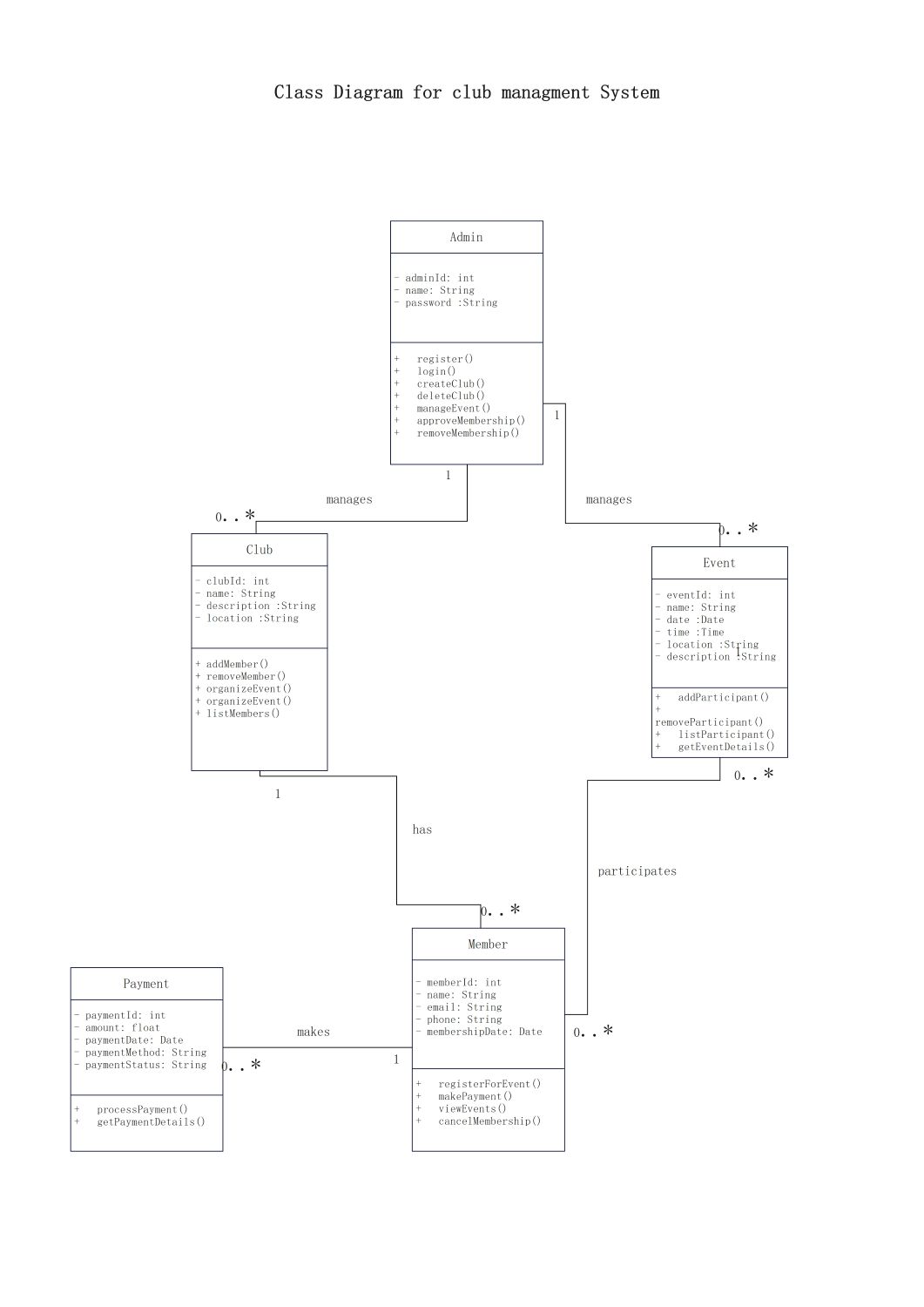
About this Class diagram for club management system template
This template provides a clear visual structure for organizing club data. It includes essential classes like administrators, members, and events to help you build a robust system efficiently.
Admin Node
The Admin class represents the system administrator responsible for overall management. This role handles high-level tasks like creating clubs, approving memberships, and managing event schedules to ensure the system runs smoothly.
- adminId: int
- name: String
- password: String
- register()
- login()
- createClub()
- deleteClub()
- manageEvent()
- approveMembership()
- removeMembership()
Club Node
The Club class acts as the central hub for specific organizations. It tracks details such as location and description. Administrators manage these entries to keep the community database current and well-organized.
- clubId: int
- name: String
- description: String
- location: String
- addMember()
- removeMember()
- organizeEvent()
- listMembers()
Event Node
The Event class tracks specific activities hosted by the club. It stores time, date, and location details. This entity is crucial for managing participant lists and ensuring members stay informed about upcoming activities.
- eventId: int
- name: String
- date: Date
- time: Time
- location: String
- description: String
- addParticipant()
- removeParticipant()
- listParticipant()
- getEventDetails()
Member Node
The Member class stores personal details for individuals joining the club. It tracks contact information and membership status. Members can register for various events and process their payments directly through the integrated system.
- memberId: int
- name: String
- email: String
- phone: String
- membershipDate: Date
- registerForEvent()
- makePayment()
- viewEvents()
- cancelMembership()
Payment Node
The Payment class manages financial transactions within the management system. It records the amount, method, and status for every fee. This ensures that the club maintains accurate financial records for all active members.
- paymentId: int
- amount: float
- paymentDate: Date
- paymentMethod: String
- paymentStatus: String
- processPayment()
- getPaymentDetails()
FAQs about this Template
-
Why use a class diagram for a club management system?
A class diagram for a club management system provides a blueprint for your software. It defines how data entities like members and administrators interact. By mapping these relationships early, you can avoid logic errors during the coding phase. It also helps stakeholders understand the system architecture without needing to read complex backend code or database schemas.
-
What are the key components of a club management system diagram?
The main components include classes like Member, Admin, Club, and Event. Each class contains attributes like IDs and names, along with methods such as login or register. Lines between these classes show associations, such as a member participating in an event. These visual connections explain how data flows through the application and how different modules communicate.
-
Can I customize this class diagram for my specific organization?
Yes, this template is fully customizable to fit unique club requirements. You can add new classes for inventory management or specific membership tiers. You might also modify the attributes to include social media handles or emergency contact details. Customizing the diagram ensures that your final software solution perfectly matches the operational needs of your specific club.

 (AI & Web)