About this class diagram for atm template
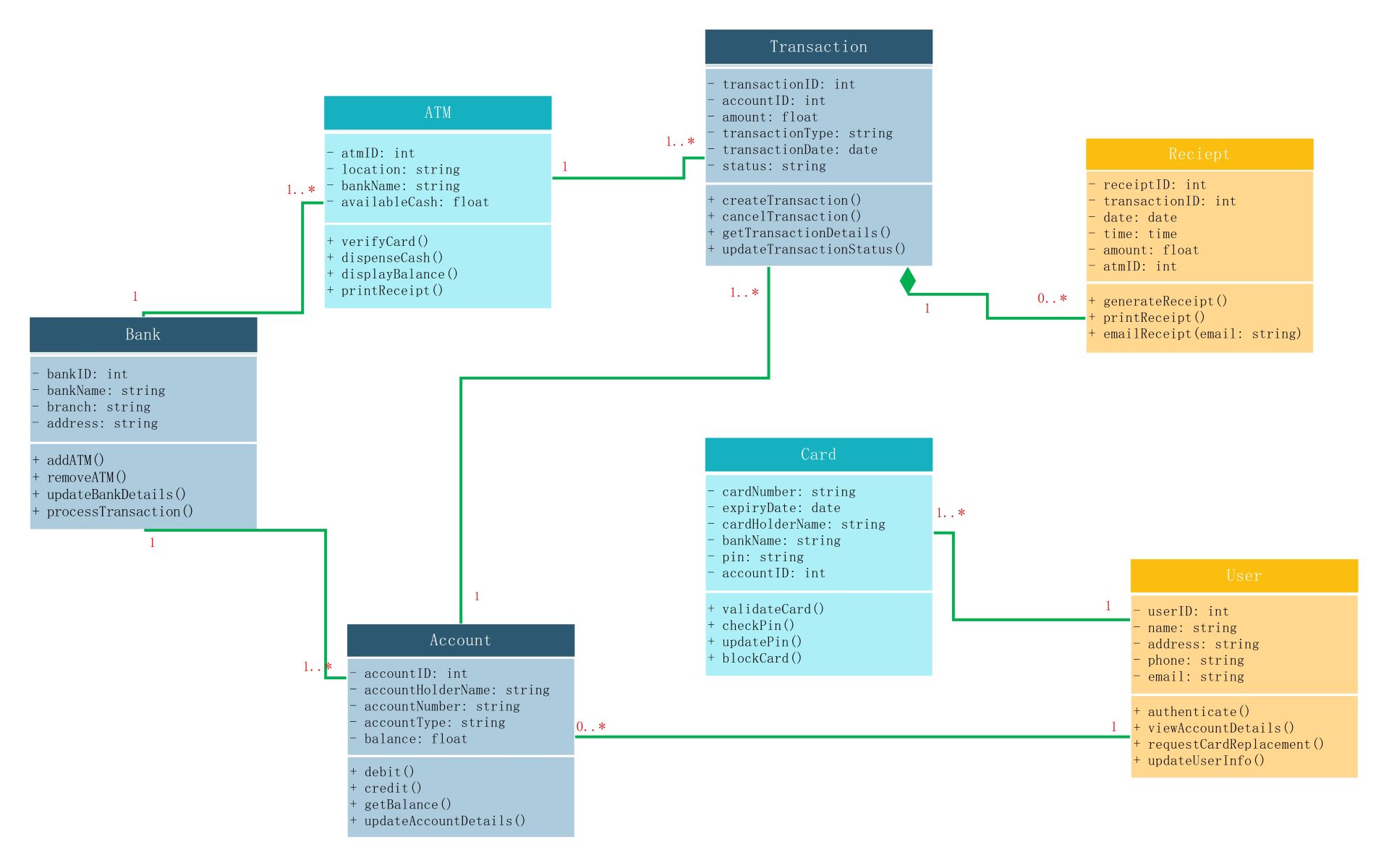
This class diagram for atm template provides a comprehensive blueprint for banking software. It maps out essential classes and their relationships. Use this to design reliable systems that handle card validation, fund withdrawals, and user account management effectively.
ATM and Bank Classes
The ATM class acts as the interface for hardware interaction. It connects directly to the Bank class to process requests. This ensures that every terminal is linked to a central banking system for data verification and updates.
- atmID, location, and bankName attributes
- verifyCard() and dispenseCash() methods
- addATM() and processTransaction() for Bank
- Relationship showing multiple ATMs per bank
Transaction and Receipt Classes
Transactions track every financial action taken by the user. Each transaction generates a receipt for record-keeping. This structure ensures accountability by logging IDs, dates, and amounts for every single withdrawal or balance inquiry performed on the machine.
- transactionID and amount details
- createTransaction() and updateTransactionStatus()
- receiptID and printReceipt() functionality
- One-to-many relationship between transactions and receipts
User and Card Components
The User class stores personal data while the Card class manages authentication. These components work together to identify the person accessing the account. Security methods like PIN checking and card blocking are integrated directly into these specific modules.
- userID, name, and contact information
- cardNumber and expiryDate attributes
- validateCard() and checkPin() security methods
- Connection between user profiles and physical cards
Account Management Class
The Account class is the core of the financial database. It stores the actual balance and account types. It interacts with both users and transactions to update funds whenever a debit or credit operation is successfully completed.
- accountNumber and balance tracking
- debit() and credit() financial operations
- getBalance() for real-time inquiries
- Links between users, cards, and transaction history
FAQs about this Template
-
What is the purpose of a class diagram for ATM?
A class diagram for an ATM system serves as a static structural model. It defines the blueprint for the software by identifying objects like users, cards, and accounts. This visualization helps developers understand how data flows between the bank and the terminal. It ensures that security protocols and transaction logic are correctly implemented before the actual coding process begins.
-
How do relationships work in an ATM UML diagram?
Relationships in this diagram show how different entities interact. For example, a bank owns multiple ATM terminals, represented by a one-to-many association. Similarly, a user can have multiple accounts or cards. These lines define the constraints and dependencies within the system. They help in building a database schema that maintains data integrity during high-volume financial operations.
-
Can I customize this class diagram for my project?
Yes, you can customize this template to fit specific banking requirements. You might add new classes for mobile banking integration or third-party payment gateways. You can also modify the attributes and methods to include biometric authentication or multi-currency support. Using a flexible template allows you to scale the system design as your software features grow more complex over time.

 (AI & Web)