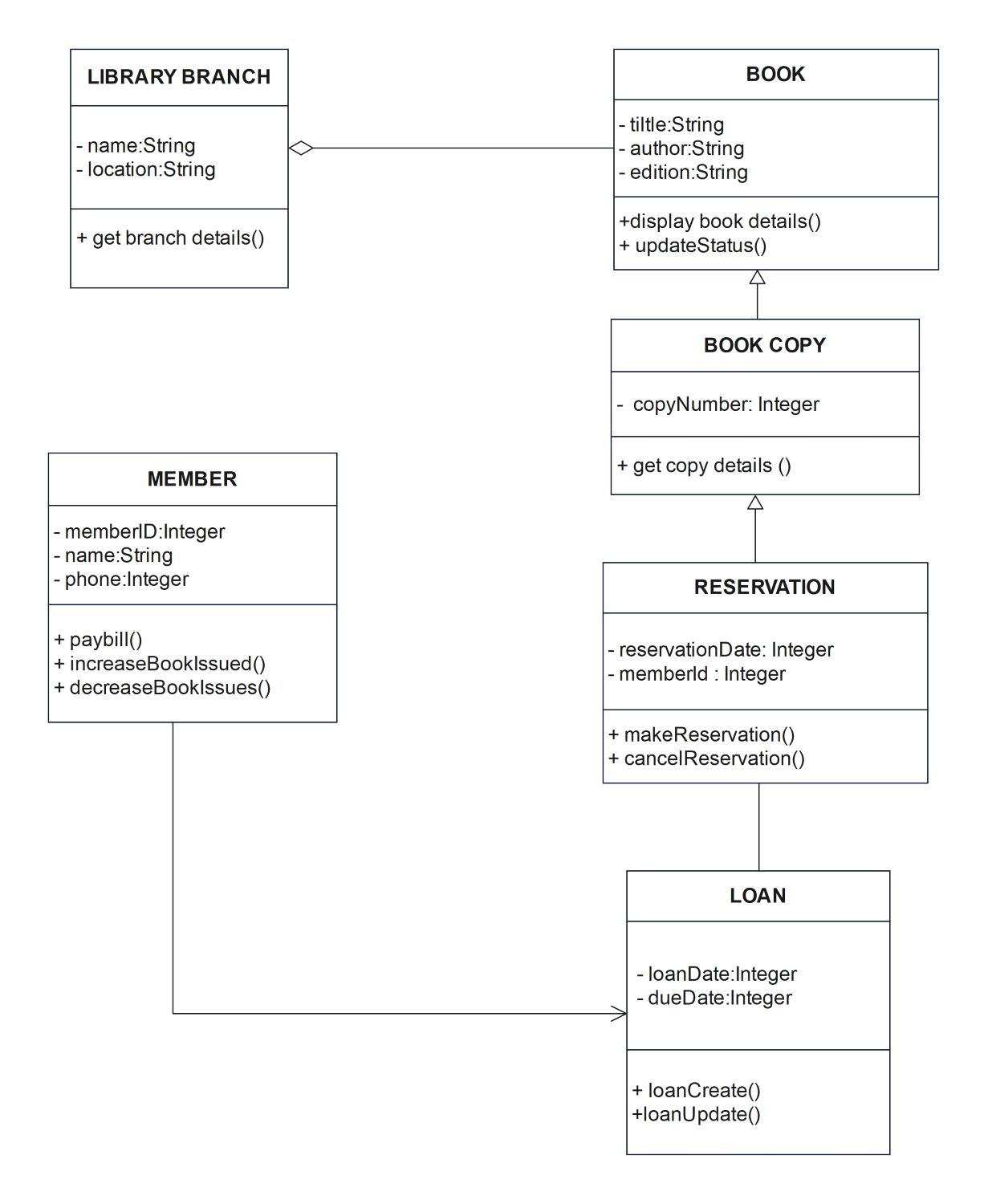
About this Library Management System UML Class Diagram template
This template provides a standard visual framework for library software architecture. It helps designers map out the essential classes required for book tracking and user management. Use this diagram to ensure your database structure is logical and your system operations are efficient for both staff and members.
Library Branch
The Library Branch class represents physical locations in the system. It tracks the name and specific address of each facility. This helps the system know where books are located across the entire organization.
- name: String
- location: String
- get branch details()
Book and Book Copy
The Book class contains general data like title and author. The Book Copy class manages specific physical units of those titles. This allows the system to track multiple copies of one book simultaneously.
- title: String
- author: String
- copyNumber: Integer
- updateStatus()
Member
The Member class handles user data for people using library services. It records unique IDs and contact numbers. This class also tracks how many books a member has borrowed to maintain loan limits.
- memberID: Integer
- name: String
- paybill()
- increaseBookIssued()
Reservation and Loan
These classes manage the flow of items between the library and its members. Reservations handle requests for busy books. Loans record the dates when books are taken and set the specific due dates.
- reservationDate: Integer
- loanDate: Integer
- makeReservation()
- loanUpdate()
FAQs about this Template
-
What is the purpose of a Library Management System UML Class Diagram?
A library management system UML class diagram acts as a technical guide for software developers. It shows the system's static structure by defining classes, attributes, and relationships. This visualization helps teams identify logic errors before coding begins. It ensures that the final software can handle complex tasks like inventory tracking and member management without data conflicts or structural errors.
-
How does the Book Copy class differ from the Book class?
The Book class stores universal information such as the author and edition which applies to all copies. In contrast, the Book Copy class tracks individual physical units using unique identification numbers. This separation is crucial for inventory control. It allows the library system to track which specific copy is currently on loan, which is available, and which requires repair or replacement.
-
Why are relationships between classes important in this UML diagram?
Relationships define how different components interact within the library application. For example, a loan must be linked to both a specific member and a specific book copy. These connections illustrate how data travels through the system during a transaction. Clear relationships prevent data isolation and ensure the software accurately reflects real-world library operations like borrowing, returning, and reserving various resources.

 (AI & Web)