About this Sequence diagram for Student attendance system template
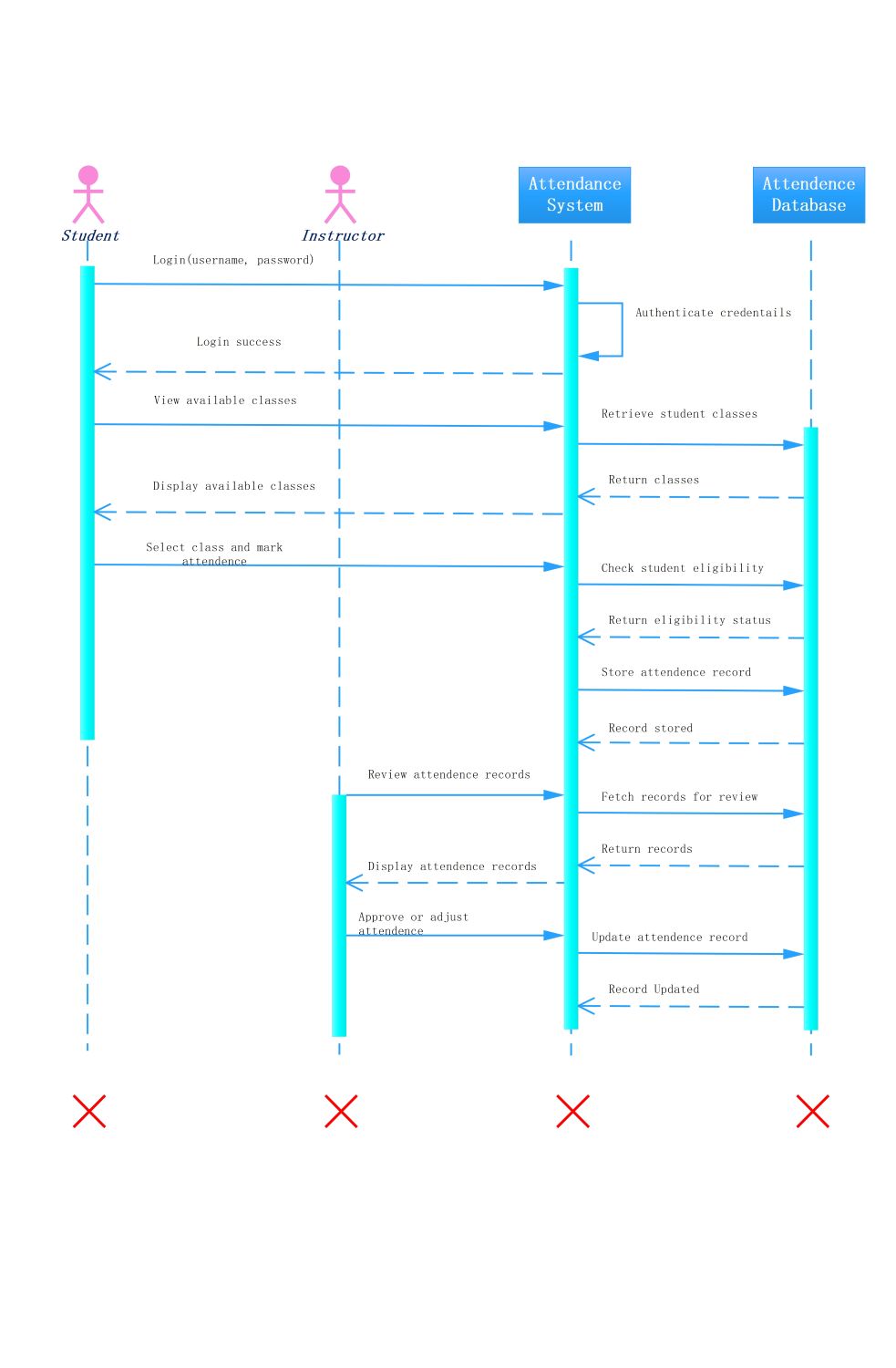
This template provides a clear visual map of how a student attendance system functions. It outlines the step-by-step communication between users and the database, making it an essential tool for software designers and developers.
Student Interactions
The student initiates the process by logging into the portal to record their presence. This section tracks how the system authenticates the user and displays available classes before confirming their eligibility for marking attendance.
- Login with username and password
- View available classes for the day
- Select specific class and mark attendance
- Receive confirmation for recorded attendance
Instructor Operations
Instructors oversee the attendance process to ensure all data remains accurate and up-to-date. This node details how teachers review student logs, fetch reports from the database, and make necessary adjustments or final approvals.
- Review student attendance records
- Fetch records for manual review
- Approve or adjust student attendance
- Receive confirmation of updated records
Backend System and Database
The backend logic and database components handle data storage and validation throughout the sequence. This part explains how the system verifies login details, retrieves class lists, and securely stores every attendance record for reporting.
- Authenticate user credentials internally
- Retrieve student classes from database
- Check student eligibility status
- Store and update record in database
FAQs about this Template
-
Why use a sequence diagram for an attendance system?
A sequence diagram is crucial because it visualizes the chronological flow of messages between students, teachers, and the database. It helps developers identify potential bottlenecks or logic errors before coding begins. By mapping out every interaction, such as login authentication and data storage, teams can ensure the system is secure, reliable, and provides a seamless experience for all users.
-
What are the key actors in this diagram?
In this specific diagram, the two main actors are the Student and the Instructor. The student is responsible for logging in and marking their own attendance for specific classes. The instructor acts as an administrator who reviews the collected data, approves records, and makes manual adjustments if a student forgets to sign in or if technical errors occur during the process.
-
How does the system handle attendance data storage?
The system manages data through a continuous exchange between the Attendance System and the Attendance Database. When a student marks their attendance, the system first checks their eligibility. Once verified, it sends a storage request to the database. The database then confirms the record is saved, ensuring that every entry is backed up and available for the instructor to review later.

 (AI & Web)