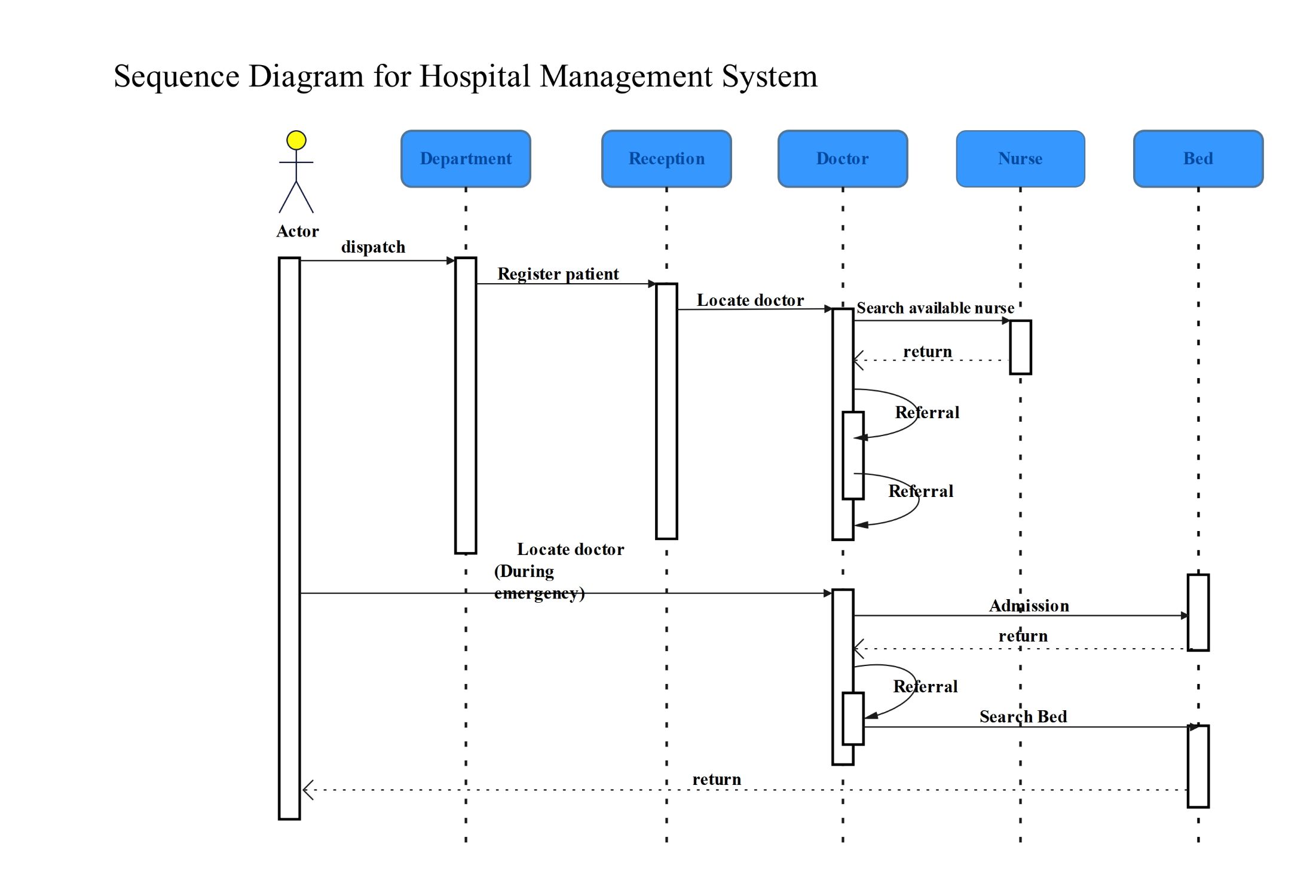
About this UML Sequence Diagram for Hospital Management System template
This template provides a clear visual map of hospital operations. It outlines how patients move through departments, reception, and care teams. Use this diagram to optimize administrative tasks and ensure smooth transitions between medical staff members during routine or emergency visits.
Administrative and Clinical Actors
The diagram identifies key participants including the main actor, department staff, and receptionists. These entities handle the initial patient dispatch and registration process to ensure all medical records are updated before treatment starts.
- Actor: The primary initiator of the process.
- Department: Manages initial patient dispatch and categorization.
- Reception: Handles formal patient registration and documentation tasks.
Medical Staff Interaction
This section focuses on the communication between doctors and nurses. It highlights how doctors locate available nursing support and manage patient referrals within the hospital system to provide continuous medical care.
- Doctor: Locates nurses and initiates the referral process.
- Nurse: Provides clinical support and returns status updates to doctors.
- Referral: A self-referencing loop for internal medical consultations.
Emergency and Bed Management
In emergency situations, the system bypasses standard steps to locate doctors immediately. This path focuses on fast-tracking hospital admissions and searching for available beds to ensure the patient receives urgent medical attention.
- Emergency Locate: Direct communication with doctors for urgent cases.
- Admission: The process of officially admitting a patient to a ward.
- Bed: The final entity used to search for and assign physical space.
FAQs about this Template
-
Why use a sequence diagram for hospital management?
A sequence diagram is essential for visualizing the chronological order of events in a hospital setting. It helps software engineers understand how different components like reception and doctors interact. By mapping these exchanges, hospitals can identify bottlenecks in patient care. This clarity leads to better system design, improved data security, and a more seamless experience for both staff and patients.
-
What are the key elements in this specific diagram?
This specific diagram includes objects like Department, Reception, Doctor, Nurse, and Bed. It uses lifelines to show the existence of these entities over time. Arrows represent messages or actions, such as Register patient or Search available nurse. The inclusion of an emergency path demonstrates how the system handles high-priority tasks differently than routine registrations, ensuring the logic covers all medical scenarios.
-
How does the diagram handle patient referrals?
Patient referrals are depicted as recursive or self-looping messages within the Doctor lifeline. This indicates that a doctor may consult internal systems or other specialists before moving to the next step. It shows the iterative nature of medical diagnosis. By including these loops, the diagram accurately reflects real-world clinical workflows where multiple evaluations may be necessary before a final admission or discharge decision.

 (AI & Web)