About this Sequence Diagram for Bookstore template
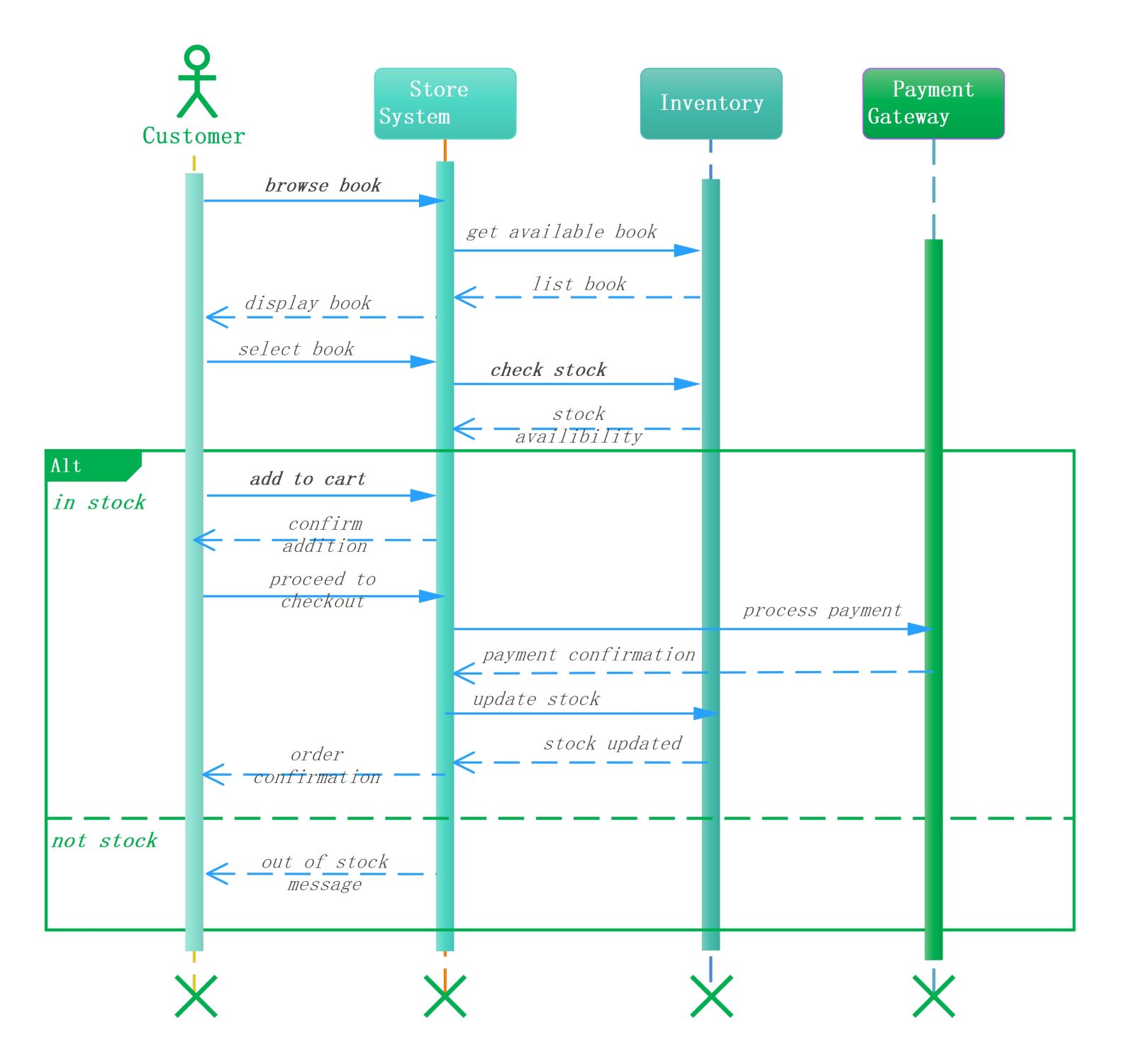
This sequence diagram template visualizes the interactions within an online bookstore. It tracks the journey of a user from initial book browsing to checkout. Using this professional layout helps teams design better software systems and improve overall user experience. It clearly outlines the communication between actors and backend systems.
Customer and Store System Interaction
The customer initiates the process by browsing for specific titles within the digital store. The store system acts as the primary interface. It receives user requests and communicates with backend databases to display relevant book information.
- Browse book request
- Display book list
- Select specific book
- Add item to cart
Inventory Stock Verification
The inventory system plays a critical role in verifying product availability. Once a book is selected, the store system queries the inventory to check stock levels. This ensures that customers only proceed with items that are ready.
- Get available book details
- Check current stock levels
- Return stock availability status
- Update stock after purchase
Payment Processing and Order Confirmation
The payment gateway handles financial transactions securely when the customer proceeds to checkout. It communicates with the store system to confirm successful payments. Once confirmed, the system triggers order fulfillment and provides the user with a final receipt.
- Proceed to checkout signal
- Process payment transaction
- Payment confirmation status
- Send final order confirmation
FAQs about this Template
-
Why is a sequence diagram important for a bookstore?
A sequence diagram is essential because it visualizes the chronological flow of events between a customer and the bookstore system. It identifies potential bottlenecks in the buying process and ensures that logic like stock checking is handled correctly. Developers use these diagrams to build reliable software that manages complex interactions between the user interface, inventory, and payment systems.
-
How does the inventory system interact with the store system?
The store system sends a query to the inventory database whenever a customer selects a book. The inventory system then checks if the item is in stock and sends a response back. If available, the transaction continues; otherwise, the system notifies the customer. This interaction prevents overselling and ensures that the system maintains accurate records of available book stock.
-
What role does the payment gateway play in this diagram?
The payment gateway is an external entity that manages the secure exchange of funds. It receives payment details from the store system and verifies the transaction with the bank. Once the payment is approved, it sends a confirmation back to the store. This allows the system to finalize the order and update the inventory records to reflect the sale.

 (AI & Web)