About this Activity Diagram for Loan Management System template
This template offers a professional visual guide for banking software developers. It clearly outlines the operational flow of a loan system. Use it to streamline your development process and ensure every business rule is covered.
Loan Application Phase
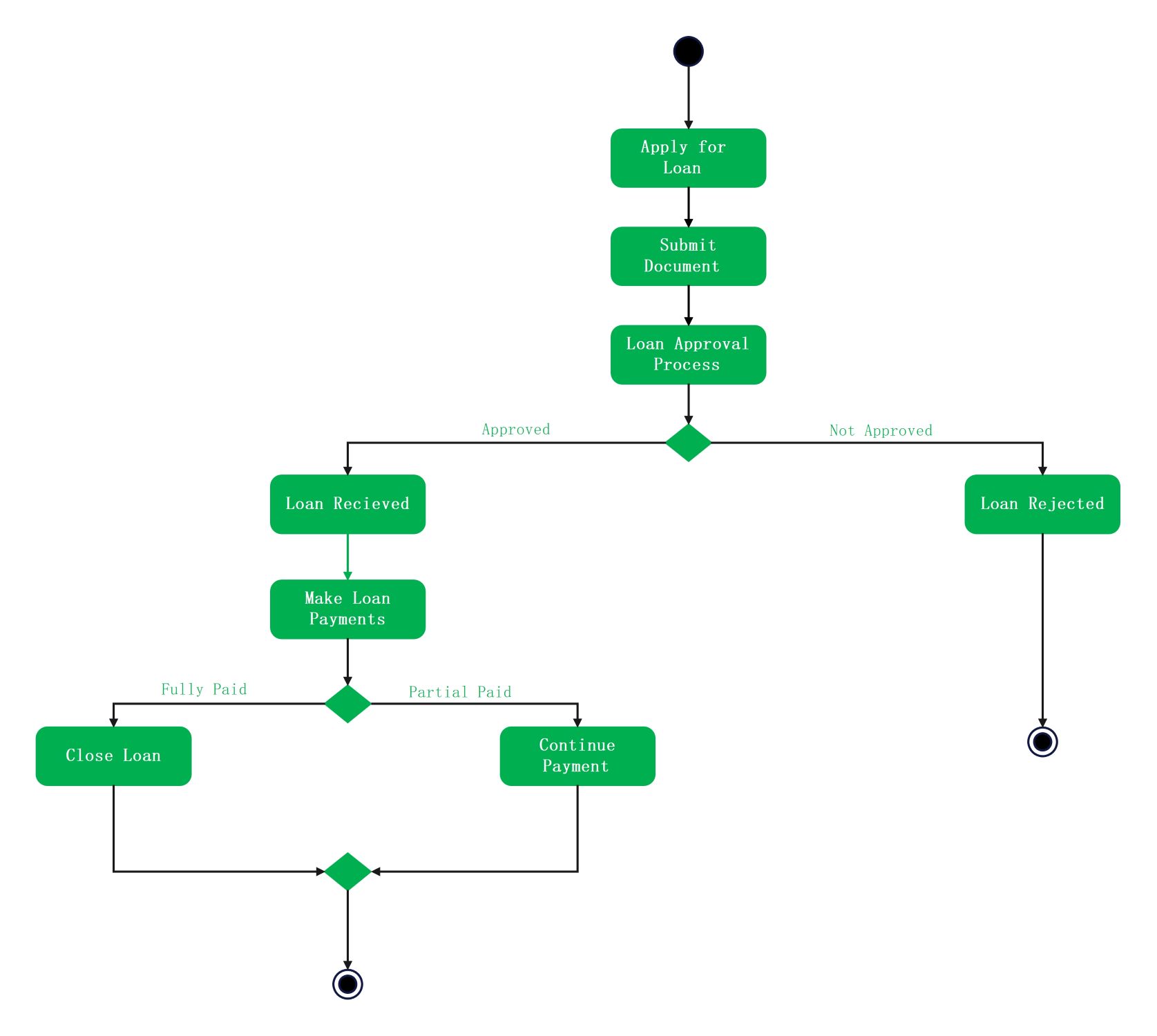
The process begins when a client starts their request. This section covers the initial interactions between the user and the system. It ensures that all necessary data and files are collected before the review starts.
- Apply for Loan
- Submit Document
- Loan Approval Process
Approval Decision Node
This critical junction determines the next steps based on the bank's criteria. The system evaluates the submitted data to decide if the loan meets requirements. It branches into two distinct paths for the applicant.
- Approved Path
- Not Approved (Loan Rejected)
Loan Management and Payment
After approval, the system manages the distribution and collection of funds. This part of the diagram tracks how payments are handled over time. It provides a clear logic for financial tracking and account status updates.
- Loan Received
- Make Loan Payments
- Decision Point (Payment Status)
Loan Closure Logic
The final phase addresses the end of the loan lifecycle. Depending on the payment status, the system either concludes the agreement or continues the cycle. It ensures that the record is properly closed once paid.
- Fully Paid (Close Loan)
- Partial Paid (Continue Payment)
- Final End State
FAQs about this Template
-
How does an activity diagram improve loan management?
An activity diagram improves loan management by providing a visual roadmap of the entire financial workflow. It helps developers and stakeholders identify potential bottlenecks or logic errors early in the design phase. By mapping every decision point, the system becomes more reliable. This clarity ensures that developers build a robust application that handles various banking scenarios without missing critical steps.
-
What are the key symbols used in this loan management diagram?
This diagram uses several standard UML symbols to represent the system logic. The solid black circle marks the starting point, while the encircled dot indicates the end. Rounded rectangles represent specific actions or tasks like document submission. Finally, diamond shapes act as decision nodes. These symbols help users quickly understand where choices are made and how the process flows.
-
Can this activity diagram be customized for different bank policies?
Yes, you can easily customize this activity diagram to fit specific institutional requirements. Different banks may have unique steps for credit scoring or collateral verification. By adding or modifying nodes, you can reflect these internal rules. This flexibility allows the template to serve as a base for various loan products, such as personal, mortgage, or small business lending programs.

 (AI & Web)