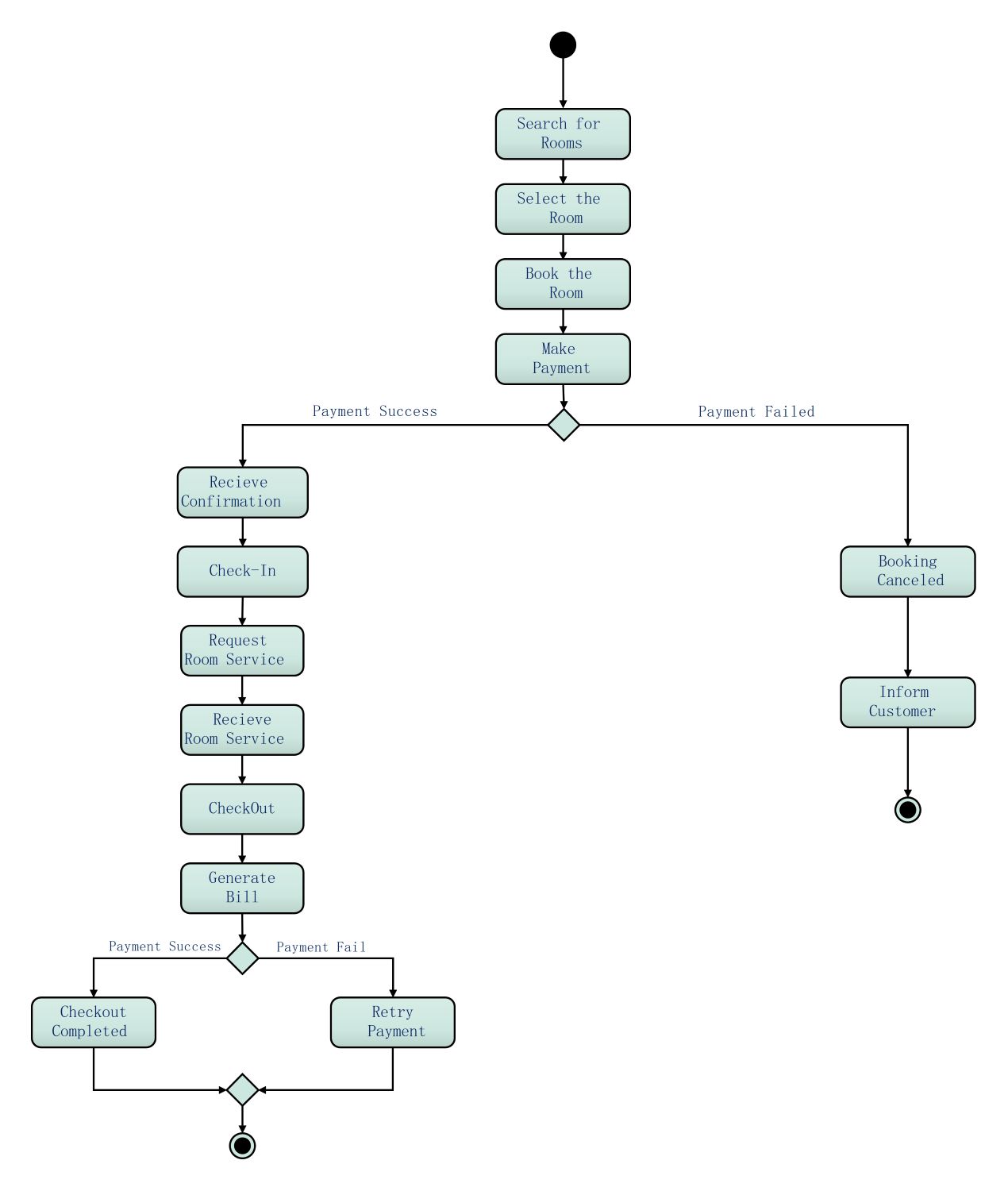
About this activity diagram for hotel management system template
This template provides a clear visual map of the guest journey. It covers everything from the initial room search to the final checkout. Use this diagram to streamline your software logic and improve the overall guest experience in your hotel establishment.
Room Selection and Booking Phase
The initial phase focuses on the guest finding a suitable room and securing it through payment. This stage is crucial for capturing customer interest and ensuring the system reserves the inventory correctly before any stay begins.
- Search for Rooms
- Select the Room
- Book the Room
- Make Payment
Guest Stay and Service Management
Once the payment is successful, the system manages the actual stay experience. This includes confirmation, physical check-in, and handling service requests. It tracks all guest activities to ensure accurate service delivery and future billing.
- Receive Confirmation
- Check-In
- Request Room Service
- Receive Room Service
Checkout and Payment Settlement
The final phase handles the guest departure and financial closing. It involves generating the final bill and verifying that all charges are paid. Successful payment completes the lifecycle, while failures prompt a retry to ensure revenue collection.
- CheckOut
- Generate Bill
- Checkout Completed
- Retry Payment
Booking Failure and Cancellation
The system must account for payment failures at the initial booking stage. This section ensures that the room inventory is released and the customer is notified. Proper error handling prevents overbooking and maintains clear communication with potential guests.
- Booking Canceled
- Inform Customer
FAQs about this Template
-
What is the primary purpose of an activity diagram for a hotel management system?
The main goal is to model the dynamic flow of activities within the hotel software. It helps developers understand how different actions relate to one another, such as how a payment failure affects the booking status. By mapping these steps, stakeholders can ensure the system logic is sound and that the guest journey is intuitive and efficient.
-
How does this diagram help in identifying system bottlenecks?
By visualizing every step from search to checkout, you can pinpoint where delays might occur. For example, if the transition between requesting room service and receiving it is complex, the diagram highlights this area for optimization. It allows teams to refine specific processes to speed up guest service and reduce manual intervention during high-traffic periods.
-
Can this template be used for mobile hotel booking applications?
Yes, this activity diagram is highly adaptable for mobile platforms. The core logic of searching for rooms, making payments, and checking in remains the same across devices. Developers can use this as a blueprint to design user interfaces and backend triggers, ensuring that the mobile app provides a seamless experience that aligns with physical hotel operations.

 (AI & Web)