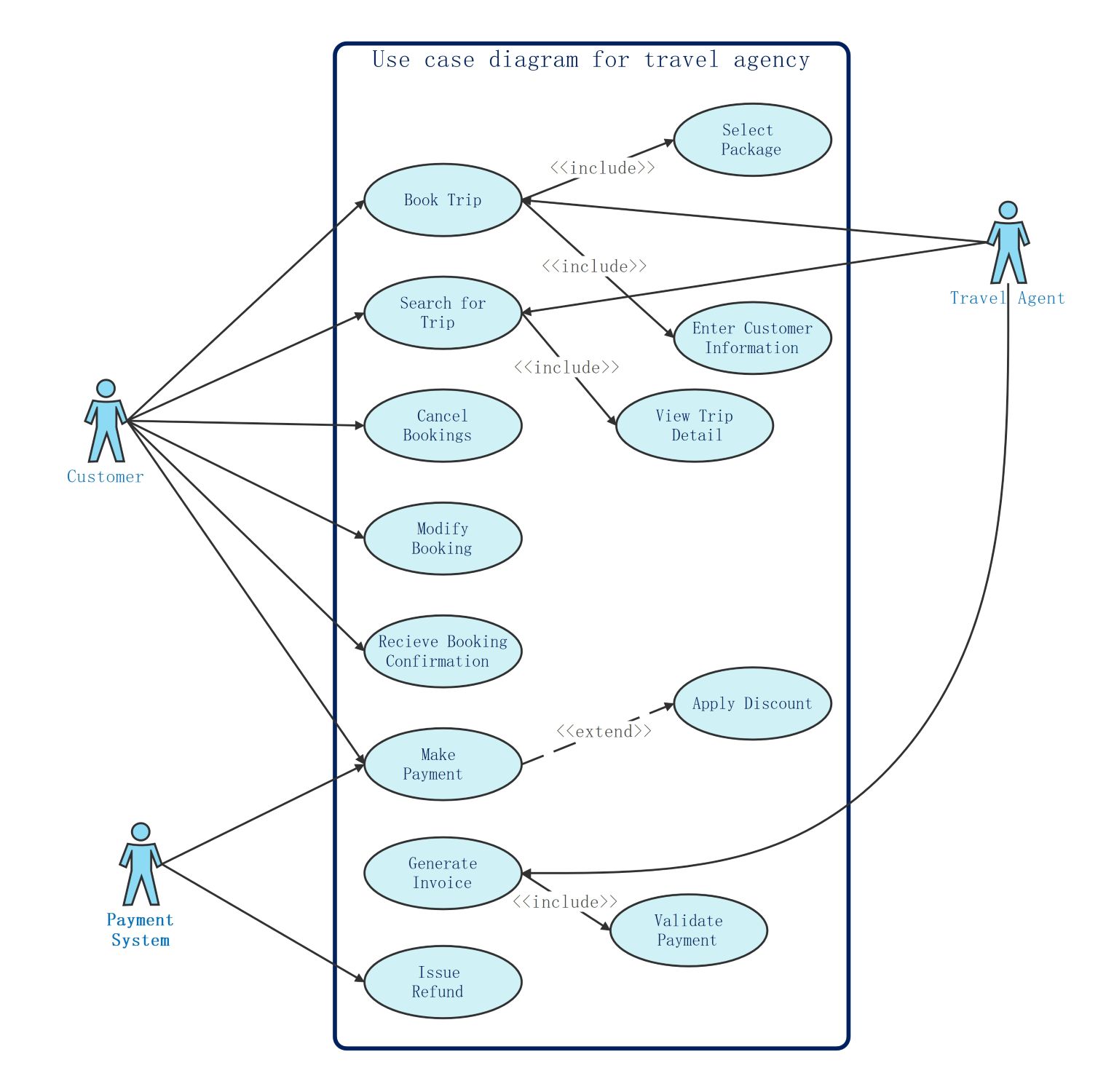
About this Use Case Diagram Travel Agency template
This template offers a professional structure for designing travel management software. It visualizes key interactions between actors like customers and payment systems. Use this diagram to plan essential features such as trip searches, booking modifications, and automated invoice generation for your travel business.
Customer System Interactions
This section outlines how travelers engage with the agency platform to manage their journeys. It focuses on the core actions a customer performs to find, reserve, and pay for travel services through a user-friendly interface.
- Book Trip
- Search for Trip
- Cancel Bookings
- Modify Booking
- Receive Booking Confirmation
- Make Payment
Travel Agent Responsibilities
Travel agents support the booking process by assisting customers with specific data tasks. This part of the diagram shows how agents interact with internal tools to enter details and help select the best travel packages for clients.
- Book Trip
- Search for Trip
- Select Package
- Enter Customer Information
- View Trip Detail
Financial and System Processes
These nodes describe the backend logic for handling payments and documentation. It involves external actors like payment systems to validate transactions. This ensures that every booking is financially secure and includes proper tax or discount records.
- Make Payment
- Apply Discount
- Generate Invoice
- Issue Refund
- Validate Payment
FAQs about this Template
-
What is the primary purpose of a use case diagram for a travel agency?
The primary purpose is to define high-level interactions between users and the software system. It helps developers and stakeholders understand exactly what tasks the system must perform. By identifying roles like customers and agents, the diagram ensures that features like trip booking and payment processing are logically organized. It serves as a visual blueprint for building a functional application.
-
How do include and extend relationships work in this diagram?
An include relationship means a base use case always requires the behavior of another. For example, booking a trip always includes selecting a package. An extend relationship shows optional behavior that only occurs under specific conditions. Applying a discount is an extension because it is not required for every transaction. These relationships help break down complex processes into smaller steps.
-
Who are the main actors in a travel agency use case model?
The main actors usually include the Customer, the Travel Agent, and the Payment System. Customers are primary users who search and book trips. Travel Agents act as intermediaries who assist with data entry and package selection. The Payment System is an external actor that handles financial validation. Identifying these actors helps clarify who is responsible for each specific action.

 (AI & Web)