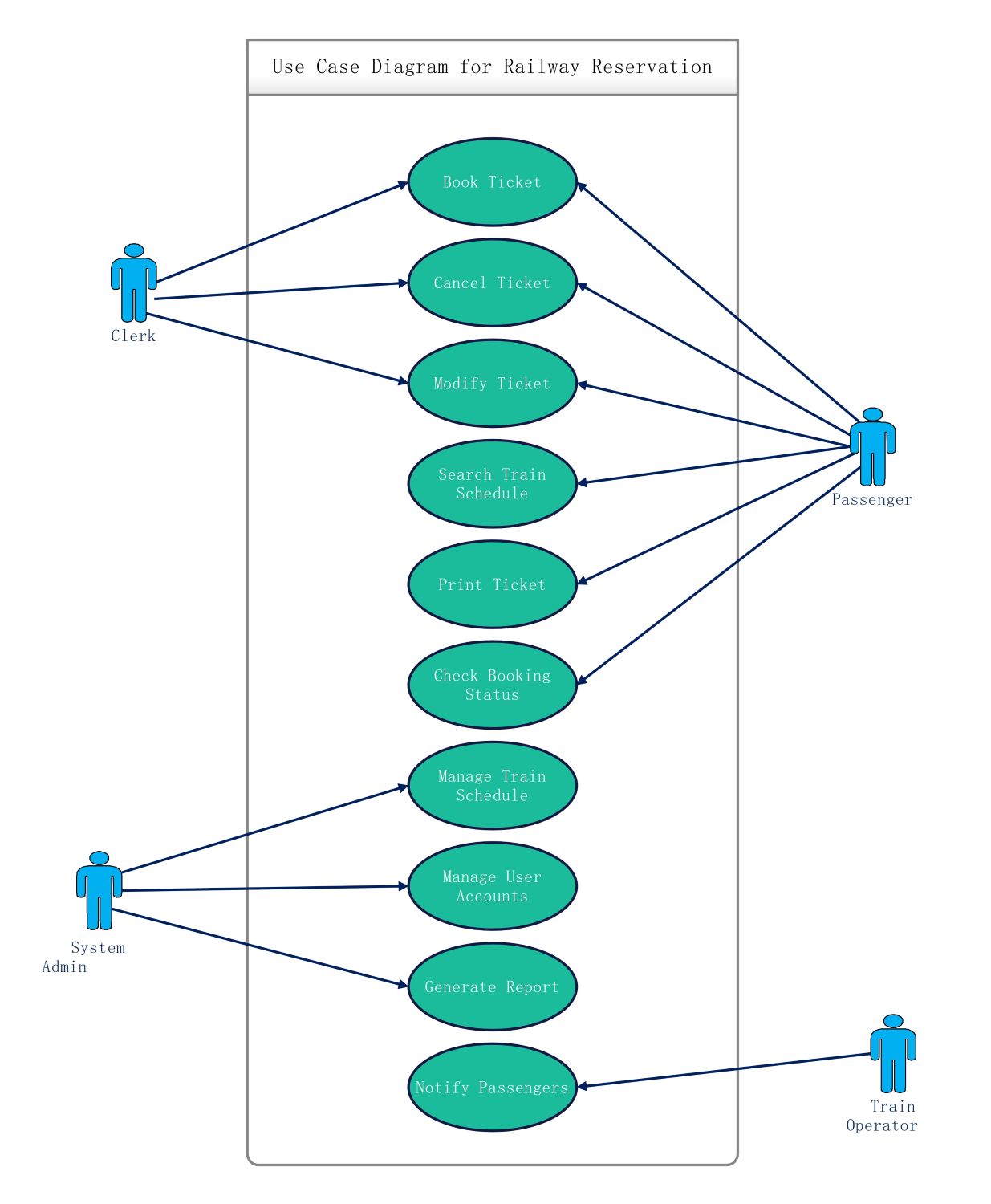
About this Use case diagram for railway reservation template
This template visualizes the core functional requirements of a railway booking system. It clarifies how different users interact with the platform to perform essential tasks like booking seats or managing train schedules effectively.
Passenger Interactions
The passenger is a primary user who interacts with the system to organize their travel. They access functions that allow for searching, booking, and managing their own tickets without needing direct staff assistance.
- Book Ticket
- Cancel Ticket
- Modify Ticket
- Search Train Schedule
- Print Ticket
- Check Booking Status
Clerk Responsibilities
Clerks act as intermediaries who assist customers with manual transactions at the station. Their role ensures that passengers who cannot access digital tools can still secure their travel plans through official channels.
- Book Ticket
- Cancel Ticket
- Modify Ticket
System Administration
The system admin maintains the backend infrastructure to ensure the platform runs smoothly. They handle data-heavy tasks that keep the train database updated and provide reports for management to analyze business performance.
- Manage Train Schedule
- Manage User Accounts
- Generate Report
Train Operator Role
The train operator focuses on real-time communication with the traveler base. Their primary goal is to provide updates regarding delays or schedule changes, ensuring that all passengers stay informed during their journey.
- Notify Passengers
FAQs about this Template
-
Why is a use case diagram important for a railway reservation system?
A use case diagram is essential because it identifies the primary stakeholders and their specific needs within the system. It helps software architects define the scope of the project and ensures all functional requirements are met. By visualizing these interactions, developers can prevent missing critical features like ticket cancellations or real-time schedule updates, leading to a much more reliable user experience.
-
What is the difference between the Clerk and Passenger roles?
While both the Clerk and the Passenger share several use cases such as booking or canceling tickets, their environments differ. The Passenger typically uses a web or mobile interface independently. In contrast, the Clerk operates a dedicated terminal at a physical station to assist walk-in customers. The Clerk acts as a support layer, ensuring the system remains accessible to all types of travelers.
-
How does the System Admin maintain the railway reservation database?
The System Admin manages the core data that the entire application relies on for daily operations. They update train schedules, add new routes, and oversee user account security to prevent unauthorized access. Additionally, they generate detailed reports that help the railway authority understand passenger trends and optimize resource allocation. Their behind-the-scenes work is vital for the long-term stability of the platform.

 (AI & Web)