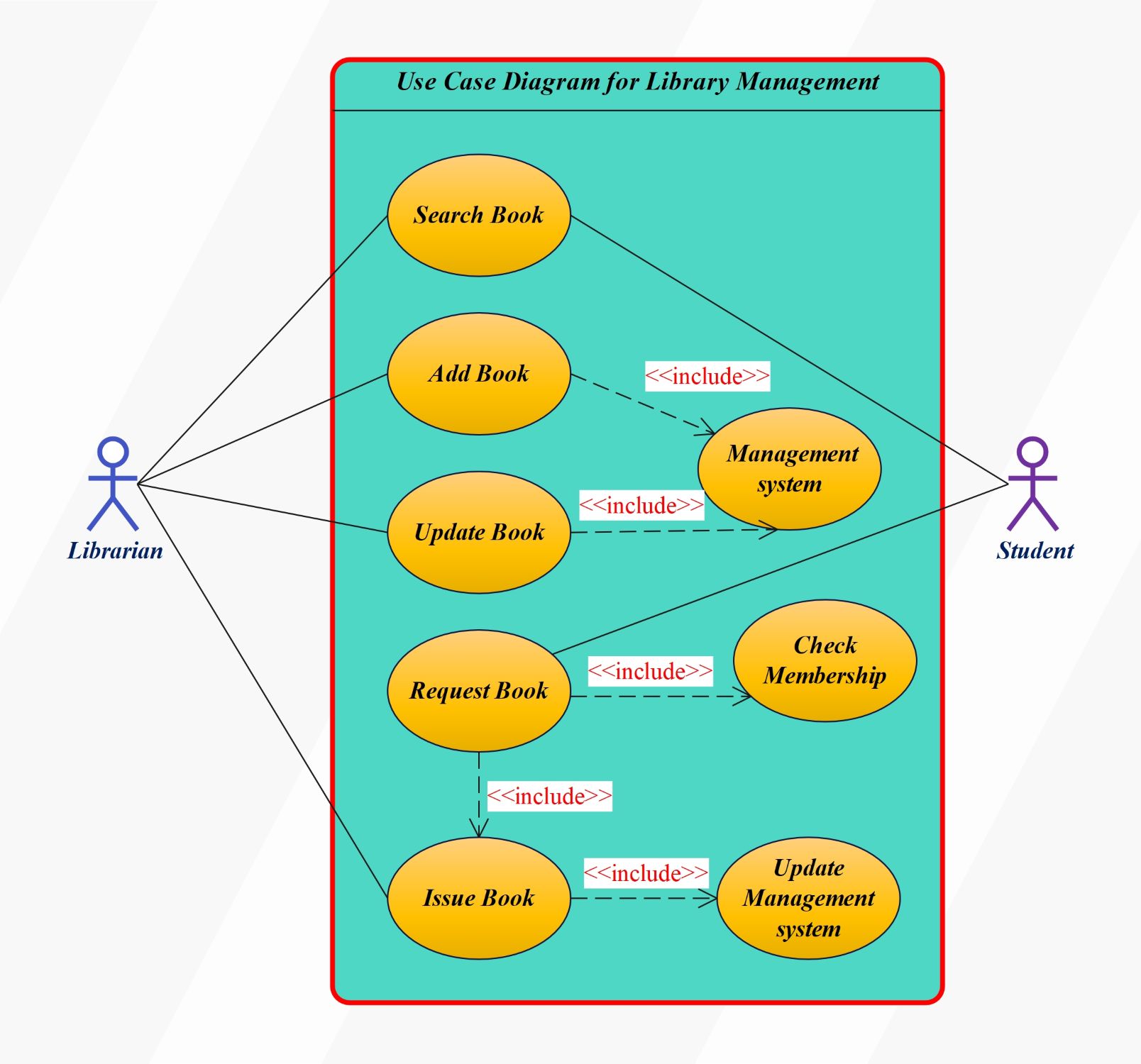
About this Use Case Diagram for Library Management template
A library management use case diagram is a UML behavioral diagram that shows who interacts with the library system and what goals they need the system to support. This template focuses on the relationship between student/borrower actions and librarian responsibilities, so it is useful for requirements discussions, coursework, and early-stage software planning. It describes user goals rather than the step-by-step sequence or database implementation behind them.
Primary actors and their goals
The two visible actors in this template represent different responsibilities. The Librarian manages catalog and circulation tasks, while the Student uses the system to find and request library resources. Keeping actor goals separate makes the system boundary easier to review with developers, librarians, and other stakeholders.
- Librarian: search books, add books, update book information, and issue books.
- Student: search for books and request a book.
Core use cases shown in the template
The main use cases describe the services the system must provide. Search-related actions support discovery, catalog-management actions keep book records current, and circulation actions support requests and issuing. If your real project also handles returns, reservations, fines, renewals, authentication, or administrators, add those only when they are in scope for the system you are modeling.
How to read system dependencies
Use case diagrams can also show relationships between use cases. An <<include>> relationship is appropriate when a secondary use case is a required part of another use case; an <<extend>> relationship is used for optional or conditional behavior. Do not use these relationships simply to show chronological steps. If you need to explain the order of issuing, returning, or validating a book request, a sequence or activity diagram is usually a better companion.
When this template is most useful
This template is best suited to defining or reviewing functional requirements and actor responsibilities for a library system. It can be customized for school, university, public, or digital libraries by renaming actors and adding the services that apply to that environment. Validate the final actor list and use cases against the actual project scope before treating the diagram as a complete specification.
FAQs about this Template
-
Who are the main actors in a library management use case diagram?The actors depend on the project scope. In a basic library system, common actors are a Librarian and a Student, Member, or Borrower. Larger systems may also include an Administrator or external services. Each actor should represent an external role with a goal the system must support.
-
What use cases should a library management system diagram include?Typical use cases include searching the catalog, borrowing or requesting books, returning items, and managing book records. Reservations, renewals, fines, membership, authentication, and reporting can be added when they are part of the actual requirements. The diagram should focus on user goals rather than implementation details.
-
What is the difference between include and extend in a use case diagram?An <
> relationship represents behavior that is required as part of another use case. An < > relationship represents optional or conditional behavior that supplements a base use case. Neither relationship should be used merely to show the chronological order of steps; use an activity or sequence diagram when process order is the main question.

 (AI & Web)