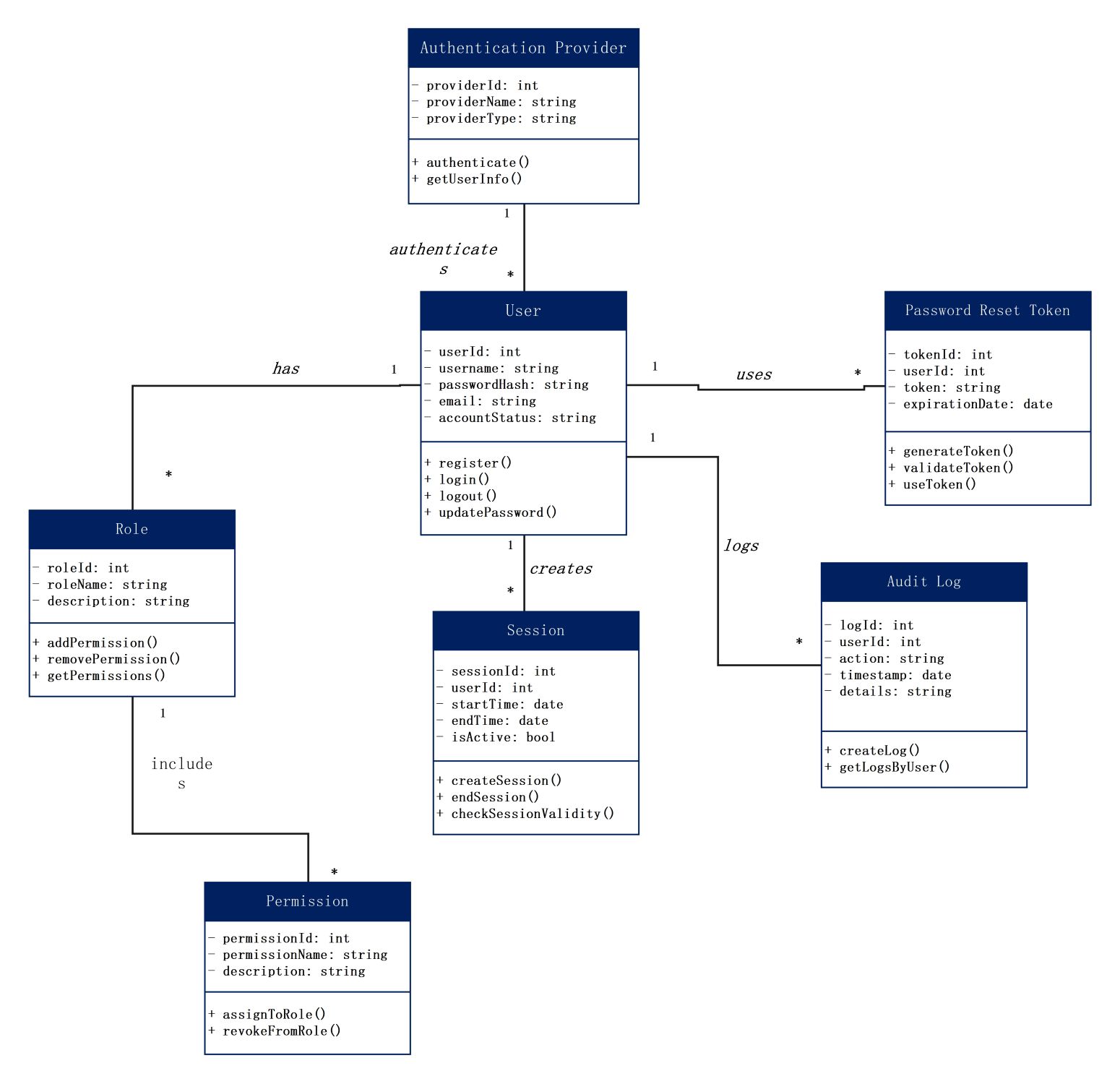
About this class diagram for authentication template
This template provides a comprehensive visual map of a standard authentication system. It helps software architects and developers define the necessary classes, attributes, and methods for secure user management and session handling.
Authentication Provider
The Authentication Provider class handles the external or internal services used to verify identities. It stores provider types and names while executing the authentication logic to retrieve user information securely from various sources.
- providerId: int
- providerName: string
- providerType: string
- authenticate()
- getUserInfo()
User Management
The User class is the central hub of this diagram, representing the system's members. It contains sensitive data like password hashes and account statuses. It manages key actions including registration, login, and logout.
- userId: int
- username: string
- passwordHash: string
- email: string
- accountStatus: string
- register()
- login()
- logout()
- updatePassword()
Role and Permissions
These classes define the access levels granted to different users within the application. Roles group specific permissions together, allowing for a structured way to assign or revoke user rights based on their specific job functions.
- roleId: int
- roleName: string
- permissionId: int
- permissionName: string
- addPermission()
- assignToRole()
Session and Security
The Session and Password Reset Token classes manage temporary access and recovery. Sessions track active users over time, while reset tokens provide a secure way for users to regain account access after losing their passwords.
- sessionId: int
- isActive: bool
- tokenId: int
- expirationDate: date
- checkSessionValidity()
- validateToken()
Audit Log
The Audit Log class is responsible for maintaining a record of all security-related actions. It tracks who performed an action and when it occurred. This provides a clear trail for troubleshooting and security monitoring.
- logId: int
- action: string
- timestamp: date
- details: string
- createLog()
- getLogsByUser()
FAQs about this Template
-
How does a class diagram improve authentication security?
A class diagram for authentication improves security by allowing developers to plan data flows before writing code. It helps identify exactly where sensitive information, like password hashes, is stored and handled. By visualizing the relationships between users and sessions, teams can ensure that no unauthorized access paths exist. This structured planning phase reduces logic errors that often lead to vulnerabilities.
-
What is the importance of the Audit Log in this diagram?
The Audit Log class is critical for accountability and forensic analysis within an authentication system. It records every login attempt, password change, and permission update with a timestamp. If a security breach occurs, administrators can use these logs to trace the attacker's steps. Maintaining a detailed audit trail is also a requirement for many legal compliance standards and industry regulations.
-
Can this authentication template support multi-factor authentication?
Yes, this class diagram for authentication can easily be expanded to support multi-factor authentication. You can add a specific class for 'MFA_Token' or 'VerificationProvider' that links to the User class. This new node would handle temporary codes sent via email or SMS. Integrating these additional layers into the diagram ensures the system remains scalable and capable of meeting modern security requirements.

 (AI & Web)