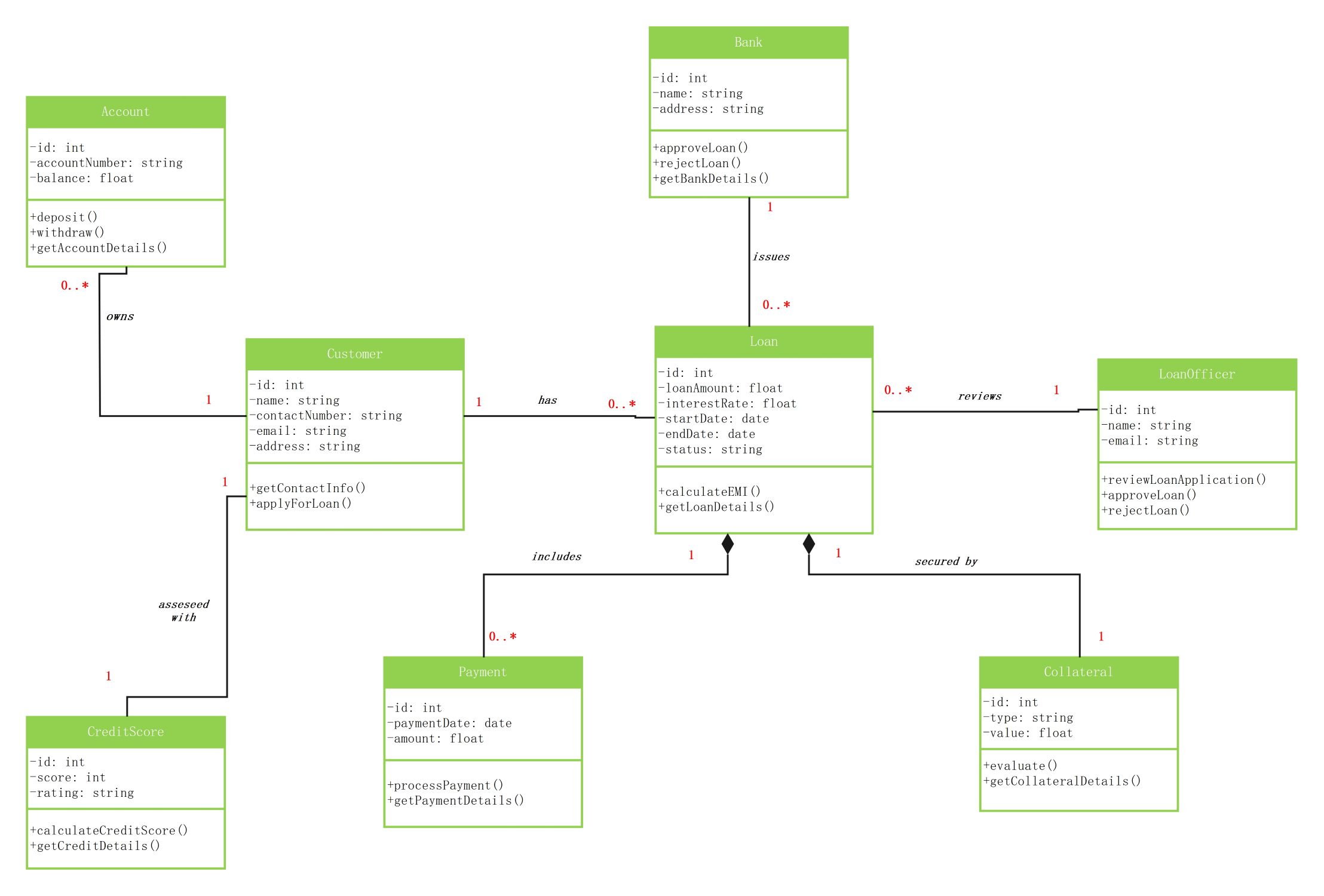
About this Class diagram for bank loan template
This template offers a professional blueprint for designing a bank loan management system. It identifies the core objects needed to track applications, verify credit scores, and manage collateral efficiently for various users.
Bank Management Entity
The Bank class serves as the main authority in this diagram. It manages the overall loan process and stores essential institutional details like names and addresses to maintain proper legal records for every transaction.
- id: int
- name: string
- address: string
- approveLoan()
- rejectLoan()
- getBankDetails()
Customer and Account Profiles
This section defines the user profile and their financial standing. It links the customer to their active bank accounts and personal contact information. This ensures the bank can identify and contact borrowers easily.
- id: int
- name: string
- contactNumber: string
- email: string
- address: string
- applyForLoan()
Loan and Payment Tracking
The Loan class acts as the central hub for financial data. It tracks the principal amount, interest rates, and schedule. It connects directly to payment records to ensure all installments are logged correctly.
- id: int
- loanAmount: float
- interestRate: float
- startDate: date
- endDate: date
- calculateEMI()
Risk Assessment and Security
This part of the diagram focuses on financial security and officer reviews. It includes credit scores and collateral details to minimize lending risks. Loan officers use these classes to decide on application approvals.
- CreditScore: score and rating
- Collateral: type and value
- LoanOfficer: reviewLoanApplication()
- evaluate()
- calculateCreditScore()
FAQs about this Template
-
Why is a class diagram essential for a bank loan system?
A class diagram is essential because it defines the static structure of the banking application. It identifies necessary classes like Customer, Loan, and Account along with their specific attributes and methods. By visualizing these relationships early, developers can prevent logic errors during coding. This ensures that the system handles complex financial data securely and maintains accurate records for every borrower.
-
How does the diagram handle loan risk assessment?
The diagram handles risk assessment through classes like CreditScore and Collateral. The CreditScore class calculates a rating based on historical data to determine a borrower's reliability. Meanwhile, the Collateral class tracks assets used to secure the loan. These entities work together with the LoanOfficer class. This helps the bank decide if a loan application should be approved or rejected based on data.
-
What is the purpose of the Payment class in this system?
The Payment class tracks every financial installment made toward a specific loan. It records the payment date and the exact amount paid by the customer. Because it is linked to the Loan class, the system can automatically update the remaining balance. This automation reduces manual accounting mistakes. It also allows the bank to generate accurate statements for the customer throughout the loan term.

 (AI & Web)