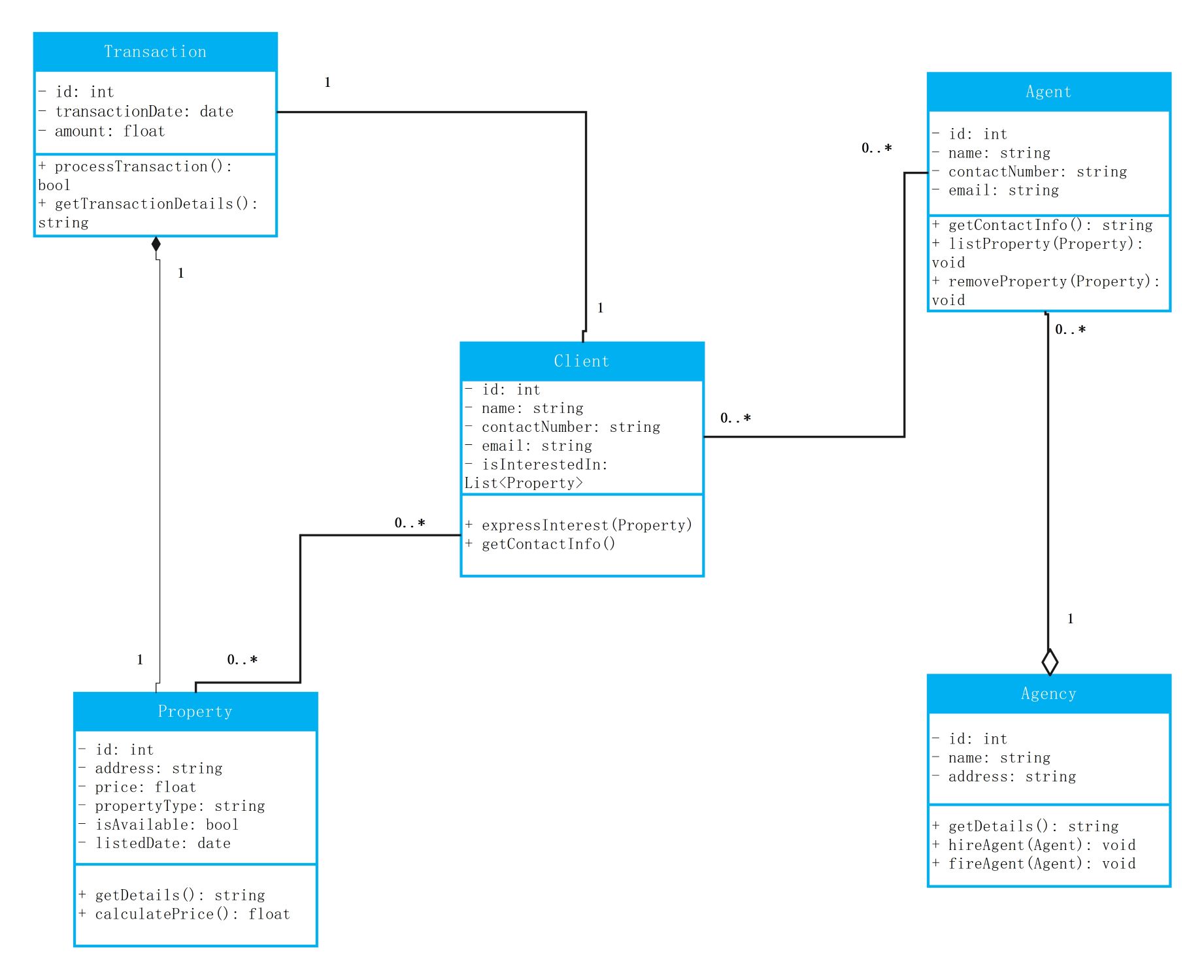
About this Class Diagram for Real State template
This template provides a clear visual structure for property management software. It organizes data into logical categories like sales, buyers, and listings. It helps teams build scalable databases for real estate businesses efficiently.
Transaction
The transaction node tracks the financial details of every property sale. It stores critical data such as the unique ID, date, and total amount. This section ensures that every purchase is recorded and processed accurately.
- Transaction ID
- Transaction Date
- Amount
- Process Transaction
- Get Transaction Details
Client
This section represents the individuals looking to buy or rent properties. It captures their contact information and specific interests. Managing client data here helps agents provide personalized service and maintain long-term relationships with buyers.
- Client ID
- Name
- Contact Number
- Email Address
- Express Interest
Agent
Agents act as the bridge between properties and potential buyers. This node manages their personal details and professional actions. It allows the system to track which agent is responsible for specific listings or successful sales.
- Agent ID
- Name
- Contact Number
- List Property
- Remove Property
Property
The property node holds all the physical details of the real estate listings. It includes location, price, and the current availability status. This is the core of the system where all inventory is managed.
- Property ID
- Address
- Price
- Property Type
- Is Available
Agency
The agency node represents the main business entity that oversees agents and transactions. It stores the company name and main office address. This high-level view helps organize multiple agents under one professional umbrella.
- Agency ID
- Agency Name
- Business Address
- Hire Agent
- Fire Agent
FAQs about this Template
-
Why is a UML class diagram important for real estate software?
A UML class diagram provides a blueprint for the software architecture. It clearly defines how different parts of the business, such as agents and properties, interact. By using a diagram, developers can spot logical errors before they start coding. This saves time, reduces development costs, and ensures the final real estate application is stable and easy to maintain.
-
How do you define relationships in a real estate class diagram?
Relationships show how data connects across the system. For example, one agent might manage many properties, creating a one-to-many relationship. You use lines and numbers to indicate these connections. This clarity helps database administrators create tables that match real-world business rules. It ensures that every transaction is linked to the correct client and the right property listing.
-
What are the main benefits of using a template for this diagram?
Using a template saves significant time for project managers and architects. You do not have to start from scratch because the common classes like Client and Property are already included. It follows industry standards, ensuring that everyone on the team understands the structure. Templates are also easy to customize, allowing you to add specific features unique to your business.

 (AI & Web)