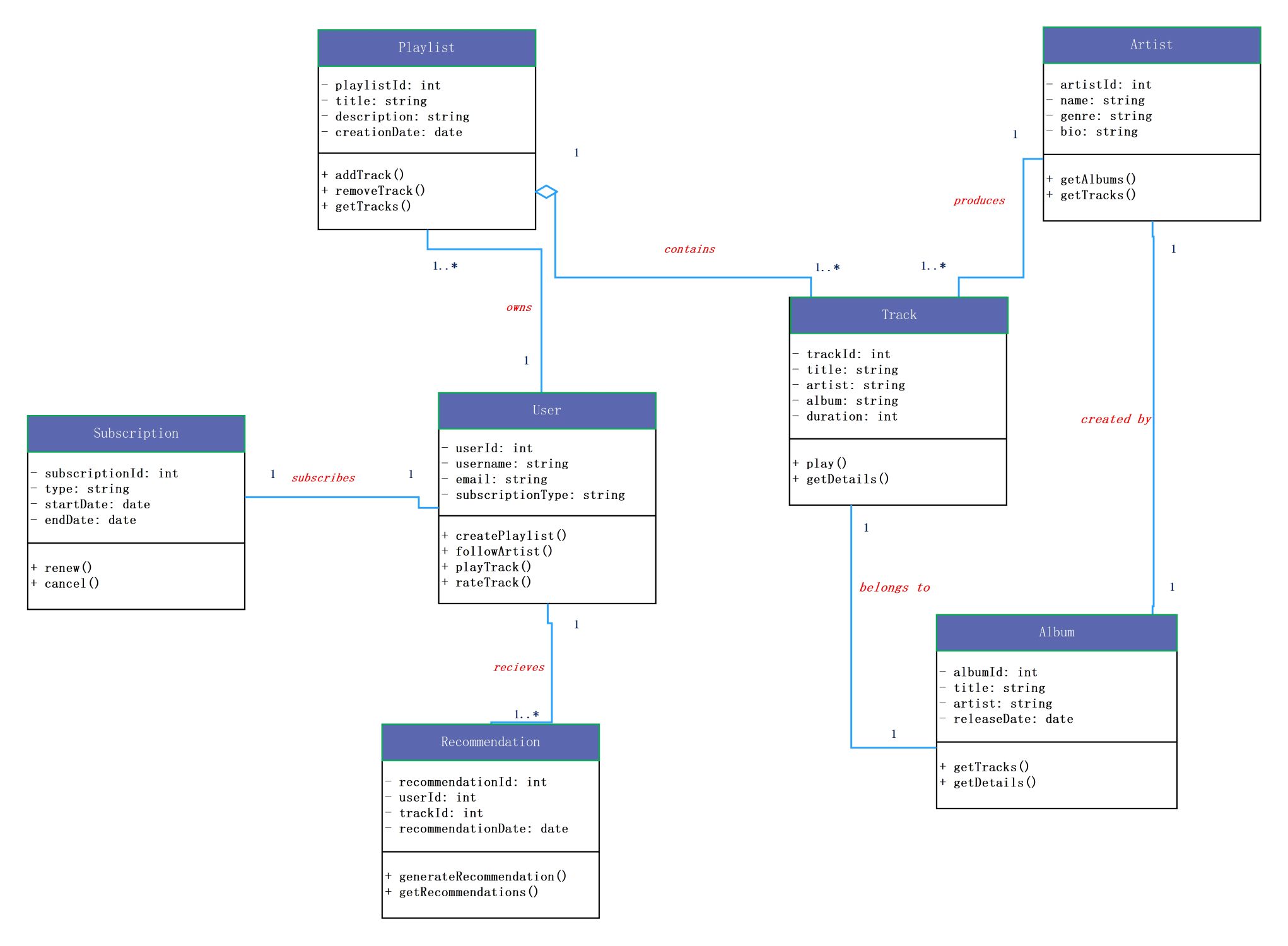
About this class diagram for spotify template
This UML class diagram template maps out the backend structure of a music platform. It defines how user profiles connect with tracks, artists, and billing systems to create a functional app environment.
User and Subscription Management
The User class acts as the central hub for the system. It links to subscriptions to manage access levels. This section ensures that every account has specific details for login and payment status.
- User ID, username, and email attributes
- Subscription type and validity dates
- Methods to create playlists and follow artists
- Functions for renewing or canceling subscriptions
Music Track and Album Structure
This section organizes how songs and albums are stored. It connects tracks to specific artists and collections. This structure is vital for searching and playing music while maintaining high-quality metadata for the library.
- Track titles, duration, and unique IDs
- Album release dates and artist names
- Artist biographies and genre details
- Methods to play songs and retrieve track details
Playlists and Personalized Recommendations
These nodes handle user interaction with the music library. They allow users to group songs into custom lists. The system also uses recommendation data to suggest new music based on a listener's history and preferences.
- Playlist titles and creation timestamps
- Recommendation dates and track IDs
- Functions to add or remove tracks
- Logic to generate automated music suggestions
FAQs about this Template
-
What is the purpose of a class diagram for Spotify?
A class diagram for Spotify provides a blueprint of the music app's database and logic. It shows how different parts like users, artists, and songs relate to each other. By defining these relationships, developers can build a system that manages thousands of tracks efficiently. This visual guide makes it much easier to plan updates and fix technical bugs in the app.
-
How does the diagram handle user subscriptions?
The diagram includes a specific Subscription class linked directly to the User class. This setup tracks the payment status, start date, and end date for each account. It allows the system to check if a user should have access to premium features or ad-free listening. Clearly defining this relationship helps prevent billing errors and ensures a smooth user experience.
-
Why are the Artist and Album classes separated from the Track class?
Separating these classes follows the principles of database normalization. It prevents the system from repeating information like an artist's bio for every single song they release. Instead, the Track class simply references the Artist and Album IDs. This approach saves storage space and makes it faster for the application to load data when a user searches for music.

 (AI & Web)