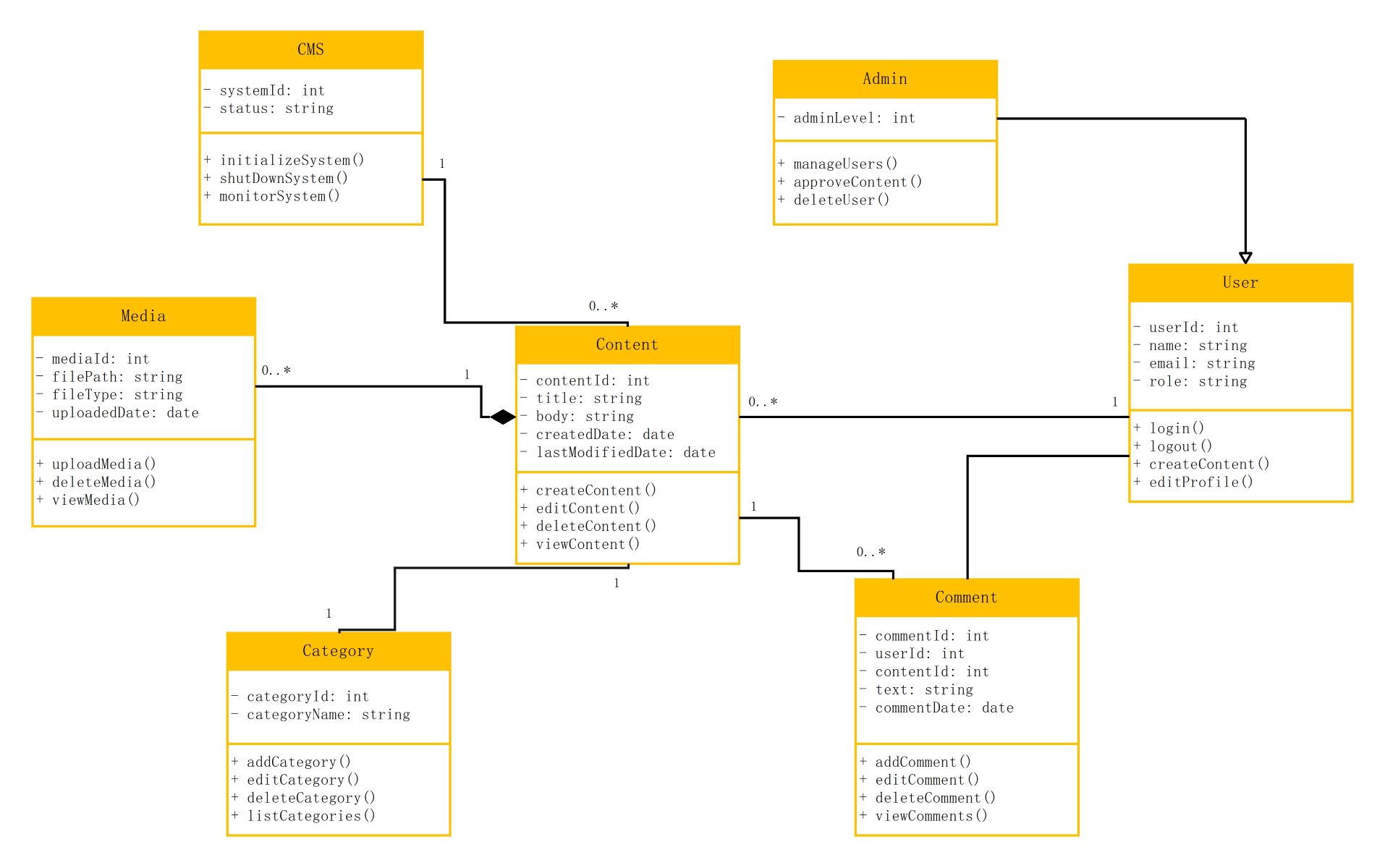
About this Content Management System class diagram template
This class diagram provides a visual map of a standard CMS. It illustrates the relationships between core components like users, administrators, and the content itself. You can use this template to design your own database or software architecture quickly.
CMS and Administrative Control
The CMS class acts as the central hub for the entire system operations. It handles system status and initialization. Administrators extend the user class to manage people, delete accounts, and approve new content entries.
- System ID and status tracking
- Admin user management functions
- Content approval workflows
- System monitoring capabilities
User and Account Management
The User class defines the basic profile and actions for every person on the platform. It tracks unique IDs and roles while allowing for login and profile editing. Users are the primary creators of content items.
- Login and logout methods
- User profile editing
- Role-based access control
- Account identification details
Content and Category Organization
Content is the heart of the system, storing titles, text, and modification dates. Each piece of content belongs to a specific category. This structure helps keep the website organized and makes searching for articles easier.
- Title and body management
- Created and modified timestamps
- Category classification
- CRUD operations for content
Media Assets and User Engagement
Media classes handle file paths and types for images or videos attached to content. The Comment class allows users to engage by leaving text feedback. These elements add richness and interactivity to the core CMS platform.
- File path and type tracking
- Media upload and deletion
- User comment threads
- Timestamped engagement data
FAQs about this Template
-
What is the primary purpose of a CMS class diagram?
A CMS class diagram acts as a structural blueprint for developers. It defines the classes, attributes, and methods required to build a functional system. By visualizing relationships like inheritance and associations, teams can ensure the database and code logic align. This planning stage prevents errors during the development phase and helps in building a scalable and maintainable application.
-
How does the Admin class relate to the User class in this diagram?
In this diagram, the Admin class inherits from the User class. This means an administrator has all the properties of a regular user, such as a name and email. However, the Admin class includes additional permissions and methods. These special functions allow administrators to manage users, approve submitted content, and oversee the entire system, providing higher-level control over the platform.
-
Why are the Media and Comment classes separate from the Content class?
Separating Media and Comments into distinct classes promotes better data organization and modularity. Content items can exist without media or comments, but they often have a one-to-many relationship. This separation allows the system to handle complex media file details and user feedback independently. It makes the system more flexible, allowing for future updates to specific features without breaking the core content logic.

 (AI & Web)