About This E-commerce UML Class Diagram
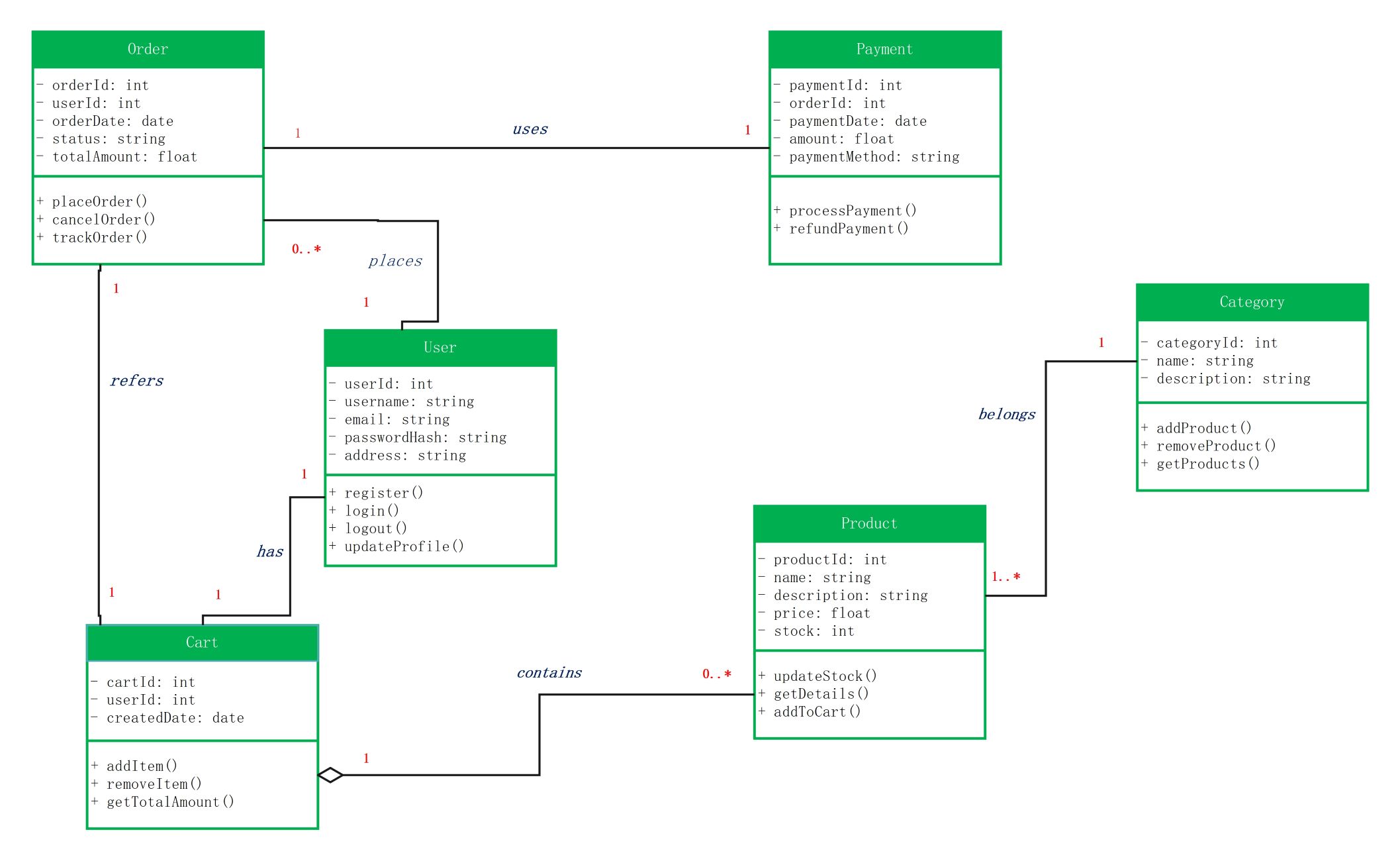
This editable UML template models the static structure of an online shopping system. It is useful for requirements discussions, backend design, coursework, and technical documentation because it places classes, attributes, operations, and relationships in one visual model.
Core Classes in the Template
- User: identity, credentials, profile, registration, and login operations
- Product and Category: catalog information, price, stock, and grouping
- Cart: items selected before checkout and total calculation
- Order: purchase date, status, total amount, placement, cancellation, and tracking
- Payment: payment method, processing, and refund behavior
How the Classes Relate
A useful e-commerce class diagram should show more than isolated boxes. Typical relationships connect a user to carts and orders, products to categories, carts or order items to products, and orders to payments. Multiplicity such as 1, 0..1, or 0..* clarifies how many objects may participate in each relationship.
Attributes and Methods
Attributes describe the state held by each class, while methods describe behavior. For example, Product may contain price and stock attributes plus an updateStock() operation, while Order can store status and totalAmount and expose placeOrder(), cancelOrder(), or trackOrder(). Adapt names and types to the conventions of your implementation.
When to Use This Diagram
Use the template when defining a domain model, reviewing responsibilities with developers, documenting an existing system, or preparing a starting point for code design. For a production system, you may need additional classes such as OrderItem, Address, Shipment, Discount, Inventory, Review, or interfaces for external payment services.
Class Diagram vs. Database ER Diagram
A UML class diagram models software classes, behavior, and object relationships; an ER diagram focuses on persistent data entities, attributes, and database relationships. They may contain similar concepts, but they serve different design questions and should not be treated as interchangeable.
FAQs about this Template
-
What classes are commonly included in an e-commerce class diagram?
Common classes include User or Customer, Product, Category, Cart, Order, OrderItem, Payment, Address, and Shipment. The exact model should reflect the scope and business rules of the system being designed.
-
Why are multiplicities important in an e-commerce UML diagram?
Multiplicity shows how many instances can participate in a relationship, such as one customer having many orders or one order containing many order items. It makes the domain rules more explicit before implementation.
-
Is a UML class diagram the same as an ER diagram?
No. A class diagram can represent attributes, methods, inheritance, composition, and other object-oriented relationships. An ER diagram is primarily used to model persistent database entities and their relationships.

 (AI & Web)