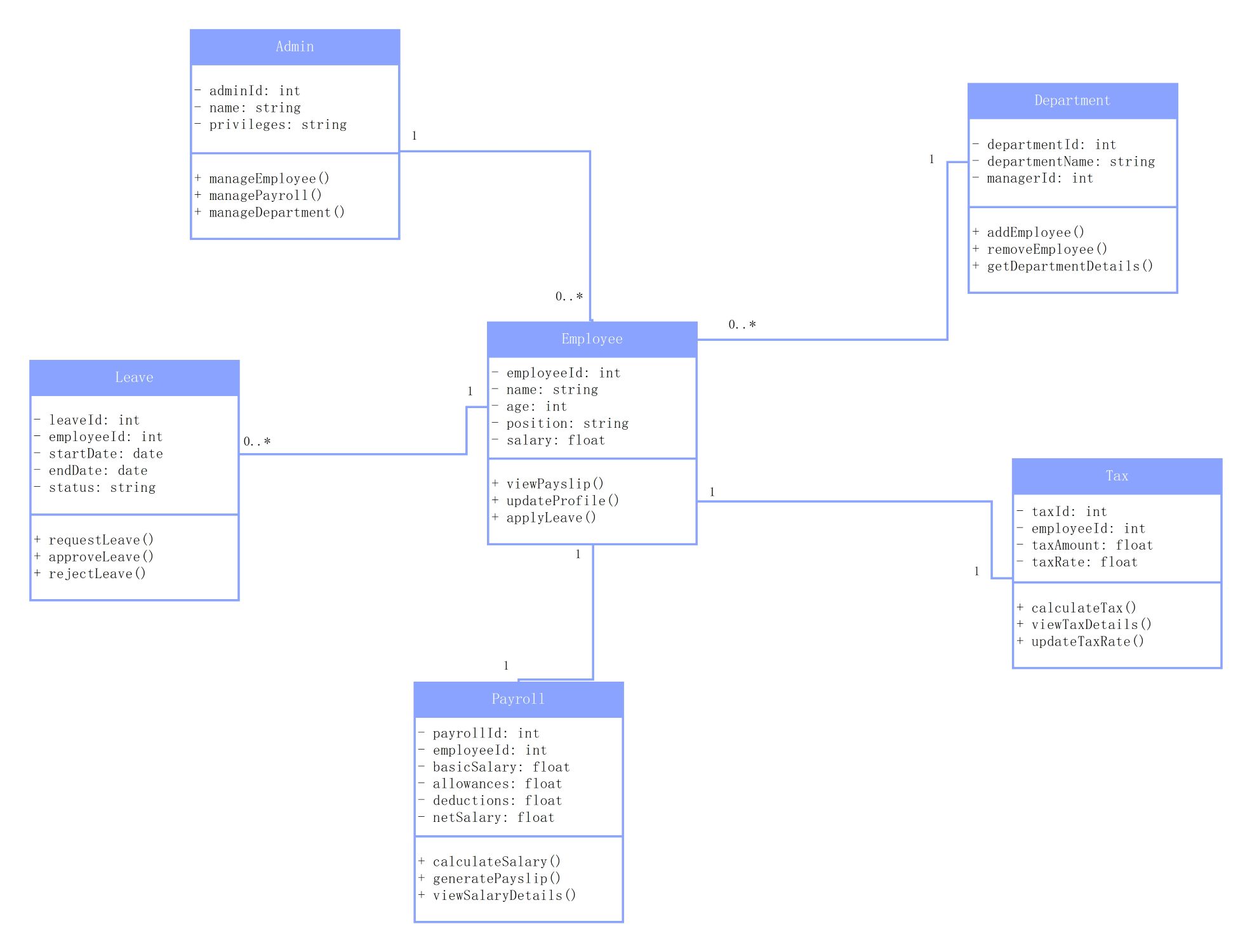
About this class diagram for employee payroll system template
This template provides a comprehensive UML structure for designing payroll software. It includes essential classes like Admin, Employee, and Payroll to help developers organize complex business logic into a readable and functional visual format.
Admin Class
The Admin class serves as the central control point for the entire payroll system. It stores administrative credentials and provides methods to manage employee records, department structures, and overall payroll processing for the company.
- adminId: int
- name: string
- privileges: string
- manageEmployee()
- managePayroll()
- manageDepartment()
Employee Class
This core class represents the staff members within the organization. It captures vital personal information and job details while allowing employees to interact with the system by updating their profiles or requesting their payslips.
- employeeId: int
- name: string
- age: int
- position: string
- salary: float
- viewPayslip()
- updateProfile()
- applyLeave()
Department Class
The Department class organizes employees into specific functional groups. It maintains records of department names and their respective managers, allowing for streamlined resource allocation and reporting within the larger organizational hierarchy and system structure.
- departmentId: int
- departmentName: string
- managerId: int
- addEmployee()
- removeEmployee()
- getDepartmentDetails()
Leave Class
This class tracks time-off requests and approvals for every staff member. It links directly to employee records to monitor start dates and durations, ensuring that leave status is accurately reflected in payroll calculations.
- leaveId: int
- employeeId: int
- startDate: date
- endDate: date
- status: string
- requestLeave()
- approveLeave()
- rejectLeave()
Payroll Class
The Payroll class handles the financial calculations required for monthly compensation. It processes basic salaries alongside various allowances and deductions to determine the final net pay for each individual employee in the organization.
- payrollId: int
- employeeId: int
- basicSalary: float
- allowances: float
- deductions: float
- netSalary: float
- calculateSalary()
- generatePayslip()
- viewSalaryDetails()
Tax Class
The Tax class manages the legal financial obligations associated with employee earnings. It calculates specific tax amounts based on current rates and individual salary levels, ensuring the organization remains compliant with regional financial regulations.
- taxId: int
- employeeId: int
- taxAmount: float
- taxRate: float
- calculateTax()
- viewTaxDetails()
- updateTaxRate()
FAQs about this Template
-
What are the main components of a class diagram for employee payroll system?
A class diagram for employee payroll system typically includes classes like Employee, Admin, Payroll, Department, Tax, and Leave. These classes define specific attributes such as IDs, names, and salaries. They also include methods for calculating pay, managing staff, and processing tax deductions. Relationships between these classes show how data flows from administrative actions to final employee payment generation.
-
How does the Leave class affect the Payroll class in this diagram?
In a functional system, the Leave class connects to the Employee, who is then linked to a Payroll record. When leave is approved, the system can use this data to adjust the Payroll calculations. This ensures that unpaid leave or specific bonuses related to attendance are correctly applied to the final net salary calculation during the monthly payment cycle.
-
Why is the Admin class separated from the Employee class in this model?
The Admin class is separated to maintain security and distinct functionality within the system. While employees focus on viewing payslips and applying for leave, admins require higher-level privileges. These privileges include adding new staff, removing members from departments, and overseeing the entire payroll process. This separation follows the principle of least privilege in software design and security.

 (AI & Web)