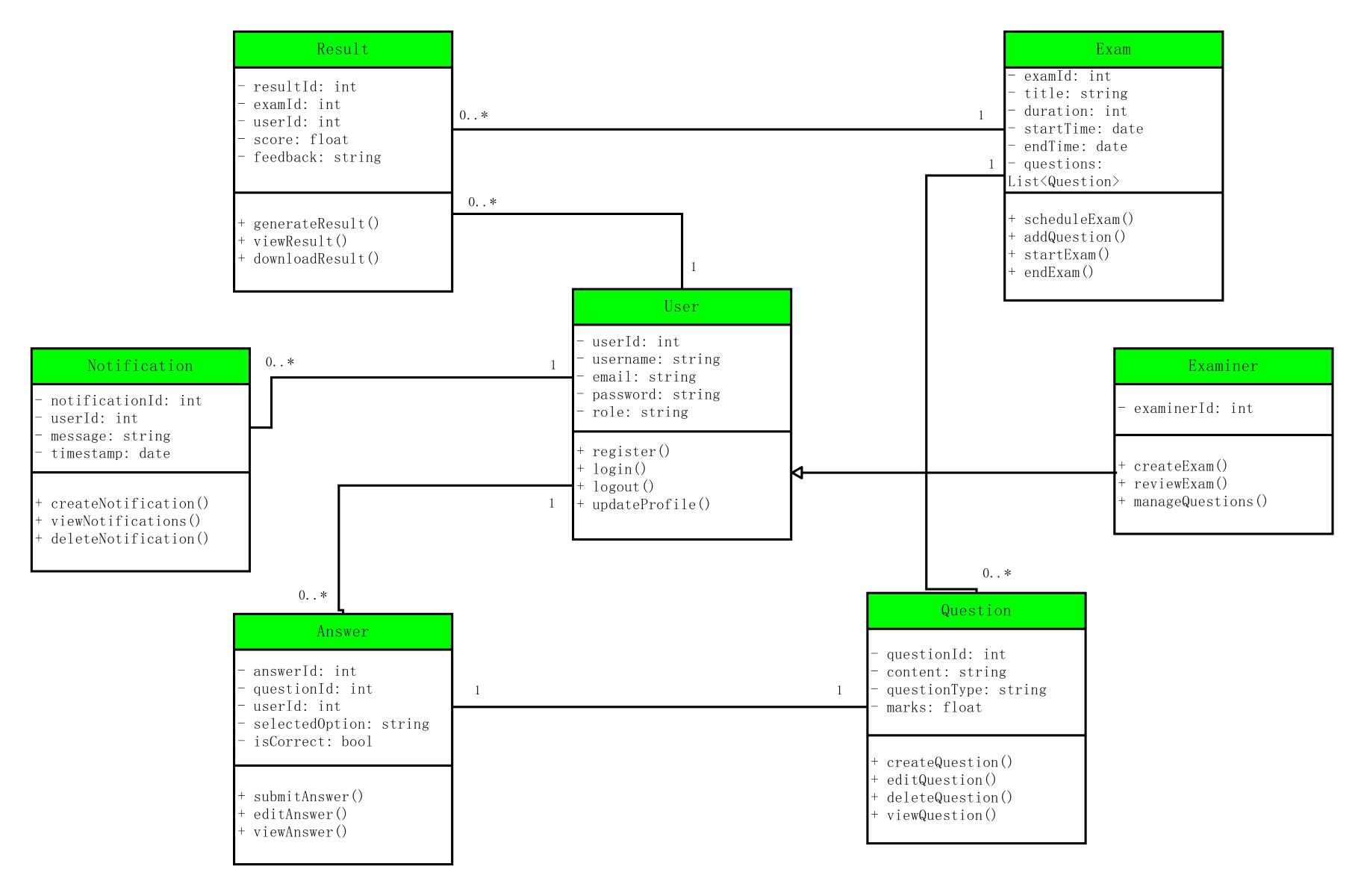
About this class diagram for online examination system template
This template provides a clear visual structure for building a digital testing platform. It maps out essential data entities and their relationships. This helps developers understand the system logic efficiently before coding starts. It is a vital tool for technical planning and database design.
User and Examiner Entities
These classes manage access control and identity for the entire testing platform. They handle registration and login processes while distinguishing between standard users and those with administrative permissions. This ensures only authorized individuals can create or manage exams.
- userId, username, email, and password
- Login and logout operations
- Examiner specific ID and management tools
- Update profile and registration methods
Exam and Question Management
This section defines the core structure of a test and its individual components. It connects specific exams to a list of questions while establishing duration, timing, and total marks. This helps in organizing the actual digital testing content efficiently.
- Exam title, duration, and start times
- Schedule and start exam functions
- Question content and question types
- Methods to create, edit, or delete questions
Evaluation and Result Tracking
These entities capture student responses and calculate final scores based on correct answers. The system tracks individual performance and provides feedback. It also allows users to download their official results easily once the examination period has ended.
- Selected option and correctness status
- Submit and view answer operations
- Score calculation and feedback storage
- Generate and download result functions
Notification System
The notification class manages alerts and updates sent to users within the system. It ensures that students and examiners receive timely messages. These messages might include information about exam schedules, result updates, or other important system announcements.
- Notification ID and user association
- Message content and timestamp
- Create and view notification methods
- Delete notification functionality
FAQs about this Template
-
What is a class diagram for an online examination system?
A class diagram for an online examination system is a visual tool that maps out the software structure. It identifies key classes like students, tests, and results while showing how they connect. This blueprint helps developers build organized databases and reliable code. It ensures that the final digital platform is secure, functional, and easy for every user to navigate.
-
How does the system handle different user roles?
In this system, users are categorized to maintain security and order. The examiner class allows teachers to create and edit tests easily. Meanwhile, the student class focuses on taking exams and viewing final results. This separation of roles ensures that only authorized people can change content. It creates a safe environment where testing remains fair and controlled for everyone.
-
Why is the Result class separate from the Exam class?
The result class is separate because it records individual student performance for a specific test. While the exam class defines the questions and time limits, the result class stores unique scores and feedback. This structure allows the system to reuse the same exam for many students. It also makes it easy to track historical data and generate reports.

 (AI & Web)