About this Use case diagram ATM template
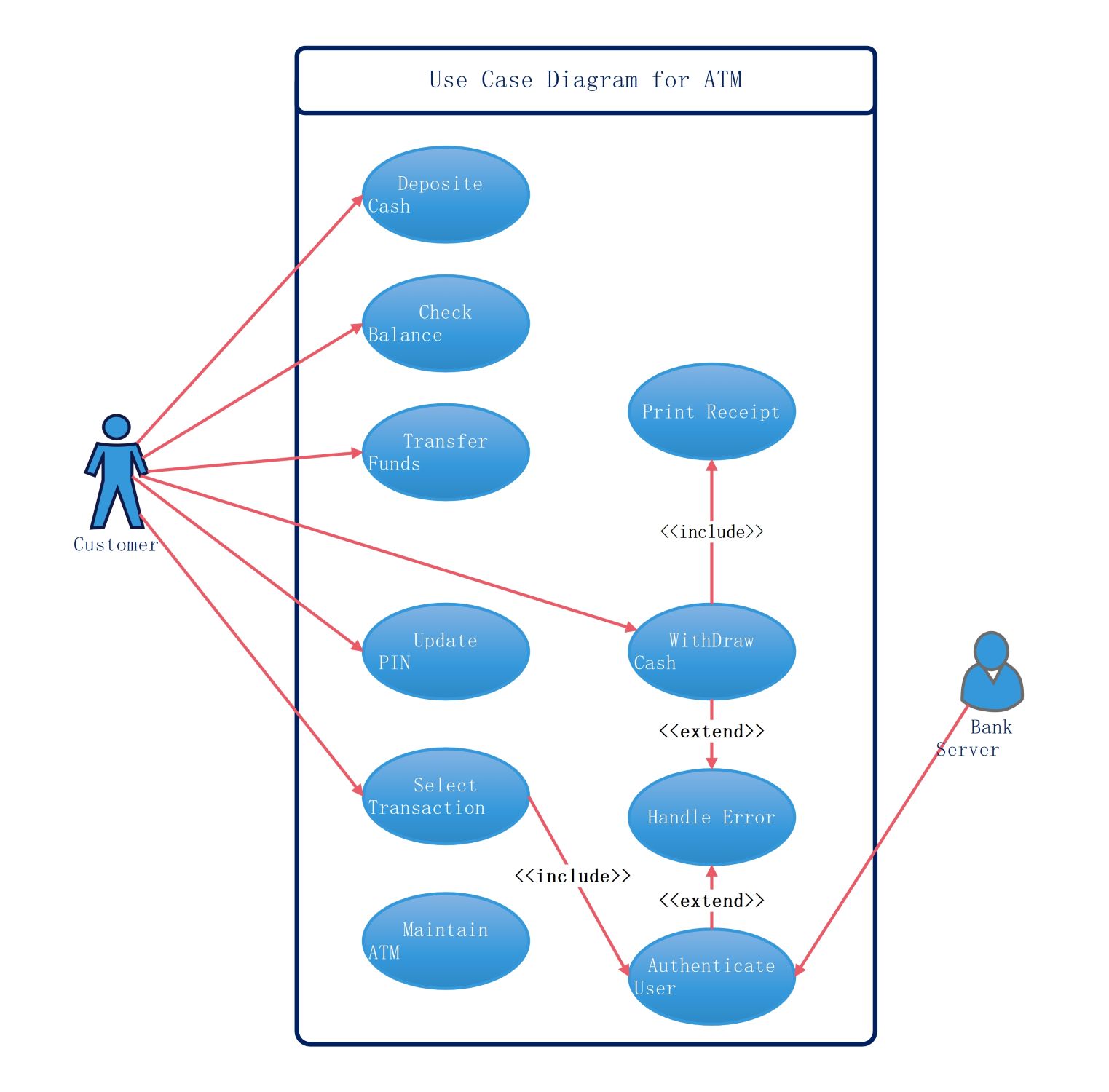
This template provides a clear visual layout of how a customer interacts with an automated teller machine. It covers essential banking functions and background system processes for developers.
Customer Actor
The Customer is the primary user who initiates most transactions within the system. They interact with the interface to manage their personal accounts and perform various banking tasks securely and efficiently.
- Deposit Cash
- Check Balance
- Transfer Funds
- Update PIN
- Select Transaction
- Withdraw Cash
System Processes
These internal functions handle the logic and verification needed for safe transactions. They ensure that users are authenticated and that errors are managed properly during the banking session to maintain security.
- Authenticate User
- Handle Error
- Maintain ATM
Transaction Outcomes
This section includes specific actions that occur as a direct result of user requests. Some processes are optional, while others are required to complete a specific task like printing a paper receipt.
- Print Receipt
- Handle Error
Bank Server Actor
The Bank Server acts as a secondary actor that validates user data and transaction requests. It provides the backend authorization necessary for the ATM to complete secure financial operations for the user.
- Authenticate User
FAQs about this Template
-
What is the purpose of an ATM use case diagram?
The primary purpose of an ATM use case diagram is to visualize the functional requirements of the banking system. It clearly shows how different users, like customers and technicians, interact with the machine. By mapping out these relationships, developers can identify all necessary features. This ensures that the final software meets all user needs and security standards efficiently.
-
How do include and extend relationships work in this diagram?
In this diagram, an include relationship means a use case is mandatory for another process to finish. For example, withdrawing cash might automatically include printing a receipt. An extend relationship indicates an optional action that only happens under specific conditions. A handle error process is a great example, as it only triggers if something goes wrong during a transaction.
-
Why is the bank server included as an actor?
The bank server is included as a secondary actor because the ATM cannot process transactions in total isolation. It needs to communicate with the bank's central database to verify account balances and user identities. The server provides the external validation required for every secure action. Including it in the diagram helps developers understand the external dependencies of the ATM system.

 (AI & Web)