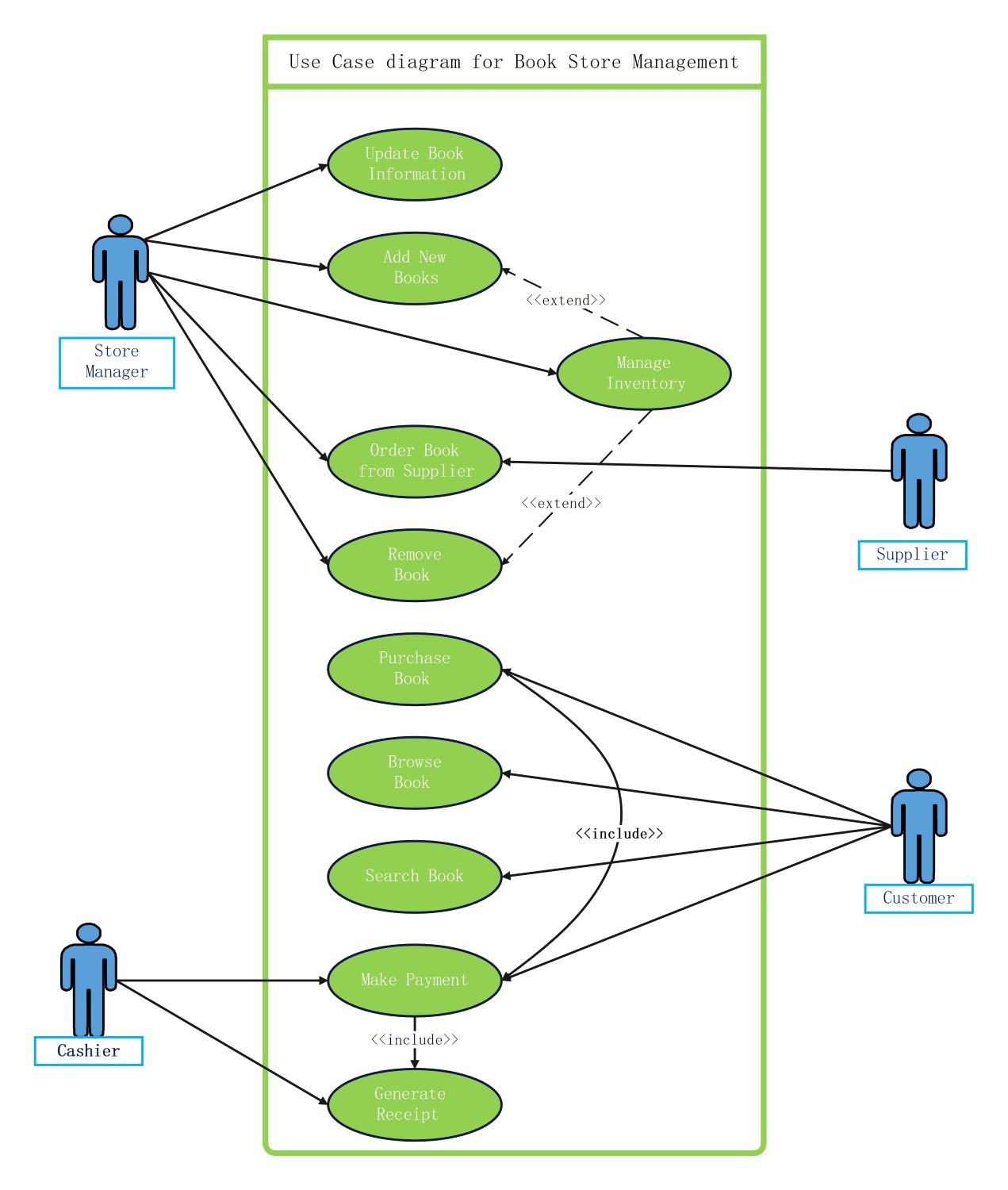
About this use case diagram book store management template
This template provides a clear visual structure for a book store system. It identifies key roles and their specific tasks. Use it to map out technical requirements and improve communication between developers and business owners.
Store Manager Operations
The store manager handles high-level administrative tasks to maintain the bookstore inventory. They ensure the system contains accurate book data and manages stock levels effectively. This role is crucial for keeping the catalog current and organized.
- Update Book Information
- Add New Books
- Manage Inventory
- Order Book from Supplier
- Remove Book
Customer System Access
Customers interact with the book store management system to find and buy items. Their journey includes searching the database and completing transactions. These use cases focus on providing a smooth and intuitive user experience for shoppers.
- Purchase Book
- Browse Book
- Search Book
- Make Payment
Transaction and Supply Chain
This section covers the financial and logistics side of the business. It involves the cashier processing payments and the supplier fulfilling stock orders. These actions ensure the store remains profitable and well-stocked for all customers.
- Generate Receipt
- Make Payment
- Order Book from Supplier
FAQs about this Template
-
What is the primary purpose of a use case diagram for book store management?
A use case diagram for book store management identifies the interactions between external actors and the internal system. It serves as a visual guide to define the scope of the project and specify functional requirements. By mapping actions like inventory management and sales, teams can ensure the final software meets all operational needs for both staff and customers effectively.
-
Who are the main actors involved in this bookstore system?
In this specific bookstore system, the primary actors are the Store Manager, Cashier, Customer, and Supplier. Each actor represents a role that interacts with the management software. For instance, the Store Manager updates inventory, while the Customer browses books. Clearly defining these roles helps developers build specific access levels and user interfaces tailored to different professional and consumer tasks.
-
How do "include" and "extend" relationships work in this diagram?
In this diagram, "include" relationships signify a mandatory sub-step, such as a payment requiring a receipt. Conversely, "extend" relationships represent optional or conditional actions that might occur during a process, like managing inventory when adding books. These UML relationships provide a deeper level of detail regarding how different system functions rely on or trigger one another during real-world operations.

 (AI & Web)