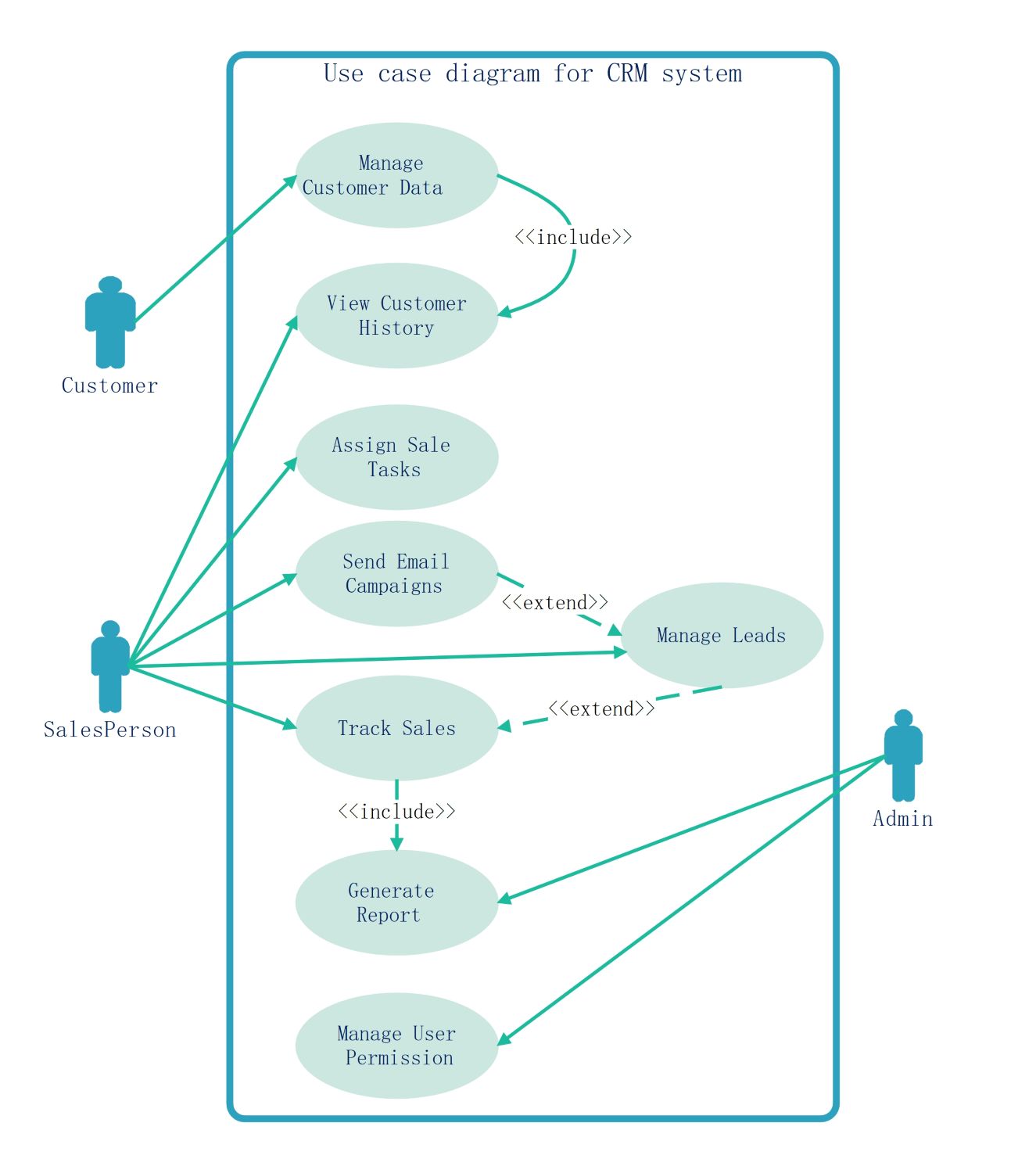
About this Use case diagram for CRM system template
This template provides a clear blueprint for building a Customer Relationship Management system. It maps out essential interactions between users and the software. Developers use this to ensure all functional requirements are covered during the early design phases.
Customer Interactions
The customer role is central to any CRM system for data accuracy. This section shows how clients provide or access their information directly. It highlights the primary entry point for external data into the software environment.
- Manage Customer Data
- View Customer History
Sales Operations
Salespeople handle the majority of daily tasks within the CRM platform. This section focuses on lead management and direct communication with potential clients. These processes are vital for tracking sales progress and managing effective email outreach campaigns.
- View Customer History
- Assign Sale Tasks
- Send Email Campaigns
- Manage Leads
- Track Sales
Administrative Functions
Administrators oversee the backend stability and security of the CRM system. They ensure that data is organized and that only authorized users have access. This section covers critical oversight tasks like reporting and managing user access levels.
- Generate Report
- Manage User Permission
FAQs about this Template
-
Why is a use case diagram important for a CRM?
A use case diagram for a CRM is essential because it captures functional requirements visually. It defines how different actors like sales teams or admins interact with the system. This clarity prevents misunderstandings between developers and stakeholders. By mapping these actions early, you ensure the final software effectively supports lead tracking, customer data management, and reporting needs for the business.
-
What do include and extend relationships mean here?
In this diagram, include means a base use case requires another action to be complete. For example, tracking sales must include generating a report. On the other hand, extend represents an optional action that only happens under specific conditions. Sending email campaigns might extend lead management if a promotion starts. These relationships help developers understand the logic and dependencies within the CRM software.
-
Can I customize this CRM use case template?
Yes, this template is fully customizable to fit your specific business requirements. You can add new actors like marketing managers or support staff to the diagram. You can also modify existing use cases to better reflect your unique sales process. Using professional software like EdrawMax allows you to drag and drop shapes, change text, and adjust arrows easily for a perfect fit.

 (AI & Web)