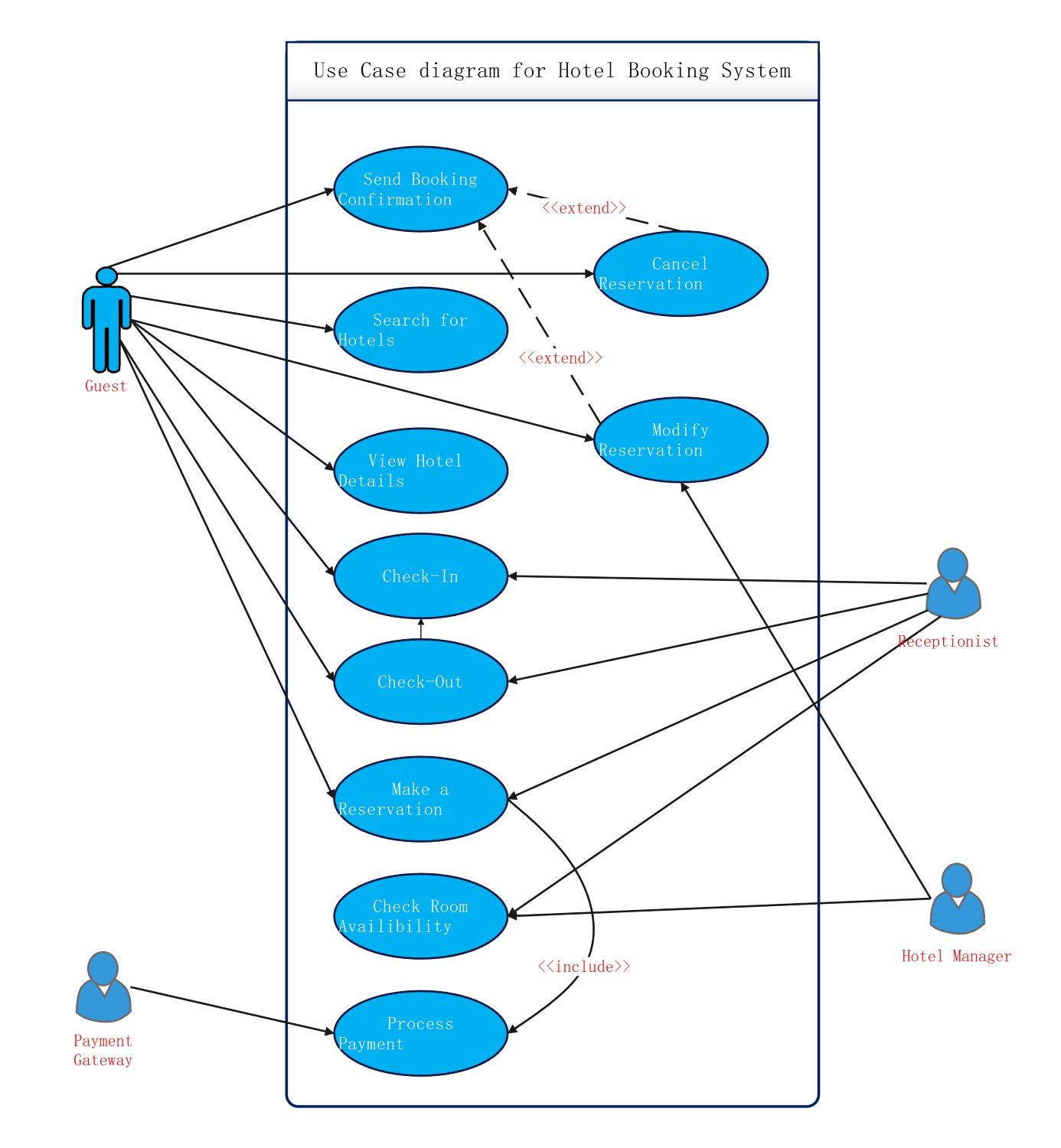
About this hotel booking use case diagram template
This template provides a professional layout for mapping out complex hotel management workflows. It allows you to identify key actors and their specific actions within the booking system. Using this visual guide, teams can streamline communication and ensure a seamless experience for every hotel guest.
Guest Interactions
The guest is the primary actor who initiates most processes within the booking system. They interact with the front-end interface to find accommodations and manage their personal stays through several integrated steps.
- Search for available rooms based on dates
- Browse room types and amenities
- Make a secure room reservation
- Cancel or modify existing bookings
- Provide feedback and reviews after stay
Staff and Receptionist Actions
Hotel staff use the management system to handle daily operations and guest arrivals. This node focuses on maintaining high service standards by managing the flow of guests and accurately recording their transaction details.
- Check-in and check-out guests
- Verify guest identification and booking details
- Update room availability status in real-time
- Process walk-in reservations manually
- Manage special guest requests or services
Administrative and System Functions
The admin and backend systems ensure the software runs smoothly and handles data securely. These processes often occur in the background to support the core hotel operations and provide management with necessary business insights.
- Process payments through external gateways
- Manage room information and pricing models
- Generate daily and monthly occupancy reports
- Maintain system security and user permissions
- Update hotel inventory and service lists
FAQs about this Template
-
What are the primary actors in a hotel booking use case diagram?
The primary actors typically include the Guest, Receptionist, Hotel Manager, and the Payment Gateway. The Guest interacts with search and booking features, while the Receptionist manages check-ins and room status. The Manager oversees system data and generates reports. Finally, the Payment Gateway acts as a secondary system actor to securely process all financial transactions for the hotel.
-
How do 'include' and 'extend' relationships work in this system?
In a hotel booking diagram, an 'include' relationship signifies a mandatory step, such as 'Make Payment' being included in 'Book Room.' An 'extend' relationship represents optional actions that occur under specific conditions. For example, 'Request Late Check-out' might extend the 'Check-out' process only if the guest requires it, allowing for a flexible and modular system design.
-
Why is a use case diagram important for hotel software development?
A use case diagram is essential because it captures functional requirements from the perspective of the user. It helps stakeholders visualize the scope of the project before coding begins. By defining exactly how guests and staff interact with the system, developers can avoid missing critical features. This structured approach reduces errors, improves system usability, and ensures a better overall guest experience.

 (AI & Web)