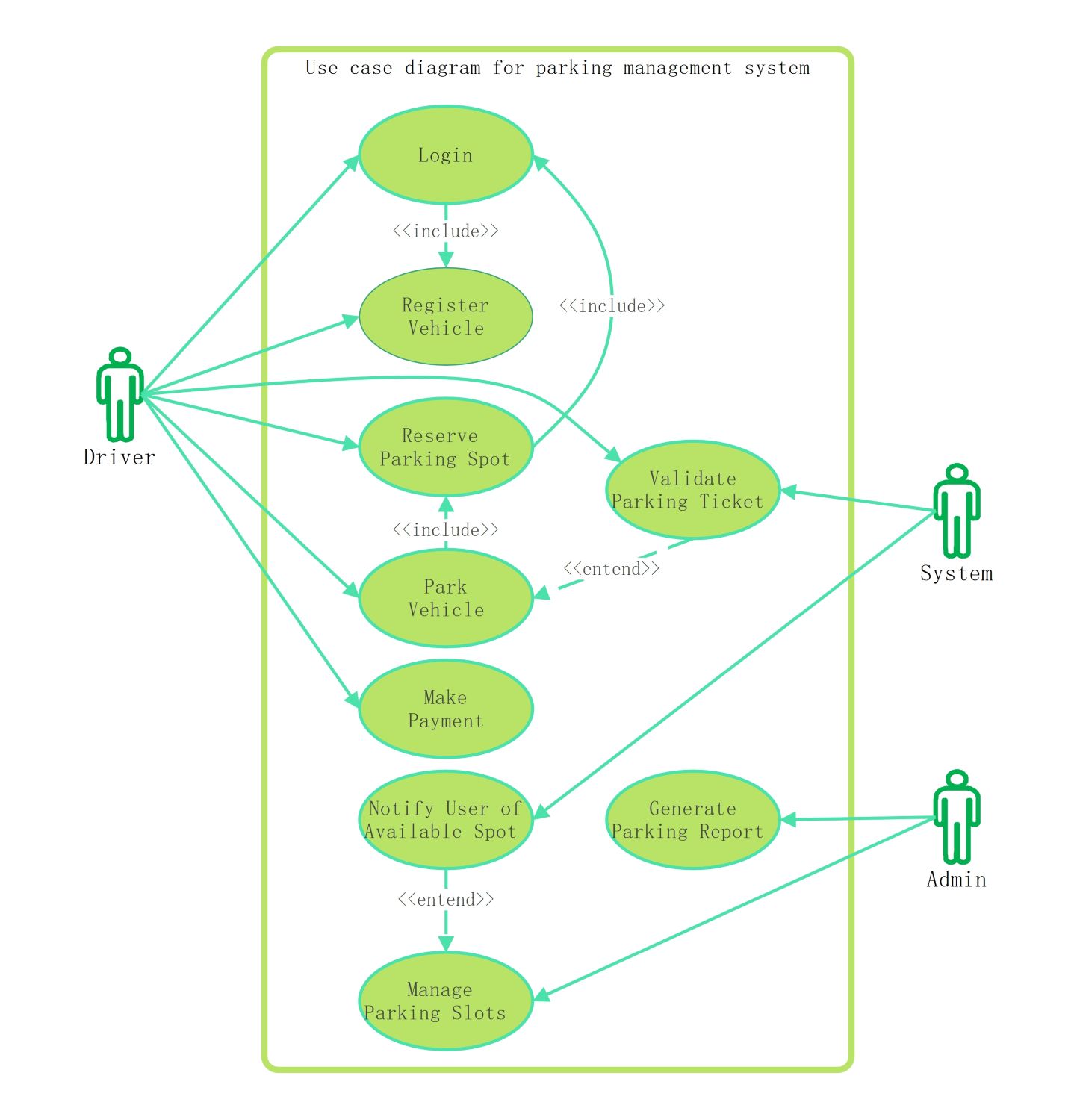
About this Use case diagram for parking management system template
This template provides a clear visual map of a parking system. It identifies key actors like drivers and administrators, outlining their specific tasks and system interactions to streamline development and improve project planning.
Driver Interactions
The Driver actor initiates several core functions within the system to secure a spot. These use cases define how a user accesses the platform, registers their information, and completes the parking process successfully.
- Login
- Register Vehicle
- Reserve Parking Spot
- Park Vehicle
- Make Payment
Automated System Functions
The System actor handles background tasks that ensure operational integrity and user convenience. These processes automate verification and communication steps, reducing the need for manual oversight while maintaining high accuracy in slot tracking.
- Validate Parking Ticket
- Notify User of Available Spot
Administrative Management
Administrators oversee the entire parking infrastructure through dedicated management tools. These use cases allow staff to monitor system performance, handle inventory of slots, and generate data-driven reports for business analysis and operational scaling.
- Generate Parking Report
- Manage Parking Slots
FAQs about this Template
-
What is the primary purpose of a use case diagram for a parking management system?
The primary purpose is to define the functional requirements and scope of the software project. It illustrates the relationships between different actors, such as drivers and admins, and the specific tasks they perform. This visualization helps stakeholders understand how the system should behave, ensuring that all necessary features like payment and registration are included during development.
-
How do include and extend relationships work in this specific parking diagram?
In this diagram, include relationships signify mandatory steps, such as needing to login before registering a vehicle. Extend relationships represent optional or conditional actions. For instance, managing parking slots might extend to notifying a user only when a spot becomes free. These notations clarify the logic flow, helping developers build more robust and predictable software for parking facilities.
-
Why is the System actor included alongside the Driver and Admin in this UML model?
The System actor represents external systems or automated internal processes that interact with the use cases. Including it shows that certain actions, like ticket validation or notifications, happen automatically without human intervention. This distinction is vital for backend developers to understand which parts of the parking system require automated triggers versus those initiated by a manual user action.

 (AI & Web)