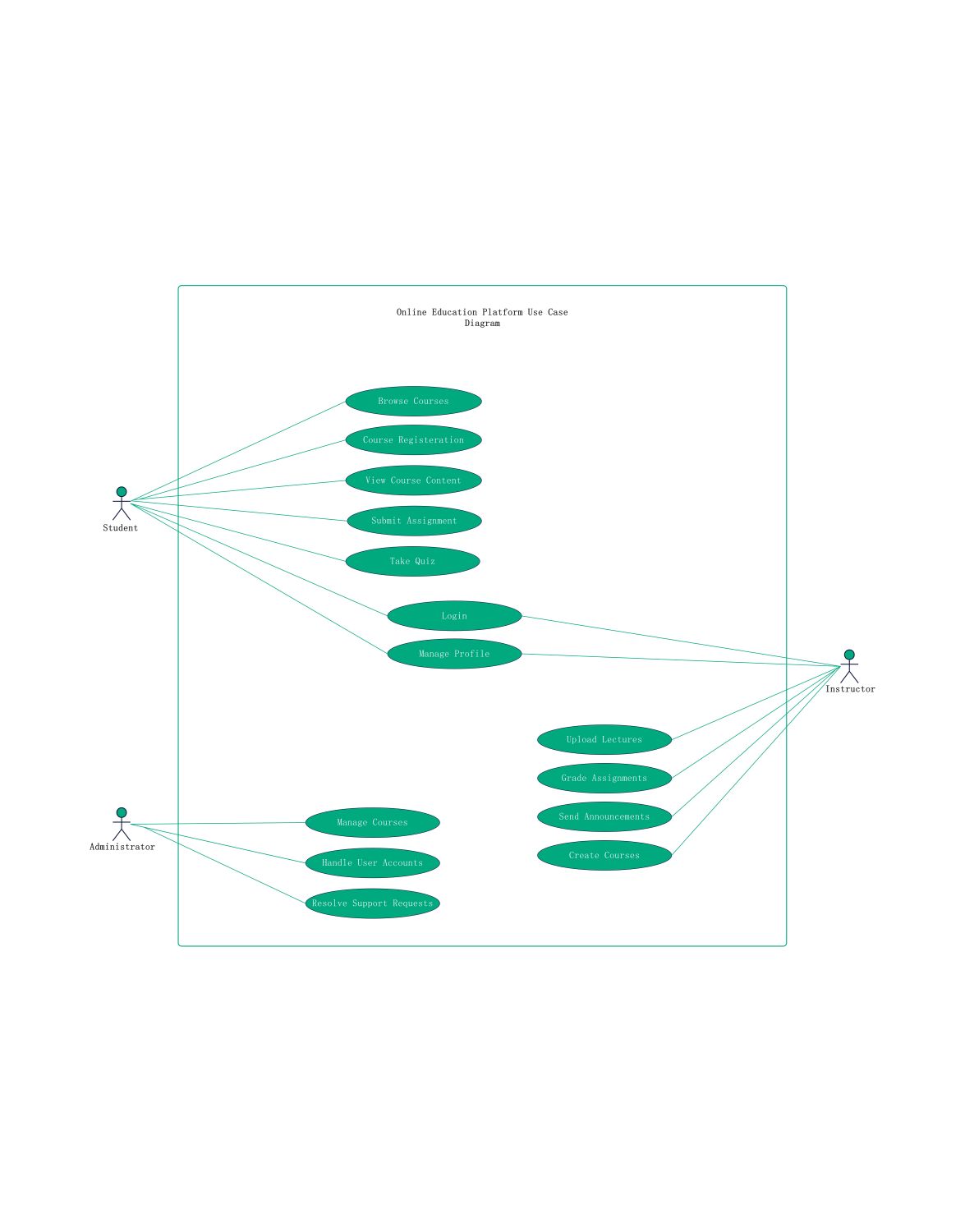
About this Online Education Platform Use Case Diagram template
This template provides a clear visual map of how different users interact with an e-learning system. It highlights the essential features needed for students, instructors, and administrators to achieve their goals effectively within the digital classroom environment.
Student Actor Functions
Students are the primary learners who interact with the core educational content. They use the platform to navigate academic requirements and complete tasks. This section outlines the specific actions a learner takes to succeed.
- Browse Courses
- Course Registration
- View Course Content
- Submit Assignment
- Take Quiz
- Login
- Manage Profile
Instructor Actor Functions
Instructors manage the educational flow and create the learning materials. They use the platform to guide students and track progress. This section details the tools available for teaching and administrative course management.
- Login
- Manage Profile
- Upload Lectures
- Grade Assignments
- Send Announcements
- Create Courses
Administrator Actor Functions
Administrators ensure the platform runs smoothly for all users. They handle the technical and backend aspects of the system. This section focuses on high-level management tasks that keep the educational environment secure and functional.
- Manage Courses
- Handle User Accounts
- Resolve Support Requests
FAQs about this Template
-
What is the main purpose of an online education platform use case diagram?
The main purpose of this diagram is to define the functional requirements of an e-learning system. It identifies the relationships between actors like students and teachers and the specific actions they perform. By visualizing these interactions, project managers and developers can ensure the software meets all user needs and provides a logical flow for educational activities.
-
Who are the primary actors in an e-learning system use case?
The primary actors typically include students, instructors, and administrators. Students focus on learning and assessments. Instructors handle course creation and grading. Administrators manage the technical infrastructure and user accounts. Each actor has distinct permissions and goals, which the use case diagram clearly separates to avoid confusion during the system development and testing phases.
-
How does this diagram help in the software development process?
This diagram acts as a blueprint for developers during the initial design phase. It helps teams identify necessary features and prevents scope creep by keeping the focus on core functionalities. It also serves as a communication tool between technical teams and stakeholders, ensuring everyone agrees on how the online education platform should operate before coding begins.

 (AI & Web)