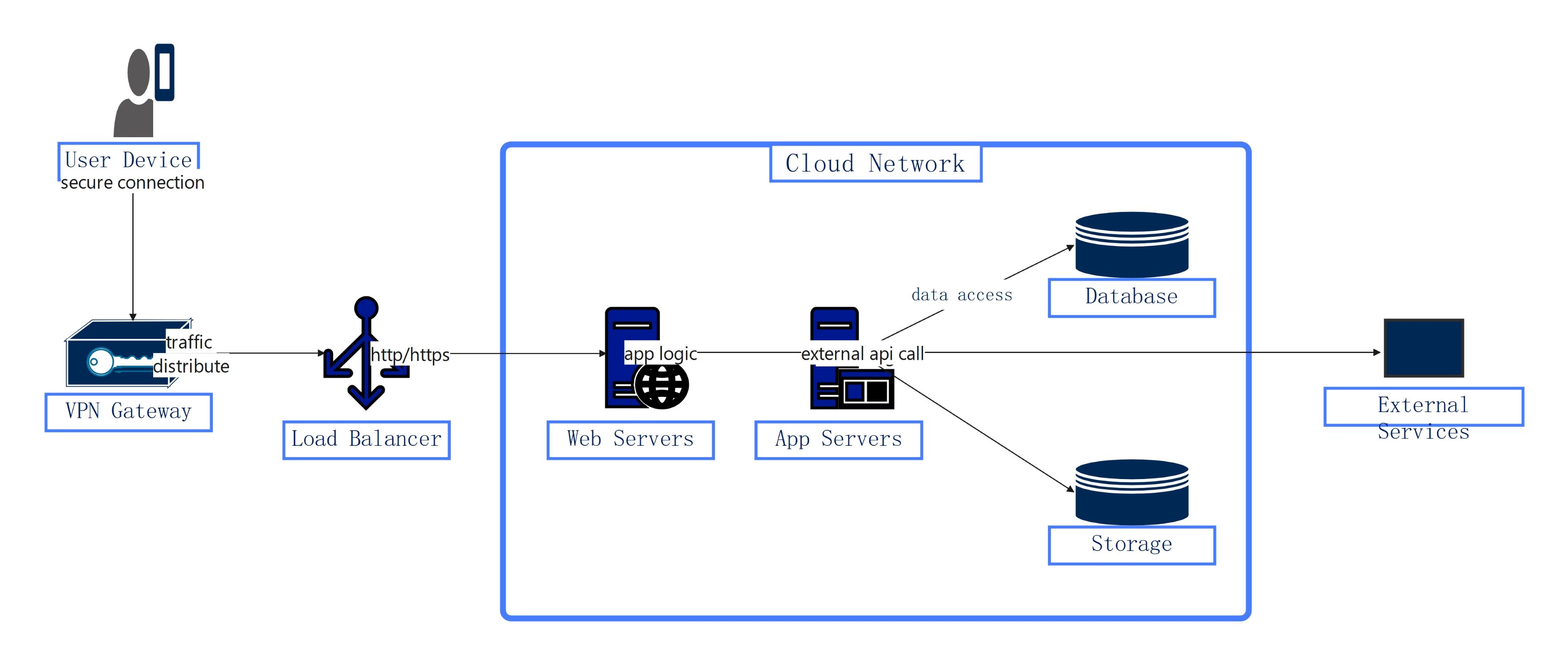
About this Network diagram for cloud template
This template provides a clear visual map of a modern cloud architecture. It covers user connectivity, security gateways, and internal server logic. Use it to design a robust and scalable network system that ensures high availability and secure data transfers across your organization.
User and VPN Access Layer
This section focuses on how users connect to the cloud environment safely. It emphasizes secure tunnels and initial entry points that protect internal resources from direct exposure to the public internet during data transfer.
- User Device with secure connection
- VPN Gateway for traffic distribution
- Secure encrypted tunnels
Traffic Load Balancing
The management layer ensures that incoming requests are handled efficiently across the system. It balances the load to prevent server crashes. This maintains a smooth user experience even during high traffic periods on the web.
- Load Balancer for http/https traffic
- Scalable traffic routing
- System availability management
Cloud Infrastructure Core
The core layer houses the logic and data storage components of the application. It manages everything from the user interface logic to deep database queries and the storage of persistent data within the cloud boundary.
- Web Servers for app logic
- App Servers for external API calls
- Database for data access
- Storage for persistent files
External Service Integration
External services represent third-party integrations outside the primary cloud network. These connections allow the system to interact with outside APIs. These provide additional functionality or data required by the main application to function correctly.
- External API calls
- Third-party service integration
- Outbound communication paths
FAQs about this Template
-
What is a network diagram for cloud?
A cloud network diagram is a visual map that shows the structure of a cloud environment. It identifies key components like servers, databases, and security tools. This diagram helps IT teams understand how data flows and how different parts interact. It is a vital tool for planning infrastructure, troubleshooting technical issues, and ensuring the entire system meets security requirements.
-
Why use a VPN Gateway in cloud architecture?
A VPN Gateway is crucial because it creates a secure, encrypted tunnel for data moving between user devices and the cloud. This prevents hackers from intercepting sensitive information during transmission. It acts as a gatekeeper, ensuring that only authorized traffic can enter the private network. This significantly reduces the risk of data breaches and strengthens the overall security posture of the cloud system.
-
How does a load balancer improve cloud performance?
A load balancer distributes incoming web traffic across multiple servers. This prevents any single server from becoming overwhelmed, which can lead to slow response times or complete crashes. By spreading the work evenly, the load balancer ensures the application remains highly available and responsive. It also allows for easier maintenance and scaling as the server count can be adjusted without downtime.

 (AI & Web)