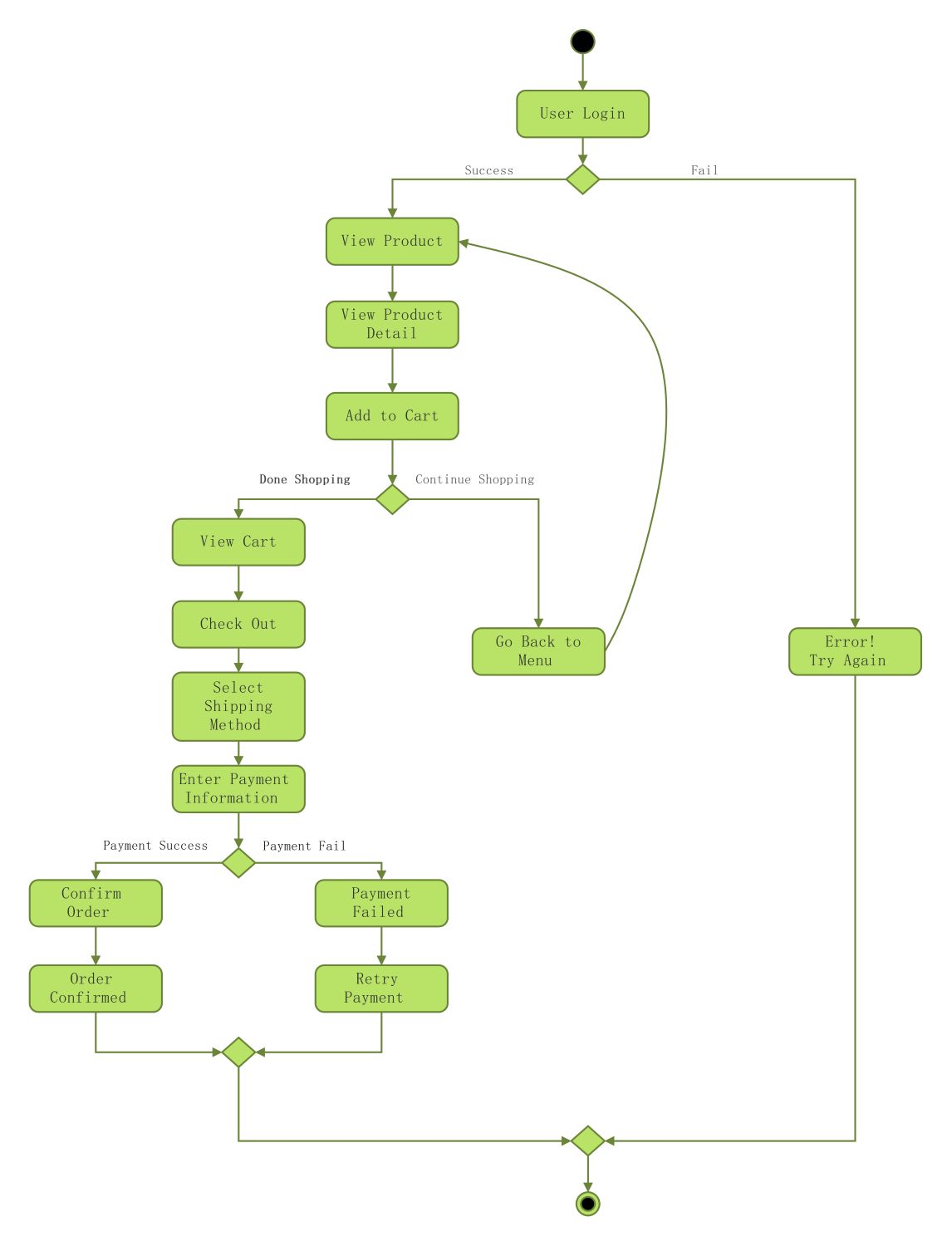
About this Activity Diagram for E-Commerce Website template
This template outlines the step-by-step logic of an online shopping system. It maps out user interactions, decision points, and system responses. Use this diagram to plan your backend processes and improve the user interface of your web store.
User Authentication Phase
The process begins with the user attempting to log into the e-commerce platform. This stage determines if the visitor can access personal account features or must try again. It is a critical security step for protecting customer data.
- User Login
- Login Success Decision
- Error! Try Again
Product Discovery and Selection
Once logged in, the customer browses products and views specific details to make a choice. This section tracks the flow from the main menu to adding items to the cart. It focuses on the core shopping experience.
- View Product
- View Product Detail
- Add to Cart
- Continue Shopping Decision
- Go Back to Menu
Checkout Process Flow
After selecting items, the user proceeds to the checkout stage to finalize the purchase. This includes reviewing the cart, choosing shipping options, and providing payment details. It is the most sensitive part of the user journey.
- View Cart
- Check Out
- Select Shipping Method
- Enter Payment Information
Order Confirmation and Finalization
The final phase handles the transaction outcome based on payment verification. Successful payments lead to order confirmation, while failures offer a retry option. This ensures the user knows their purchase status before the session ends.
- Payment Success Decision
- Confirm Order
- Order Confirmed
- Payment Failed
- Retry Payment
FAQs about this Template
-
Why is an activity diagram important for e-commerce development?
An activity diagram is vital because it visualizes the entire user journey from start to finish. It helps developers identify potential bottlenecks or logical errors in the shopping flow. By mapping out every click and decision, the team can create a more intuitive interface. This clarity reduces coding mistakes and ensures a seamless experience for customers during the checkout process.
-
How do decision nodes improve an e-commerce workflow?
Decision nodes allow the system to handle different user scenarios effectively. For example, they manage what happens when a login fails or a payment is declined. By including these paths, the diagram ensures the system provides helpful feedback instead of just crashing. This logical branching helps designers build a robust website that guides users through problems toward a successful purchase.
-
What elements are essential in a checkout activity diagram?
A checkout activity diagram must include the cart review, shipping selection, and payment processing steps. It should also account for error handling, such as invalid credit card details or out-of-stock items. Including these specific nodes ensures that the backend logic supports all necessary business rules. A detailed diagram prevents missing critical steps that could frustrate users or cause lost sales opportunities.

 (AI & Web)