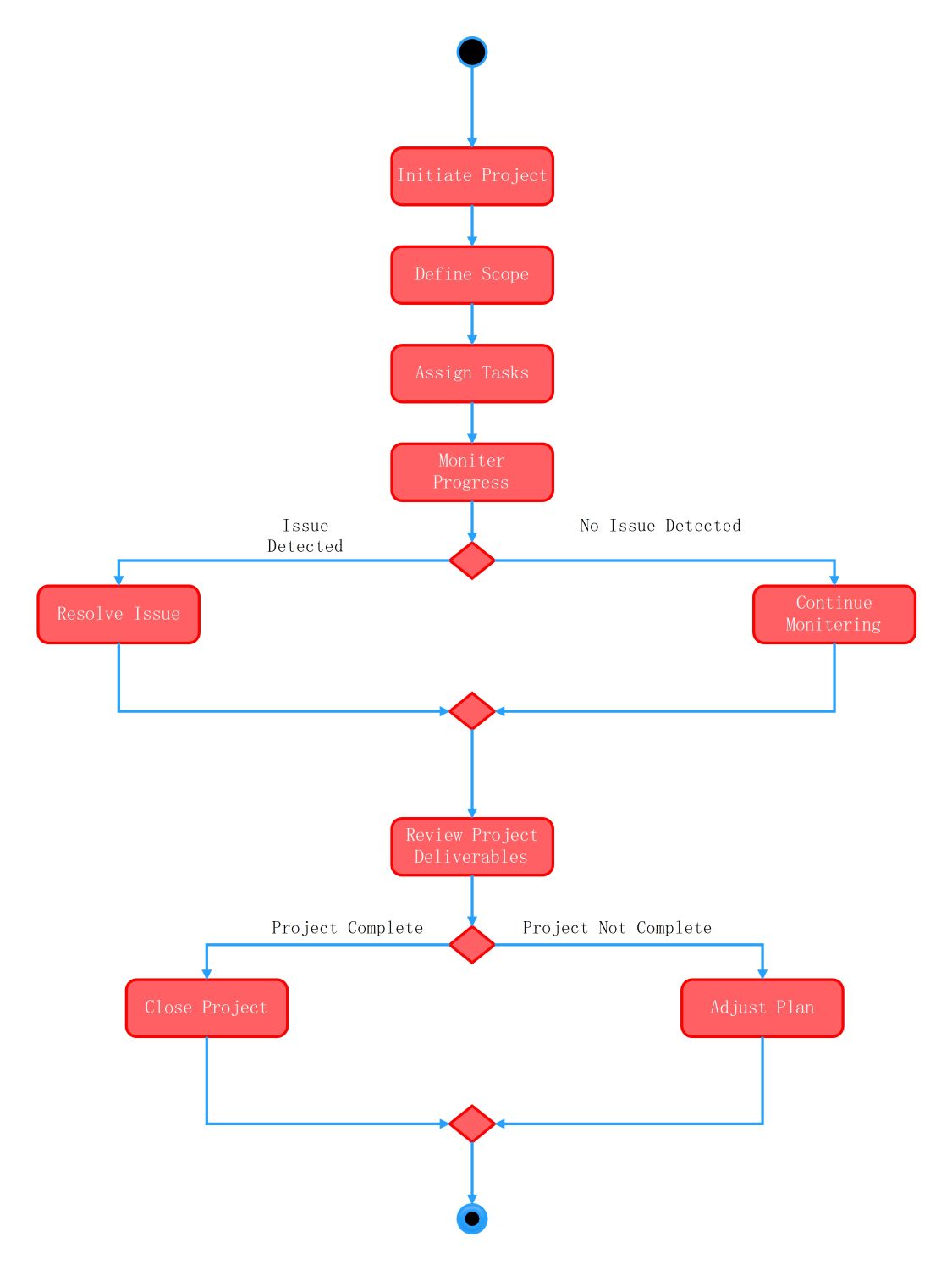
About this Activity Diagram for Project Management System template
This template provides a professional framework for mapping out project workflows. It includes standard UML symbols to represent actions and decisions. It is ideal for managers who need to document system logic or identify potential bottlenecks in their project lifecycle.
Project Initiation and Setup
This section marks the beginning of the project lifecycle. It focuses on setting the foundation by defining what needs to be done. It ensures that all roles and tasks are clear before any work starts.
- Initiate Project: The formal start of the management process.
- Define Scope: Establishing boundaries and goals for the team.
- Assign Tasks: Distributing responsibilities to the appropriate team members.
Progress Monitoring and Issue Resolution
This node handles the active phase of the project. It uses a decision point to check for problems during execution. This allows the system to pivot between normal operations and corrective actions when necessary.
- Monitor Progress: Regularly tracking the status of assigned tasks.
- Issue Detected: A decision point to evaluate project health.
- Resolve Issue: Taking corrective steps when a problem occurs.
- Continue Monitoring: Proceeding with the standard workflow if no issues exist.
Final Review and Project Closure
The final phase focuses on quality and completion. It evaluates if the deliverables meet the project goals. If work is incomplete, the system loops back to planning to ensure all requirements are eventually satisfied.
- Review Project Deliverables: Checking the final output for quality and accuracy.
- Project Complete: Determining if all objectives have been met.
- Close Project: Formally ending the project and documenting success.
- Adjust Plan: Modifying the schedule or tasks for unfinished work.
FAQs about this Template
-
What are the benefits of using an activity diagram for a project management system?
Activity diagrams provide a clear visual map of complex workflows. This helps managers identify bottlenecks and dependencies early. By mapping out every task from initiation to closure, teams can align their efforts more effectively. These diagrams also simplify the communication of system logic to stakeholders. This ensures everyone understands the project requirements and the necessary steps for success.
-
How do decision nodes improve project management workflows?
Decision nodes allow the system to handle different scenarios dynamically. In project management, things rarely go exactly as planned. These diamonds represent points where the team must choose a path based on current conditions. For example, if the system detects an issue, the workflow shifts to resolution. This flexibility prevents the process from stalling and ensures constant progress toward the goal.
-
Why is Review Project Deliverables a critical step in this system?
Reviewing project deliverables is essential for quality control. This step ensures that every outcome meets the defined scope and standards before the project ends. It acts as a gateway to check for completeness. If the deliverables are not ready, the system allows for plan adjustments. This feedback loop helps maintain high standards and prevents premature closure of important tasks.

 (AI & Web)