About this Online Recruitment System template
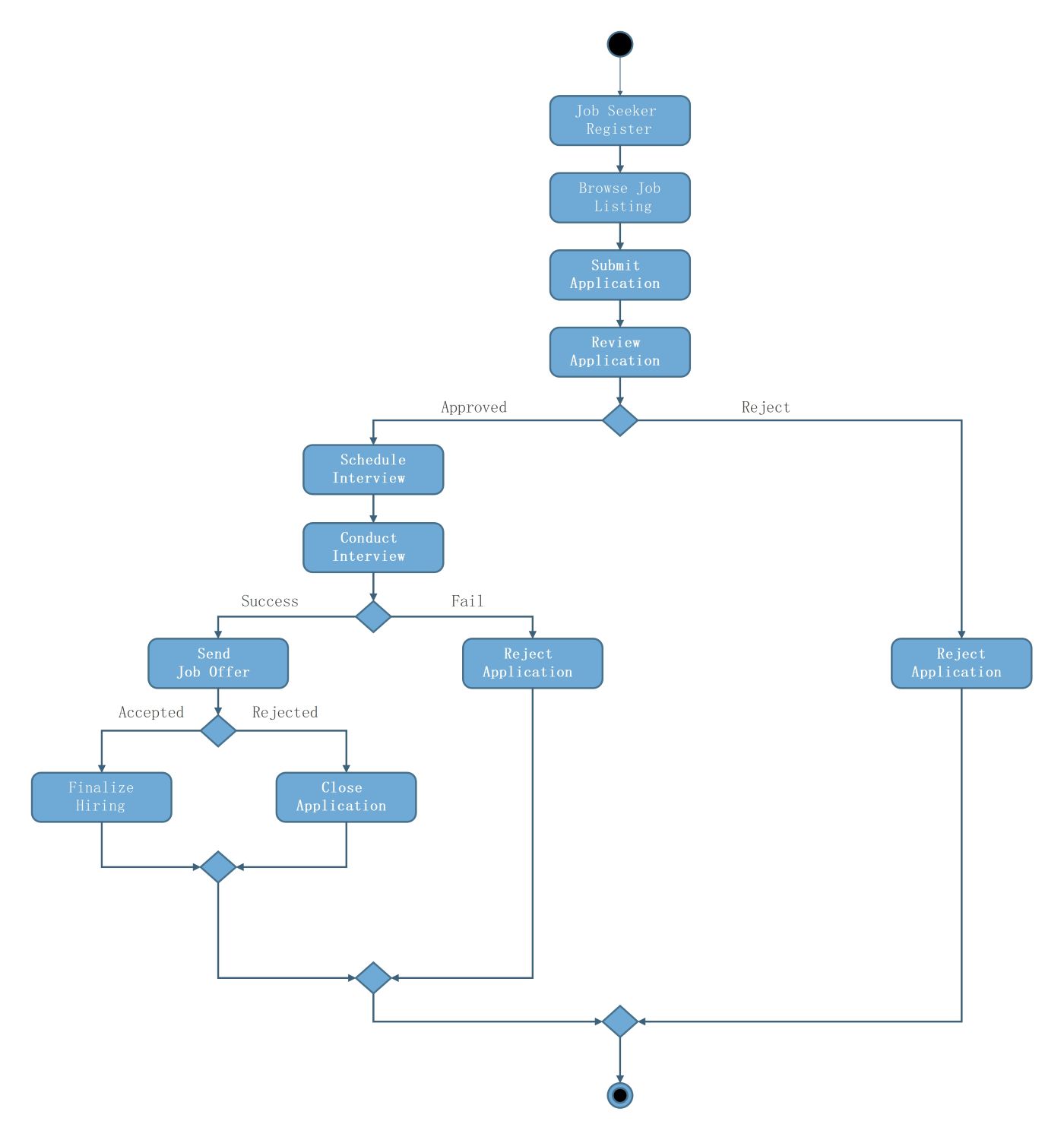
This activity diagram template provides a clear visual map of the recruitment lifecycle. It helps developers and HR professionals understand the logic flow of a digital hiring platform, from the initial job application to the final decision.
Application Submission Phase
The process begins with the candidate taking the first steps to enter the system. This phase focuses on data entry and the initial screening of a candidate's background and professional qualifications.
- Job Seeker Register
- Browse Job Listing
- Submit Application
- Review Application
Interview and Evaluation Phase
Once an application is approved, the system moves into the evaluation stage. This critical section involves direct interaction with the candidate to determine if they are a good fit for the role.
- Schedule Interview
- Conduct Interview
- Decision: Success or Fail
Offer and Finalization Phase
The final phase handles the results of the interview process. It manages the communication of job offers and the administrative tasks required to either hire the candidate or close their file.
- Send Job Offer
- Finalize Hiring (if accepted)
- Close Application (if rejected)
- Reject Application
FAQs about this Template
-
What is the purpose of an activity diagram in a recruitment system?
An activity diagram serves as a blueprint for the operational flow of a recruitment system. It visually represents the sequence of actions and decisions made by both the candidate and the hiring team. By using this diagram, stakeholders can identify potential bottlenecks, simplify complex hiring steps, and ensure the software logic aligns perfectly with real-world human resource management practices.
-
How does this diagram handle rejected job applications?
This diagram includes multiple decision points where an application can be rejected based on specific criteria. If the initial review fails or the interview is unsuccessful, the system triggers a Reject Application action. This ensures that the workflow is completed formally, allowing the system to update the candidate's status and maintain clean records for future reporting and compliance purposes.
-
Can this recruitment activity diagram be customized for different industries?
Yes, this template is highly versatile and can be adapted to various industry needs. While the core steps like registration and interviewing remain constant, organizations can add specific stages such as technical assessments or background checks. Customizing the diagram helps ensure that the final recruitment software reflects the unique hiring requirements and organizational culture of the specific business or sector.

 (AI & Web)