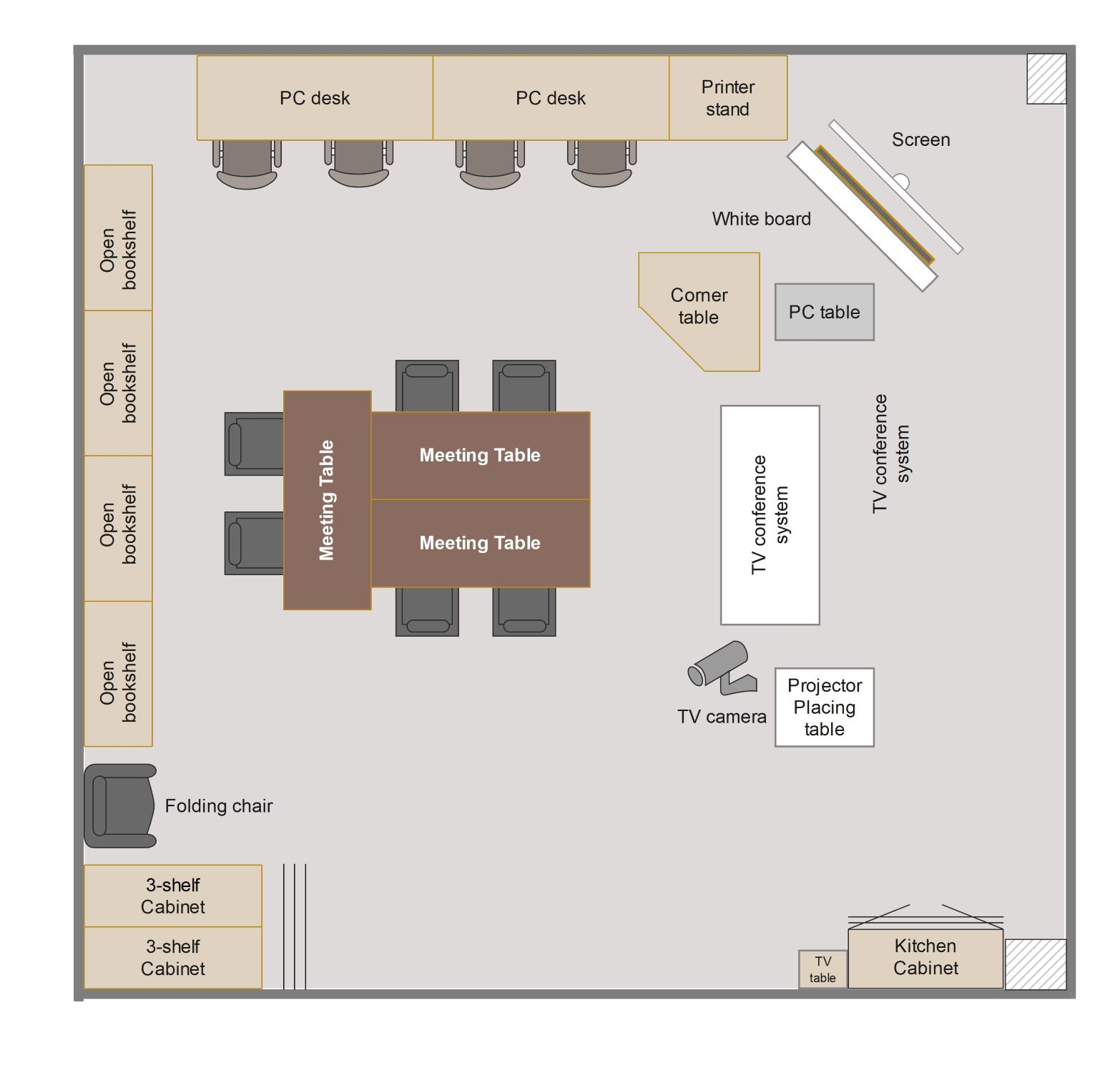
About this Classroom Floor Plan template
This classroom floor plan template offers a modern layout designed for higher education or corporate training. It balances individual computer work with collaborative group sessions. Use this professional design to organize furniture and technology effectively.
Work and Technology Zones
This section highlights specific areas for individual and group tasks. It includes specialized desks for computer use and larger tables for team discussions. These zones ensure students have the right tools for diverse learning activities.
- PC desks
- Printer stand
- Meeting tables
- PC table
- Corner table
Presentation and Conferencing Hub
The front of the room is optimized for visual teaching and remote communication. It features tools for digital displays and video calls. This setup supports modern hybrid learning environments for better student engagement.
- Screen
- White board
- TV conference system
- TV camera
- Projector placing table
Storage and Amenities Space
Organization is key to maintaining a clean and functional classroom environment. This area provides ample space for books, files, and supplies. It also includes small kitchen facilities for comfort during long sessions.
- Open bookshelves
- 3-shelf Cabinet
- Kitchen Cabinet
- TV table
- Folding chair
FAQs about this Template
-
Why is the layout of a classroom important for student learning?
A well-planned classroom layout directly impacts student focus and academic success. By arranging furniture strategically, teachers can reduce distractions and encourage better social interactions. Clear paths and organized zones help students move safely while providing easy access to learning materials. This thoughtful organization creates a comfortable environment where students feel motivated to participate in daily activities and collaborative projects.
-
How can I incorporate technology into a classroom floor plan?
Integrating technology requires placing power outlets and data ports near desks and presentation areas. You should position screens and projectors where all students can see them without glare. This template includes a dedicated conference system and PC desks to show how digital tools fit into the physical space. Proper placement ensures that technology supports learning without becoming a physical barrier or a distraction.
-
What are the best practices for arranging storage in a classroom?
Effective storage should be accessible but located away from high-traffic areas to avoid congestion. Using vertical space with bookshelves and cabinets keeps the floor clear for movement. Labeling these areas helps students find and return materials independently. In this floor plan, storage is placed along the walls to maximize the central learning area, ensuring the room feels open and highly functional.

 (AI & Web)