About this sequence diagram for bus tracking template
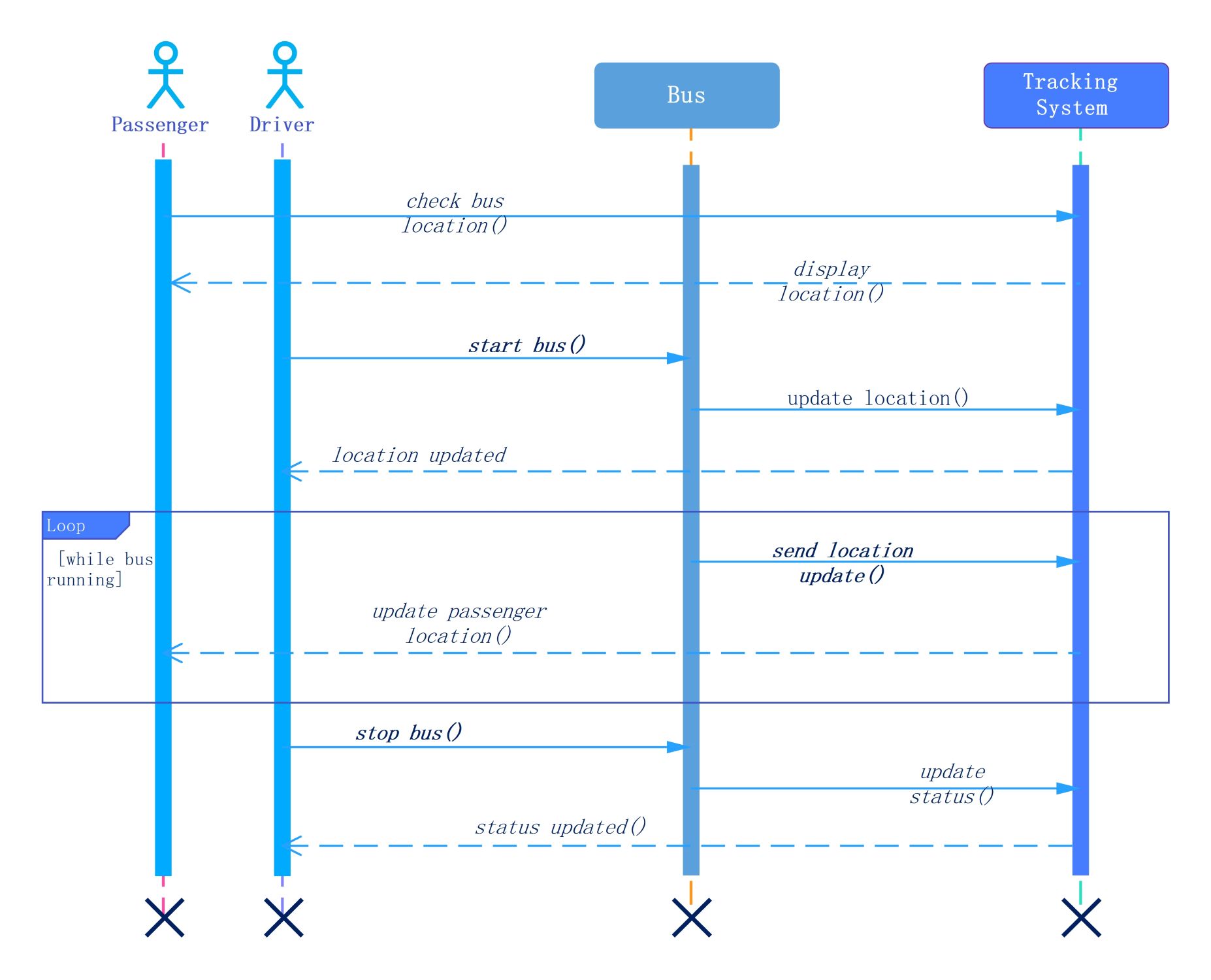
This sequence diagram template visualizes the communication between passengers, drivers, and a central tracking system. It models the entire lifecycle of a bus journey from start to finish. Use it to design efficient real-time location services and transit management software.
Passenger Interaction
The process begins when a passenger requests the current position of their bus. The tracking system processes this query and returns visual data. This interaction helps commuters plan their trips more effectively and reduces wait times.
- Check bus location()
- Display location()
Driver and Bus Initialization
The driver starts the vehicle to begin a route and notify the system. This action triggers the first location update to the tracking server. The system then confirms that the bus is active and ready for public monitoring.
- Start bus()
- Update location()
- Location updated (confirmation)
Real-time Update Loop
This loop runs continuously while the bus is in motion to provide live tracking. The bus sends frequent GPS data to the server at set intervals. The system then pushes these updates to the passenger’s device or display.
- While bus running loop
- Send location update()
- Update passenger location()
Journey Termination
When the bus reaches its final destination, the driver stops the vehicle. The bus sends a final status update to the tracking system to close the session. This ensures the map correctly reflects that the bus is offline.
- Stop bus()
- Update status()
- Status updated() (confirmation)
FAQs about this Template
-
How does a sequence diagram improve bus tracking system development?
A sequence diagram improves development by mapping out the chronological order of messages between actors. It helps engineers identify exactly where data transfers occur and where bottlenecks might exist. By visualizing the interaction between the bus, driver, and passenger, the team can ensure synchronization. This leads to a more robust system that delivers accurate, real-time location data to the end user.
-
What is the role of the loop fragment in this diagram?
The loop fragment represents a repetitive process that occurs as long as the bus is moving. It signifies that the system constantly sends location updates rather than just a single message. This continuous data flow is essential for live tracking. Without this loop, the passenger’s display would not reflect the vehicle's movement in real-time, making the tracking system far less useful.
-
Can I adapt this sequence diagram for other delivery services?
Yes, you can easily adapt this template for taxi services, food delivery, or courier tracking. The basic logic of updating a vehicle's status and sharing that location with a customer remains the same. You only need to change the labels of the actors and messages to fit your specific use case. This flexibility makes it a powerful starting point for any logistics project.



 (AI & Web)