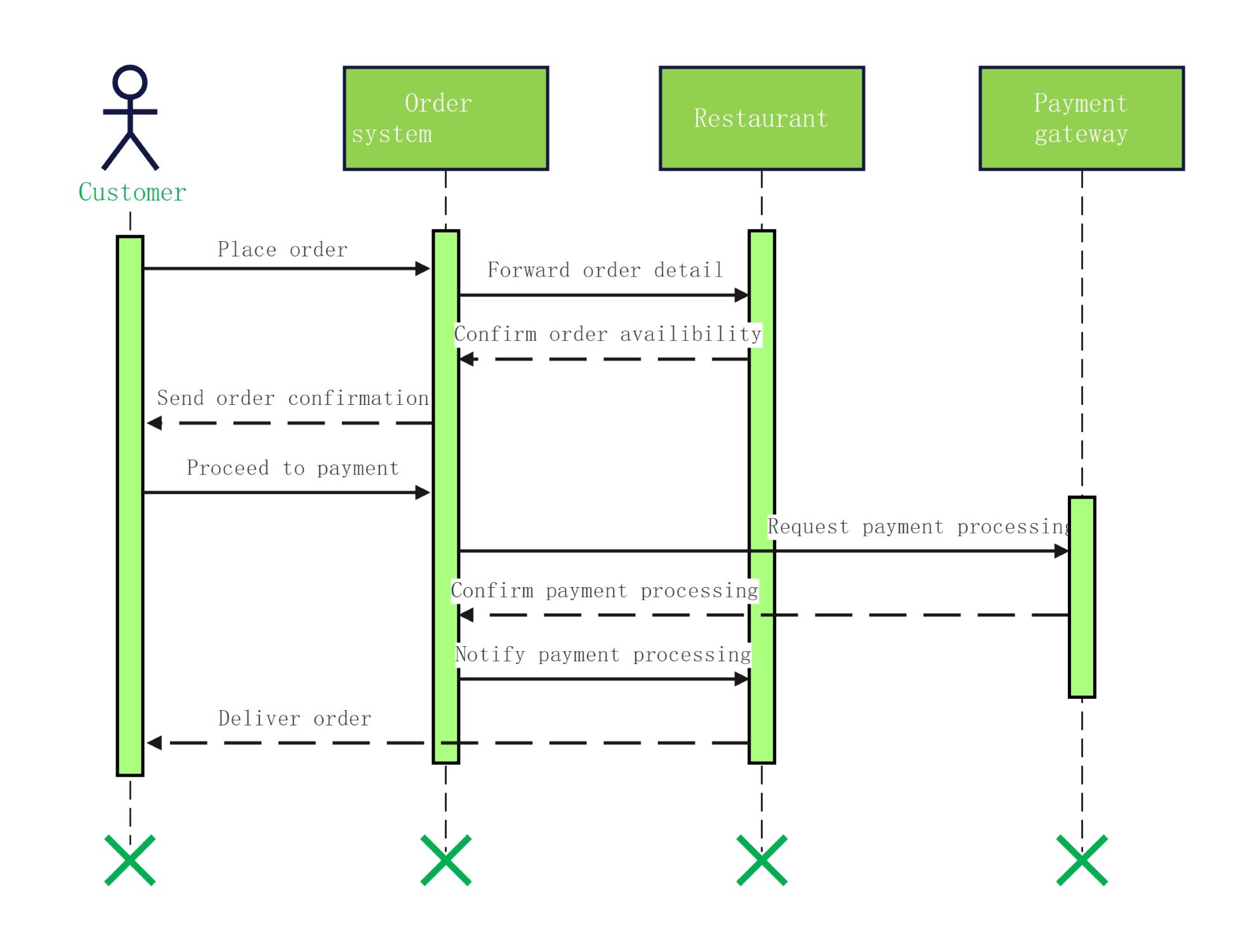
About this sequence diagram for food ordering system template
This template provides a clear visual map of how a customer interacts with a food platform. It illustrates the data flow between the user, the internal system, the kitchen, and the payment gateway for efficiency.
Customer Interaction
The customer initiates the process by interacting with the system interface. This stage focuses on the initial requests and the final receipt of the order. It ensures that the user remains informed throughout the entire transaction lifecycle.
- Place order
- Receive order confirmation
- Proceed to payment
- Deliver order
Order System Logic
The central system manages communication between all external components. It acts as a bridge that forwards details to the restaurant and coordinates with the payment gateway. This component is vital for maintaining data integrity and order flow.
- Forward order detail
- Send order confirmation
- Request payment processing
- Notify payment processing
Restaurant and Payment Operations
The restaurant checks for food availability while the payment gateway handles financial security. These external entities validate the order requirements before the transaction is finalized. Their responses determine whether the system can proceed with the delivery.
- Confirm order availability
- Confirm payment processing
- Process delivery notification
FAQs about this Template
-
What are the main components of a sequence diagram for a food ordering system?
The primary components include actors like the customer and objects such as the ordering system, restaurant management, and payment gateways. Each element is represented by a lifeline that shows its active duration. Messages between these lifelines illustrate the specific actions taken, such as placing an order or confirming payment, providing a chronological view of the process.
-
Why should developers use a sequence diagram for food ordering systems?
Developers use these diagrams to identify logic flaws or communication gaps between different software modules. By visualizing the step-by-step interaction, teams can ensure that orders are processed correctly and that payment data is handled securely. It also serves as a valuable blueprint for coding the backend logic and integrating third-party restaurant APIs effectively.
-
How does a sequence diagram handle payment processing?
In a food ordering system, the sequence diagram shows the transition from order placement to the payment gateway. It details how the system requests a transaction and waits for a confirmation signal. This visual representation ensures that the order is only sent to the kitchen after the financial transaction is successfully verified and recorded by the system.



 (AI & Web)