




Let’s be real for a second: home projects are stressful. It’s hard to know if a new bed will fit or if the room will feel too crowded. You cannot truly see the final result before making decisions. That gap between imagination and reality causes most design mistakes. Most people just guess, buy, and then regret it when the furniture arrives.
This is where a 3D room planner becomes essential. It lets you build a virtual version of your room, test layouts, and experiment freely without moving heavy furniture. Among modern tools, EdrawMax stands out as a flexible and powerful solution. It helps beginners and professionals design smarter, faster, and with fewer regrets.
In this article
Part 1: Why Do You Need a 3D Room Builder?
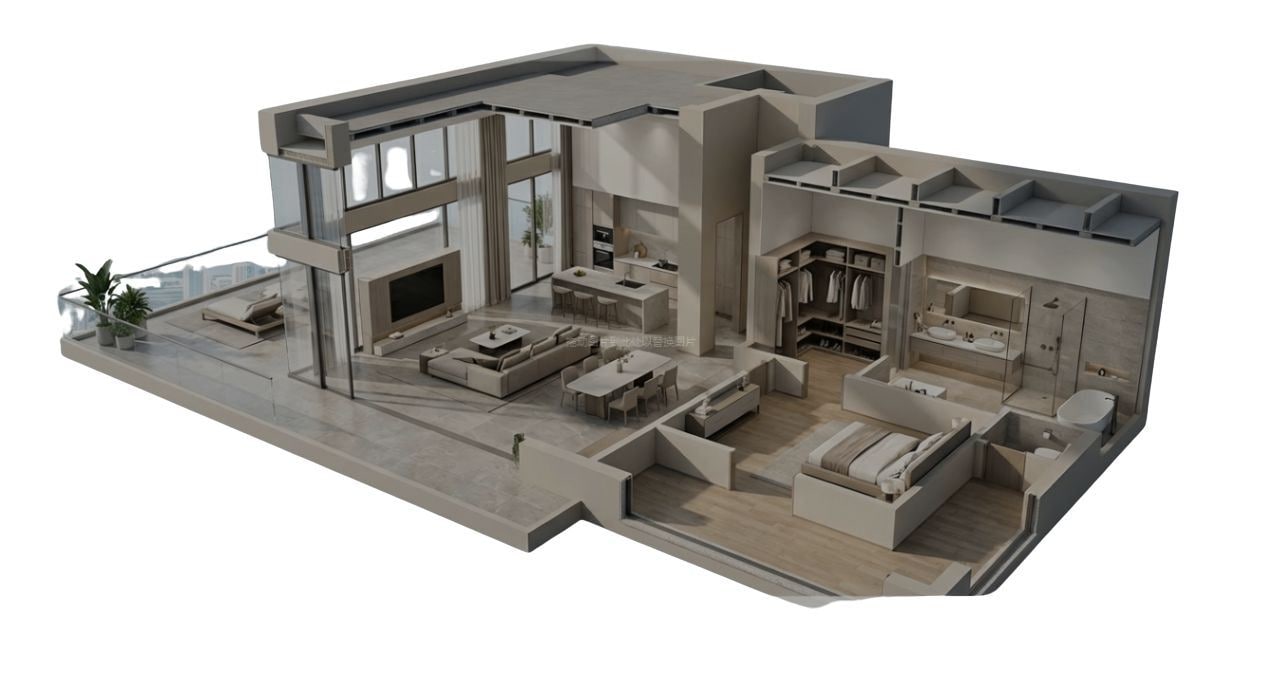
A 3D room builder eliminates guesswork from the entire design process. While 2D room plans show you all the measurements, they don’t show you how it’s going to feel. Lighting, spacing, movement, etc, it’s all difficult to judge from a 2D room plan.
With 3D, it’s all different. Not only can you see it, but you can see how things will work. You can also notice problems early, like a cabinet blocking a window or a bed making the room feel cramped.
Moreover, these tools can also save you time. Instead of physically moving furniture around, you can test multiple layouts in minutes. In short, a 3D room builder can help you make informed decisions and can show you what your idea will look like in real life.
Part 2: Key Features of a Professional 3D Room Creator
A good 3D room planner is more than just a drawing tool. It should feel smooth, practical, and powerful at the same time. Here are three must-have features:
- Intuitive drag-and-drop interface: You should be able to move objects easily without confusion. Drag a chair, rotate it, and place it exactly where you want. A simple interface keeps the process smooth and creative.
- Extensive library of symbols and furniture: A powerful tool that provides thousands of items, such as beds, tables, lighting, windows, and plants. This helps you create realistic layouts that match your actual space and style.
- Exporting high-resolution designs in multiple formats: Once your design is ready, you need to share it. Whether it is with a contractor or family member, high-quality exports like PDF or images ensure everyone clearly understands your plan.
Top 12 3D Room Planners
In this section, we will look at 12 3D room planner tools available online. These tools have vastly different applications based on your expertise and the requirements of your project. Read the introductions below and pick the best fit.
SketchUp - Professional 3D Room Builder for Advanced Design
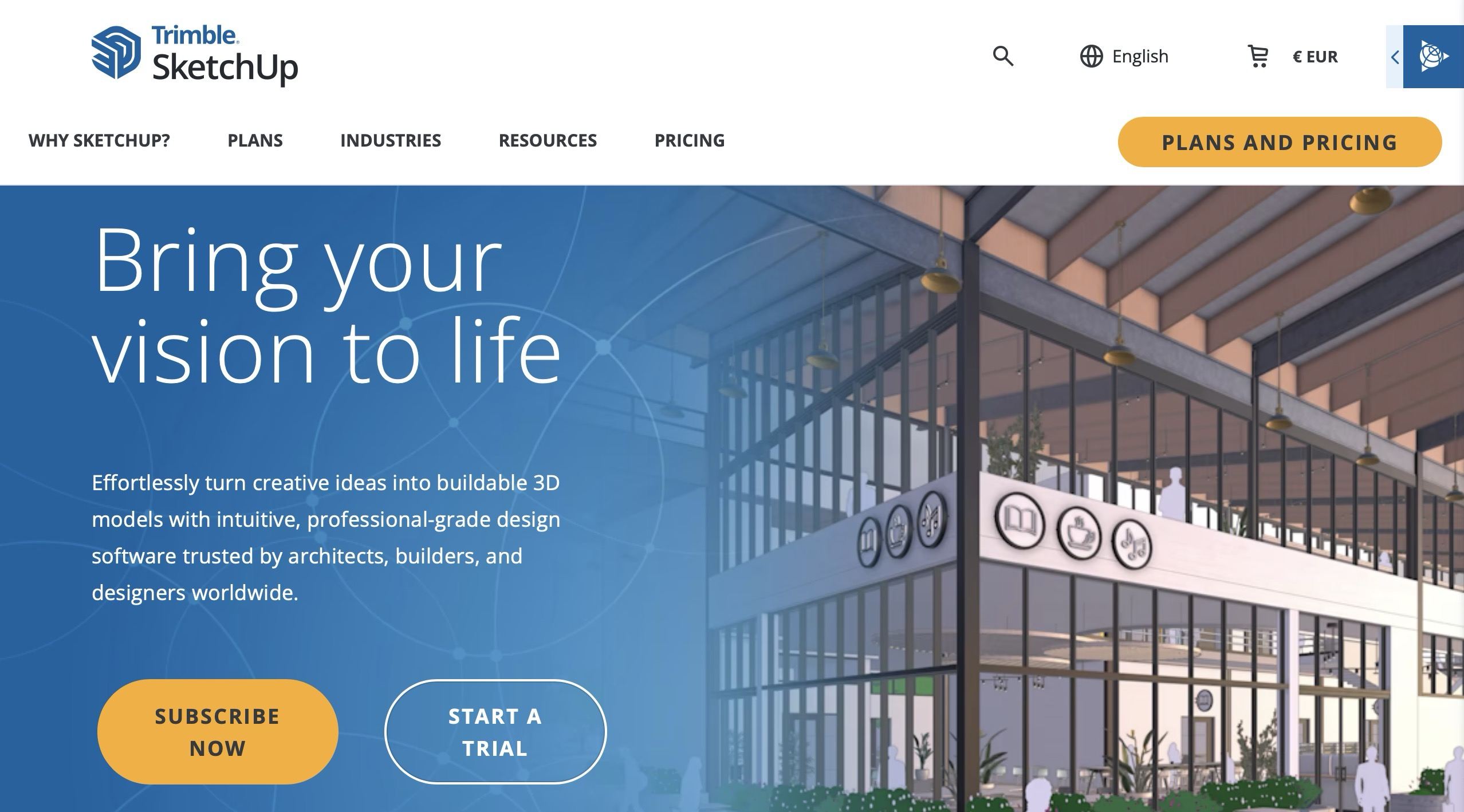
SketchUp is essentially the big name in 3D modeling. It is a powerful tool that lets you build almost anything, from a small wooden stool to a whole office building. It is a favorite for architects and students because it allows for total control over every single millimeter of a project.
Key Features
- The 3D warehouse: A huge online library with millions of models. You can find a specific brand of stove or a spiral staircase.
- Precision measurement tools: Allows you to input exact dimensions down to the fraction of an inch.
- Extension warehouse: You can add plugins for photorealistic rendering or specific architectural calculations.
- Layer management: Essential for complex projects where you need to hide ceilings or walls to see inside.
Planner 5D - Easy Online 3D Room Planner for Beginners
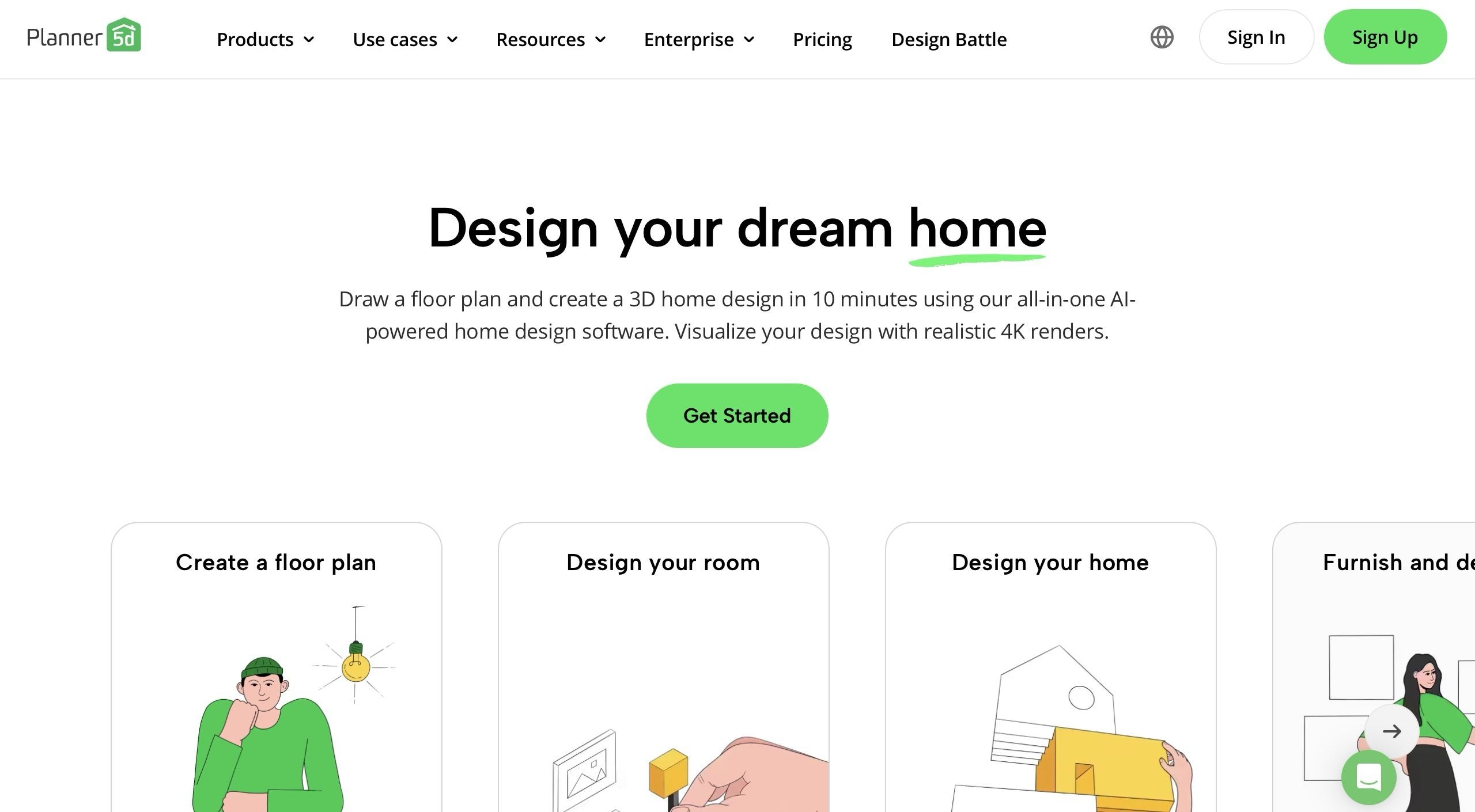
If SketchUp feels too scary, Planner 5D is the opposite. It is meant to be fun and easy to use on a phone or tablet. It focuses mostly on the decorating side of things, making it great for seeing how new colors and furniture look together in a modern house.
Key Features
- AI plan reader: Take a photo of a paper drawing and the app turns it into 3D walls for you.
- HD snapshots: Uses cloud rendering to create pictures with realistic shadows and lighting.
- AR mode: Use your phone camera to see your digital furniture in your actual physical room.
CorelCAD: Precision 3D Room Modeling and Design

CorelCAD reigns supreme in the world of 3D room planning. It's a powerhouse for those who seek precision in room design 3D projects. This software offers advanced tools, making it a top choice for professionals. It bridges the gap between creative vision and reality, offering a suite of features that bring room designs to life with remarkable accuracy.
Standout Features
- CorelCAD provides comprehensive tools for creating complex 3D models with ease.
- Users can tailor the workspace to fit their workflow, enhancing productivity.
- It offers exceptional precision for detailed architectural and interior design drawings.
- Supports various file formats, ensuring seamless integration with other software.
- CorelCAD's rendering capabilities allow for the realistic visualization of designs.
Reasons to Choose
- Brings designs to life with realistic textures and lighting.
- Equipped with a wide range of professional-grade tools.
- Compatible with major CAD formats, facilitating easy sharing and collaboration.
- Constantly evolving with new features and enhancements to improve user experience.
EdrawMax: The Most Versatile 3D Room Planner Online

EdrawMax is a full diagramming tool that is amazing at making professional floor plans. It is simple enough for a homeowner, but has hidden power that contractors want. It sits right in the middle between the hard world of SketchUp and the simple world of Planner 5D.
Key Features
- Massive library: Over 26,000 symbols, from luxury furniture to the grit of plumbing lines.
- 2D to 3D conversion: Generate a 3D model from a flat blueprint with one click.
- Cloud collaboration: Work with your team anywhere on a shared web-based canvas with real-time editing and commenting.
- Export versatility: Save designs as Visio, PDF, Word, or high-res images.
Pros
- The 2D-to-3D transition is the fastest in the industry for quick visualizations.
- The technical library covers everything you need for a real permit or build.
- Excellent value for money compared to high-end architectural software.
Cons
- Might feel slightly technical for a total beginner who just wants to play with furniture.
- The 3D view focuses more on accuracy and structure than on flashy visuals for trying out furniture.
Software Rating
- G2: 3 out of 5 stars
- Capterra: 6 out of 5 stars
Pricing Plans
EdrawMax offers the following pricing plans:
- Subscription Plan: $99 (1-year)
- Perpetual Plan: $198 (one-time payment)
- Perpetual Bundle Plan: $245 (one-time payment)
RoomSketcher: Intuitive Floor Planning and 3D Visualization

RoomSketcher, holding a prominent position in our list, is an exceptional tool for those delving into the world of 3D room planning. It's not only versatile but also known for its accessibility as a free 3D room design program. Its intuitive design and robust feature set enable users to bring their interior design ideas to life with clarity and precision.
Standout Features
- Simplifies the design process with an easy-to-use interface.
- Enables detailed floor plan creation in both 2D and 3D.
- Offers a vast collection of furniture and decor items for detailed room planning.
- Allows users to explore their designs in a virtual 3D environment.
- Updates designs instantly to reflect changes.
Reasons to Choose
- Suitable for both simple layout plans and complex interior designs.
- Easy to learn, making it ideal for those new to 3D design.
- Provides a wide range of furnishing and decoration choices.
Homestyler: Innovative 3D Space Planning and Decor

At the forefront of 3D room planning, Homestyler earns its place for its innovative approach to interior design. This platform stands out as a remarkable free 3D room builder, offering a wealth of features that cater to both amateurs and professionals.
It provides an immersive experience in designing spaces, blending ease of use with a suite of powerful tools. Homestyler transforms the concept of virtual room planning into a vivid and interactive process.
Standout Features
- Delivers high-quality visuals for a true-to-life representation of designs.
- Includes a vast array of furniture and decor items from real brands.
- Allows personalization of surfaces and finishes in designs.
- Offers realistic lighting effects based on the geographical location and time of day.
Reasons to Choose
- Produces lifelike renderings that help in visualizing the final space.
- Provides access to real furniture and fixture brands for accurate planning.
- Makes it simple to alter textures, colors, and materials.
Foyr Neo: Streamlined 3D Home Design for Modern Living

Foyr Neo excels particularly in the realm of free 3D home design, offering a platform that blends innovation with practicality. It's approach to design is both dynamic and intuitive, allowing for the creation of detailed, lifelike spaces. Its capabilities extend beyond mere planning, providing a comprehensive solution for those looking to transform their living spaces.
Standout Features
- Offers quick and efficient rendering of designs.
- Features a wide range of high-quality 3D models and materials.
- Allows for easy access and collaboration from anywhere.
- Converts 2D floor plans into 3D models effortlessly.
Reasons to Choose
- Saves time with fast and efficient rendering.
- Provides a plethora of options for furnishing and decor.
- Enhances team collaboration with cloud-based features.
Sweet Home 3D: User-Friendly Interior Design and Layout

Sweet Home 3D stands out as an accessible and efficient room planner 3D tool, perfect for those aiming to visualize and plan their living spaces with ease. It provides a robust platform for users to create detailed, customized room layouts. Sweet Home 3D strikes a balance between detailed planning and ease of use, making room designing an enjoyable experience.
Standout Features
- Offers an extensive catalog of furniture and fixtures.
- Allows importing of plans and exporting finished designs.
- Accessible in various languages, enhancing user convenience.
- Provides realistic 3D views of the designed spaces.
Reasons to Choose
- Simplifies the process of arranging and modifying elements in a design.
- Equips users with numerous choices for furnishing and decoration.
FloorPlanner: Collaborative and Detailed 3D Space Planning

FloorPlanner is a dynamic tool in the field of interior and architectural design. It provides an advanced yet accessible platform for room design 3D, catering to the needs of those looking to visualize and plan spaces effectively. FloorPlanner makes it possible to create detailed, accurate layouts and 3D models, offering a comprehensive solution for both personal and professional design projects.
Standout Features
- Enables the creation of detailed 3D models with precision.
- Offers the ability to create and modify floor plans interactively.
- Features a vast collection of furniture, fixtures, and decor items.
- Provides high-quality rendering for a realistic view of the designs.
- Facilitates easy sharing and cloud-based collaboration on projects.
Reasons to Choose
- Offers extensive options for customization and detailing.
- Ensures realistic representation of the final design.
Cedreo: Efficient 3D Home Project Visualization

Cedreo, holding the eighth position in our top 10 list, is a distinguished player in the 3D room planning market. It provides a seamless experience from conceptualization to visualization, enabling the creation of complete project proposals, including both 2D and 3D designs. Cedreo's approach focuses on efficiency and clarity, making it a solid choice for complex projects.
Standout Features
- Simplifies the rendering process with efficient one-click operation.
- Features a wide range of furniture and fixtures.
- Specialized tool for precise roof design.
- Creates high-quality, realistic images of designs.
Reasons to Choose
- Streamlines the process from initial sketch to final plan.
- Makes high-quality rendering quick and easy.
- Offers a broad range of design choices and personalization.
Roomstyler: Interactive 3D Room Design and Styling

Roomstyler is celebrated for its ability to turn design concepts into vivid, realistic representations. Roomstyler appeals to those who wish to experiment with interior design in a virtual space, offering a rich array of tools that bring design ideas to life. Its focus on realistic rendering makes it a popular choice for visualizing different room styles and arrangements.
Standout Features
- Provides high-quality visualizations of room designs.
- Includes a wide range of items to furnish and decorate spaces.
- Simplifies the process of adding and arranging items in the design.
Reasons to Choose
- Encourages learning and inspiration through community features.
- Helps in better envisioning the final look of the room.
HomeByMe: Versatile 3D Planning for Realistic Home Renovations

Rounding out our top ten list, HomeByMe stands as a significant player in the 3D room planning domain. HomeByMe offers a rich set of tools that allow users to explore various design possibilities, from basic layout planning to intricate decoration details. It focuses on delivering an immersive experience in room planning, appealing to those who value creativity in their designs.
Standout Features
- Offers a wide array of furniture and accessories from real brands.
- Facilitates sharing and collaboration on design projects.
- Allows for easy creation and customization of floor plans.
- Provides inspiration and feedback from a community of design enthusiasts.
Reasons to Choose
- Helps in creating designs with actual market-available items.
- Enables sharing ideas and receiving input from others.
Overview of all 3D Room Planners
The big deal with EdrawMax is that it has over 26,000 symbols. While other programs focus on pretty furniture, EdrawMax has technical pieces such as pipes, vents, and wiring. Most decorating programs ignore these elements entirely, but these are the most important elements in a renovation. It also works perfectly with Word and PowerPoint so you can integrate your plans into a project report.
Compared to SketchUp, EdrawMax is much faster to learn. You do not have to learn how to manually push and pull 3D walls. Compared to Planner 5D, it is much more accurate. You can set exact wall thickness and scale so a builder can actually use your drawings.
How to Make a 3D Room Plan Using EdrawMax?
If you can drag and drop, you can design a professional room plan. EdrawMax handles the technical side of 3D modeling so you can focus on making your space feel like home.
 Get 500 free AI tokens
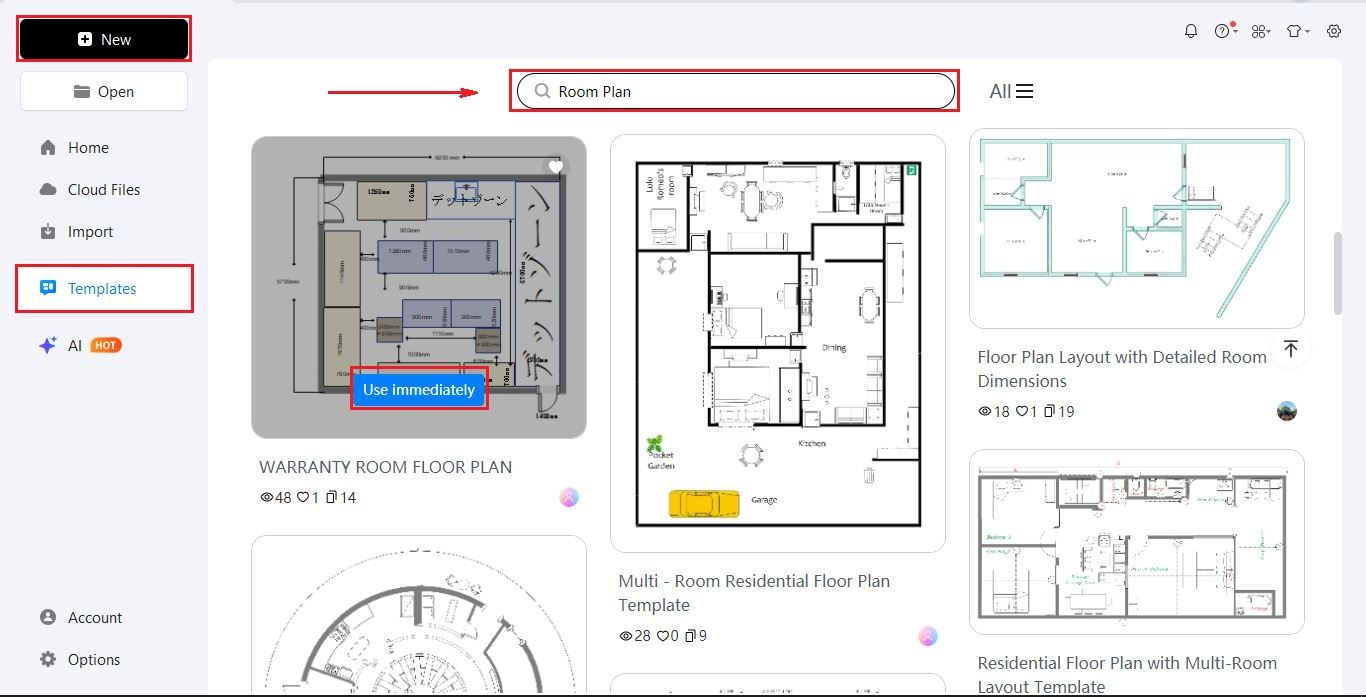
Step1 Login & Select a Template
- Launch EdrawMax and sign in with your account.
- Start fresh, or go to the Templates tab.
- Search for Room Plan.
- Click Use Immediately on a layout that fits your room's basic shape.
Step2 Customize Your 2D Layout
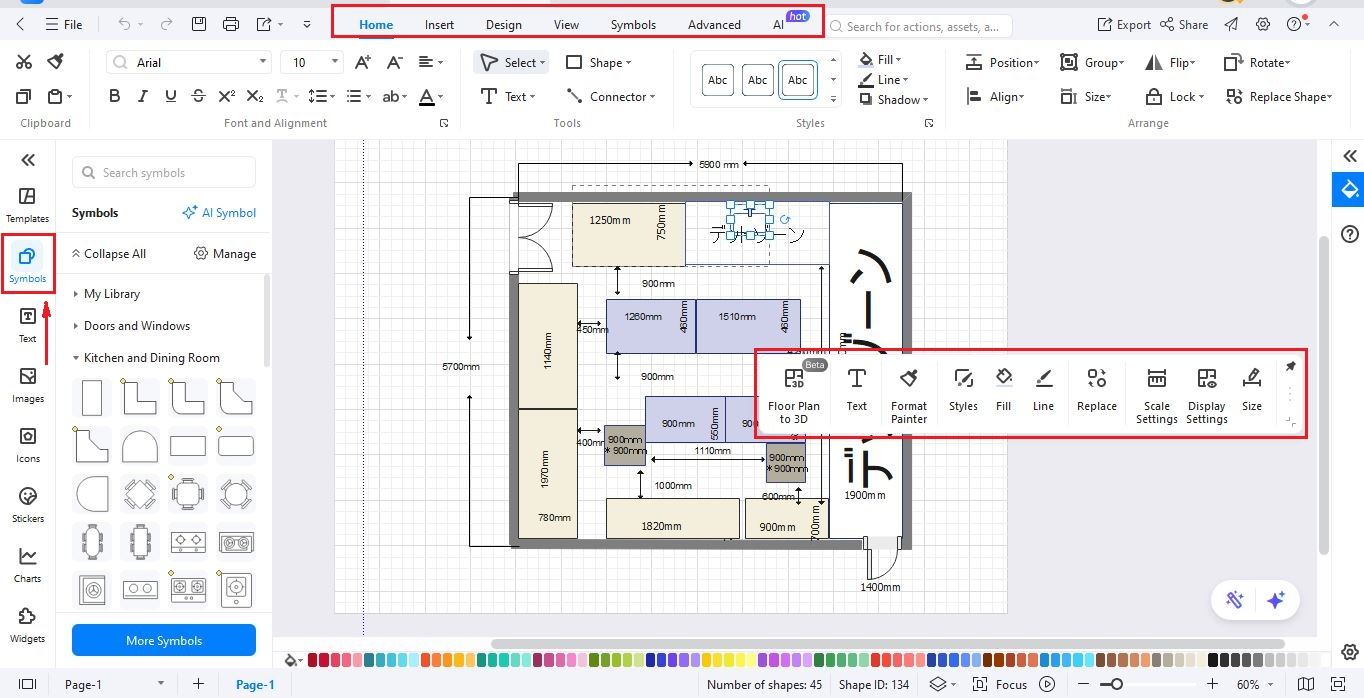
Drag walls, windows, and furniture from the Symbols library on the left onto your canvas. Use the Size tool to match your actual room dimensions and the top toolbar to change colors or add labels.
Step3 Convert 2D to 3D
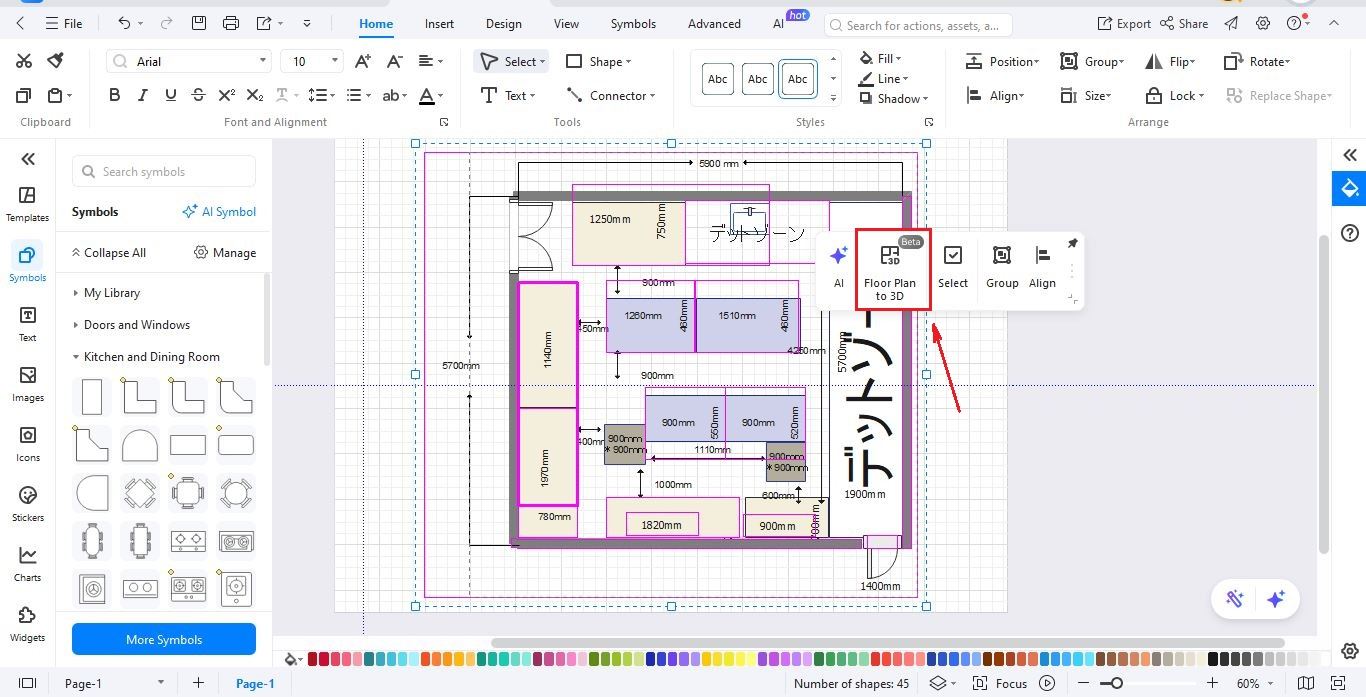
Click the Floor Plan to 3D button in the top menu once your flat blueprint is ready. Select your preferred rendering style from the settings window and click generate to build the model.
Step4 Inspect & Optimize
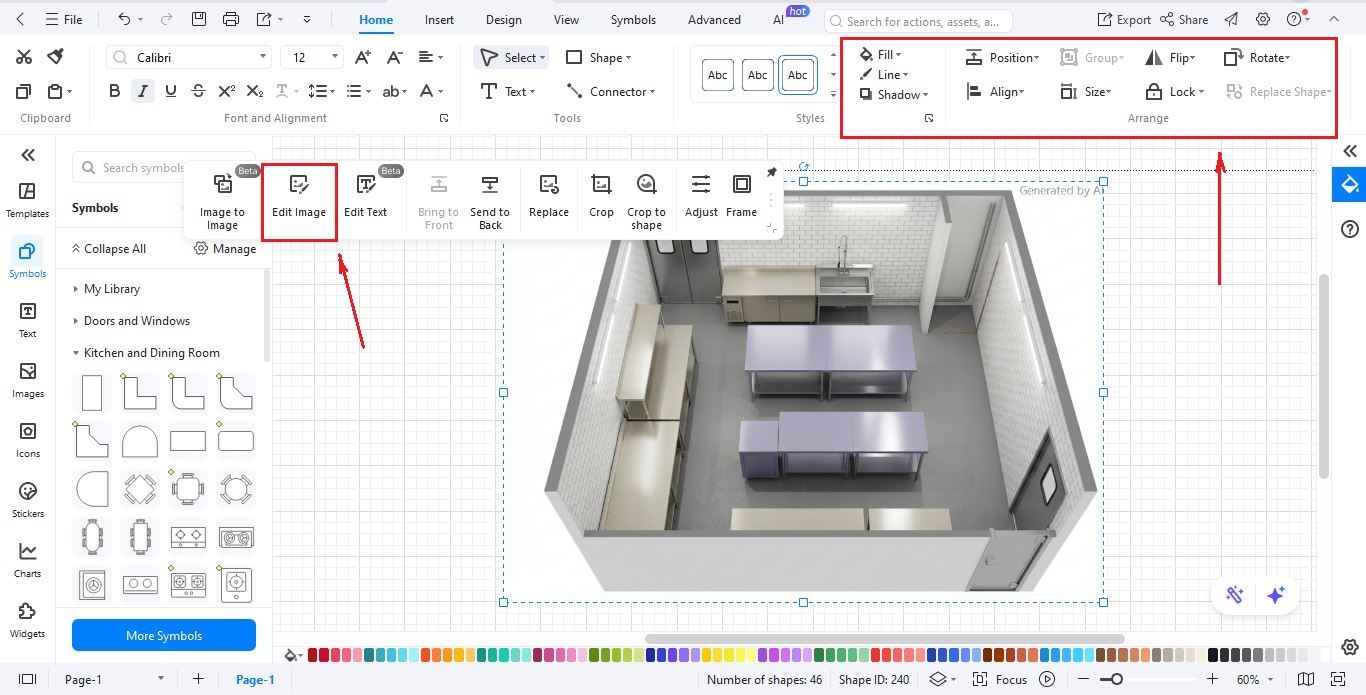
Use the top-right navigation tools to rotate and zoom into your 3D space to check for layout errors. Adjust wall paints or floor textures in this view to see which styles work best for your project.
Step5 Save & Export
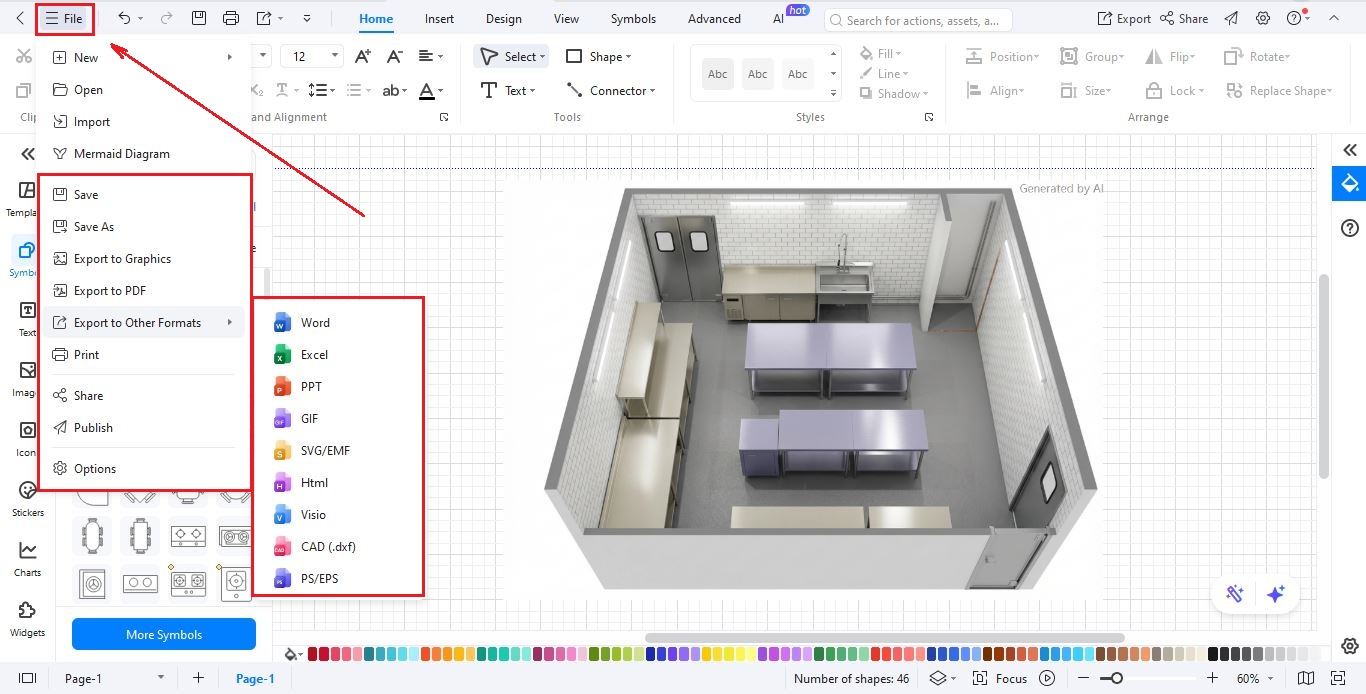
Go to File > Save to store your project in the cloud for future edits. Select File > Export to download your plan as a PNG, PDF, or SVG to share with contractors or family.
Closing Remarks
The right 3D bedroom maker will always depend on your goal. If you want to make a custom 3D chair and have the time to learn, then SketchUp is the way to go. If you want something quick for your phone, then Planner 5D is the way to go.
But if you want something professional, easy to use, and works great for both pretty pictures and technical blueprints, then EdrawMax is the way to go. With its 2D to 3D conversion, it's incredibly fast, so your home project will always be a success from the very first wall you draw.
Give it a try today to see the difference yourself!
-
What is a 3D room planner and how does it work?
A 3D room planner is a digital tool that allows you to create three-dimensional models of your living spaces. It helps you visualize how furniture, colors, and layouts will look before making any physical changes. These tools are perfect for homeowners, renters, and interior designers planning renovations or redecorating projects. -
Do I need professional design skills to use a room planner?
No, most modern 3D room planners are designed with user-friendly interfaces that require no prior experience. They often feature drag-and-drop functionality, making it easy to place furniture and adjust walls. Whether you are a beginner or a pro, these intuitive tools help anyone create professional-looking interior designs very quickly. -
Can I input my room's exact dimensions into the software?
Yes, accuracy is a key feature of 3D room planners. You can input the specific length, width, and height of your walls to create a perfect digital replica of your space. This ensures that any furniture you place in the virtual room will scale correctly to your real-life environment. -
Are 3D room planners usually free to use?
Many 3D room planners offer free versions with basic features, which are often sufficient for personal projects. However, some platforms provide premium subscriptions that unlock advanced tools, higher-quality renderings, or larger furniture catalogs. It is best to explore a few options to find the balance of features and cost.
AI Diagram Generator
Enter your prompt. Upload files if needed. Generate diagrams, charts, or slides instantly.





 (AI & Web)