EdrawMax AI Diagram Generator
AI Flowchart Generator
Generate flowcharts in seconds. Describe a process in plain English, paste workflow notes, or start from a ready-made prompt, and EdrawMax AI turns it into an editable flowchart.


Make the page feel like a tool, not just an explanation
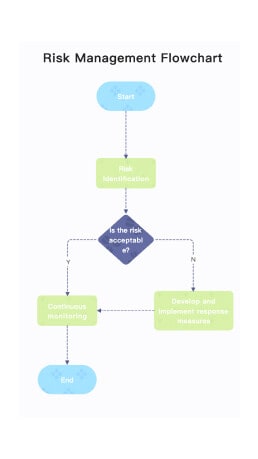
Borrowed visual blocks help the page read faster: show the input area, show what users can make, and show the template outcomes they can choose next.

How to generate a flowchart with AI
Start with a short prompt for a simple process, or paste structured notes when you need decisions, departments, exceptions, or swimlanes.
Describe your process
Enter the start point, key steps, decision points, and end states in plain English.
Generate a draft
Let EdrawMax AI organize your text into flowchart nodes, connectors, and branches.
Edit the flowchart
Adjust shapes, symbols, labels, colors, layouts, swimlanes, and branch logic.
Export or share
Use the finished flowchart in documents, presentations, SOPs, process reviews, or team handoff.
What is an AI flowchart generator?
An AI flowchart generator turns a written process, nested list, document excerpt, or workflow description into a structured diagram. It is most useful when you have rough process information and need a clear editable flowchart quickly. In EdrawMax, the AI-generated draft can be customized with templates, symbols, connectors, colors, layouts, and export options.
Tips for better flowchart prompts
A strong prompt gives AI the structure it needs to create a usable first draft instead of a generic diagram.
AI flowchart prompt examples
Copy a prompt, adjust the details, and use it to generate an editable flowchart in EdrawMax.
Customer support escalation
Create a flowchart for a customer support ticket. Start with ticket received, check priority, resolve simple issues, escalate urgent cases to Tier 2, notify the customer, and close the ticket.
Best for: support teams, service operations, help desk workflows.
Employee onboarding workflow
Generate an onboarding flowchart from offer accepted to first-week check-in. Include HR paperwork, IT account setup, manager orientation, training tasks, and completion review.
Best for: HR, people operations, team managers.
Purchase approval process
Turn this approval process into a flowchart: employee submits request, manager reviews, finance checks budget, procurement orders, requester receives confirmation, rejected requests return for revision.
Best for: finance, procurement, operations approval flows.
Software bug triage flow
Create a bug triage flowchart. Start with bug reported, reproduce issue, assign severity, route to product or engineering, fix, QA test, release, and notify the reporter.
Best for: product teams, QA, engineering workflows.
Refund request workflow
Create a flowchart for a refund request. Include request submission, eligibility check, manager review, payment processing, customer notification, and exception handling.
Best for: ecommerce, customer success, finance operations.
Clinic appointment process
Generate a patient appointment flowchart from booking to check-in, consultation, follow-up scheduling, billing, and medical record update.
Best for: healthcare operations, clinics, service design.
Should you start with AI or a template?
| Use case | Best starting point | Why |
|---|---|---|
| You have process notes, meeting notes, or a rough workflow | AI prompt | AI can convert unstructured text into the first diagram draft. |
| You need a standard business process chart | Flowchart template | A template gives you proven structure, styling, and common symbols. |
| Your workflow crosses teams or departments | Swimlane template | Swimlanes make ownership, handoffs, and approvals easier to review. |
| You need a polished deliverable quickly | AI draft + template styling | Generate the logic first, then refine the visual format in EdrawMax. |
AI flowchart templates and examples
Use templates when you already know the diagram type, or use AI first when your process is still rough.
Generate more diagrams with AI
Explore related AI diagram generators for different workflows, systems, and planning tasks.
FAQs About AI Flowchart Generator
Create editable flowcharts from prompts
Start with AI, refine with EdrawMax templates, and share a polished process diagram with your team.