




1. What is a Company Organizational Chart?
This article is all about the company organizational chart. Under the hood, the company's organizational chart provides a high-level overview of how a business functions. Soon after their launch, many startups never focus on their company organizational charts. Either they don't have time, or they don't know about it.
Let's see what on Earth is the company's organizational chart. A company organizational chart acts as a map or a tracker that helps the managers, C-suite, board of directors, other business leaders, and sometimes employees know how the company is functioning from the inside.
Quick answer: A company organizational chart shows roles, teams, departments, management levels, and reporting relationships so people can see how work and accountability are structured.
There are millions of companies working globally, varying in their sizes. There should be a solution with the business administrators to keep track of every employee department and how these departments are performing. This document is essential because it produces an abstract and high-level overview of the company.
Many companies make hierarchies if we see them in a high-level overview because the departments inside them are working cross-functionally. Suppose, If you don't have any way to track the departments, how would you make necessary decisions in the present or future, or maybe the company did not work best in the past only due to a lack of the company's organizational chart.
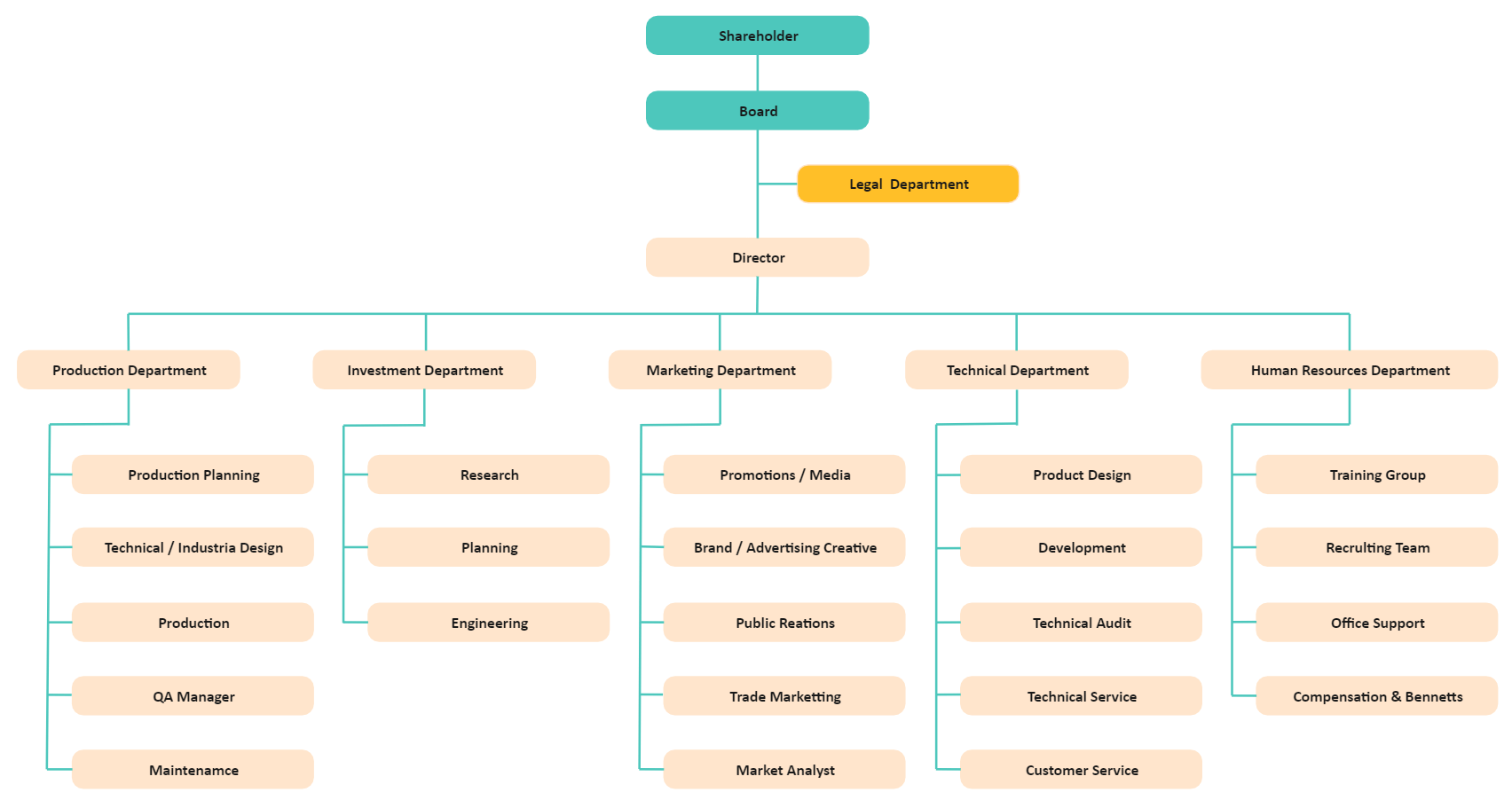
 below.
  below.
 1.1 Why do Companies Need Organizational Charts?
Some of the crucial use-cases in which a company's organizational chart may help you are listed below.
The company's organizational chart helps the business leaders and board of directors make crucial decisions daily or annually regarding the daily operations or another company's working.
The company's organizational chart helps the managers or business leaders know how the company's departments are connected.
Moreover, employees must know who their supervisor is or whom they should communicate or report to.
A company's organizational chart helps every entity know their roles and responsibilities and what actions should be performed to make a good and sustainable company.
1.2 Four Types of Organizational Structures
It is excellent to know why your company needs an organizational chart and how to make it. Still, before making a good organizational chart, you must know the types of a company's organizational charts. The four types of a company's organizational charts listed below provide the exact cause to track how the company is working internally.
Hierarchical Organizational Chart
Hierarchical organizational charts are used for the companies or businesses that are small or enormous with hundreds of departments working. A startup can use a hierarchical organizational chart because if it does not belong to the parent organization, it would have five to six small departments with a few employees. Enormous companies can use hierarchical organizational charts because tracking such companies is possible with this type of chart.
Horizontal Organizational Chart
A horizontal company's organizational structure or chart, also known as the flat organizational chart, is so-called because it indicates that an organization has few management positions governing the employees and contains more power in the highest orders above the managers. This type of organizational chart can be used in startups and self proprietary businesses.
Matrix Organizational Chart
Matrix organizational chart is used in organizations with the most complex hierarchies and has dozens of departments and employees working cross-functionally. A company that works cross-functionally from inside gives a lot of headaches to its business leaders. So, a matrix company's organizational chart is the best tool you can utilize.
Divisional Organizational Chart
The company which works on the divisional bases, for example, a company's paint manufacturing division, is in Canada, mirror-making department in Indonesia, and the final assembly in the United States; in such cases, the divisional company's organizational chart helps to handle and manage this situation.
2. How to Create a Company Organizational Chart?
This section will tell you how to make a perfect organizational chart for a company. Creating such a chart is not as easy as it sounds. You have to do much exemplary work to gather and organize all the data. If you don't have any prior knowledge of making a perfect company's organizational chart, do not get worried. Just read the article thoroughly and implement the concepts by avoiding errors.
2.1 Get familiar with your business or company's structure
As described above, a company's organizational chart has four types. For making it easy for those readers who directly skipped this part.
A hierarchical organizational chart is used in small and large companies. The hierarchies represent the employees or departments connected hierarchically.
Horizontal organizational charts are used by the organizations that have a few managers connected horizontally, and most of the decisions are made by the positions above those managers.
Matrix organizational charts are used by the organizations whose departments are connected and working cross-functionally.
Companies whose departments are spread across multiple locations used a divisional organizational chart.
2.2 Gather and organize the company and employees' data
Now comes the most important task. Gather the data about each department of an organization, its employees, how they are connected, how many outside departments they are working with, the head of the department, supervisors, and a lot more. Essentially, you have to gather all the data related to hierarchy inside an organization.
2.3 Get the right tool to complete your company's structure
Now, you have to check every tool available on the Internet providing business diagram-making services. There are hundreds of tools like Microsoft Office (Excel, Outlook, PowerPoint, Word), Google Sheets and EdrawMax Online. Always get those tools that improve your productivity and help you avoid errors. You should know how to work with the tool you choose for making the company's organizational chart. Start from the templates to prevent mistakes and boost productivity.
2.4 Complete the organizational chart
Complete the chart using the tool. Use the shapes and symbols necessary for the company's organizational chart to connect the shapes and symbols according to the configuration setting of the company's organizational chart. Once you have completed the chart, pass it to your partners in the department to review it and then finally, take it to the C-suite or any other business leader who appointed you to make the chart for approval.
 Get 500 free AI tokens
3. Company Organizational Chart Examples
This section will show you the best practical examples of the company's organizational chart. You can take ideas from the chart listed below.
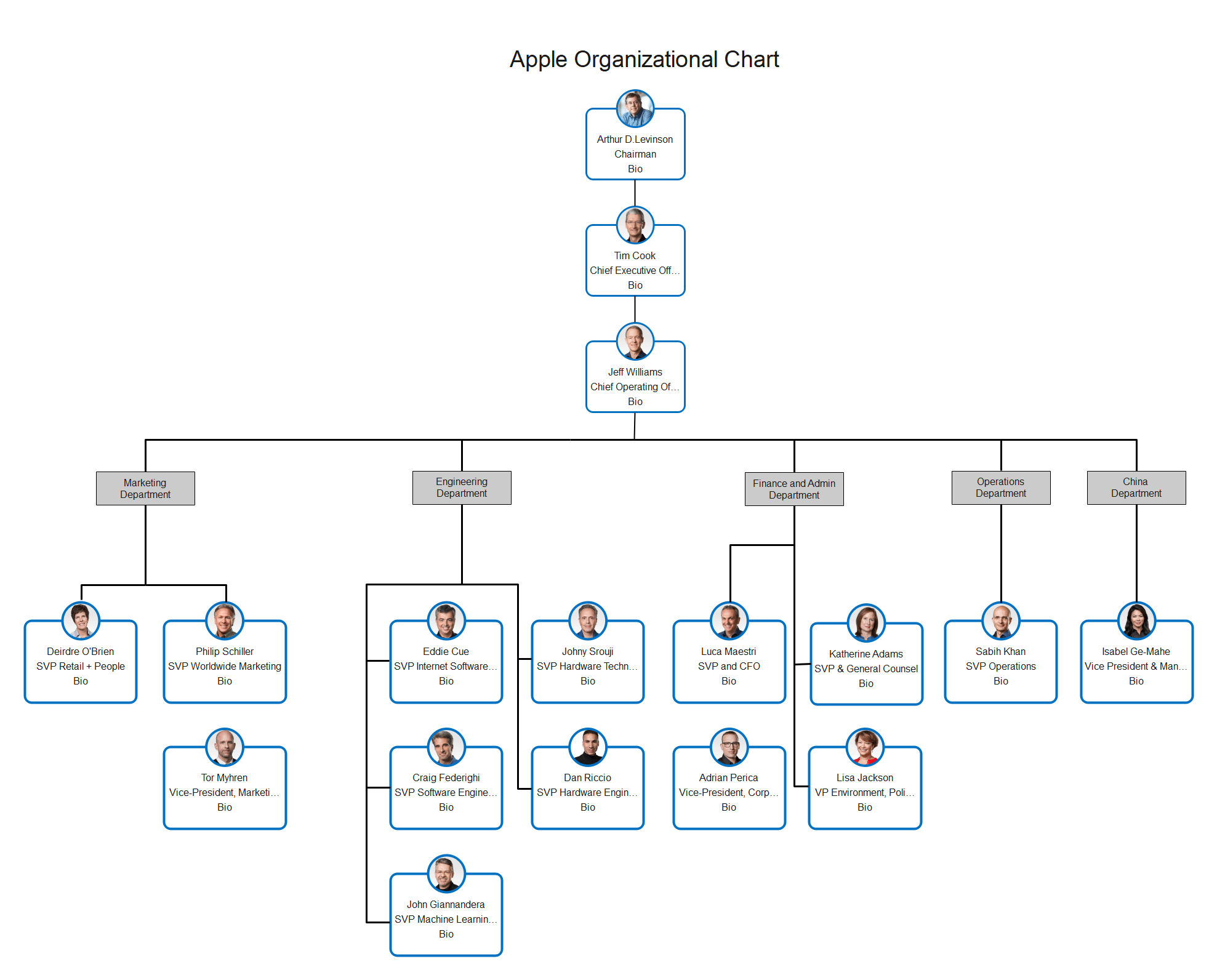
Example 1: Apple Organizational Chart
It is the best example of the Apple Organizational Chart. The chart is made using the hierarchical organizational chart model and lists the important figures of the organization. The chart starts from Tim Cook, the CEO of Apple, and then from the Chief Operating Officer, the department begins to flow. Although Apple is an enormous organization, this chart presents an abstract view of the whole organization. Now, you can think about how it is easy to make decisions when you have these charts available.
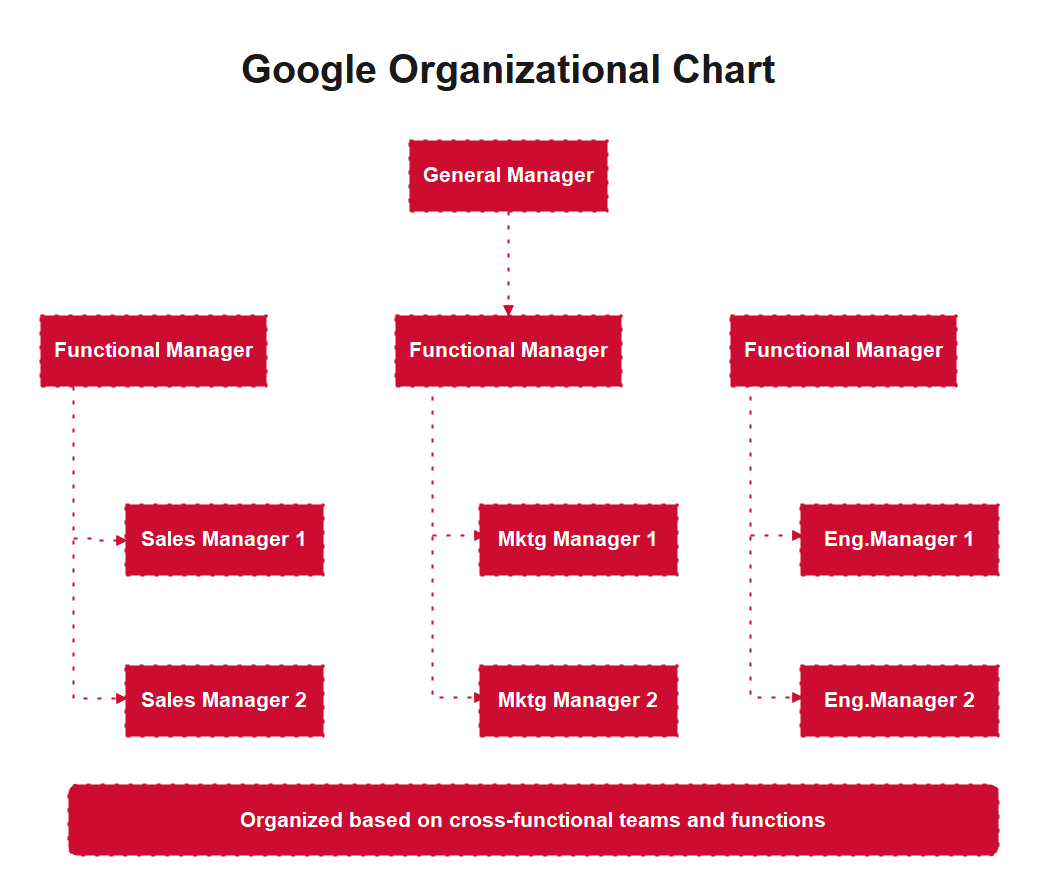
Example 2: Google Organizational Chart
A functional organizational chart is used to handle the areas of the company in which the departments work cross-functionally. This Google organizational chart is more like a functional organizational chart and elaborates that the departments in Google work cross-functionally to make the organization sustainable. If your organization also works cross-functionally, you can also get ideas from here and make your company's organizational chart like this. The chart pinned above also has a small degree of flatness. This chart belongs to that era when Google was just a startup.
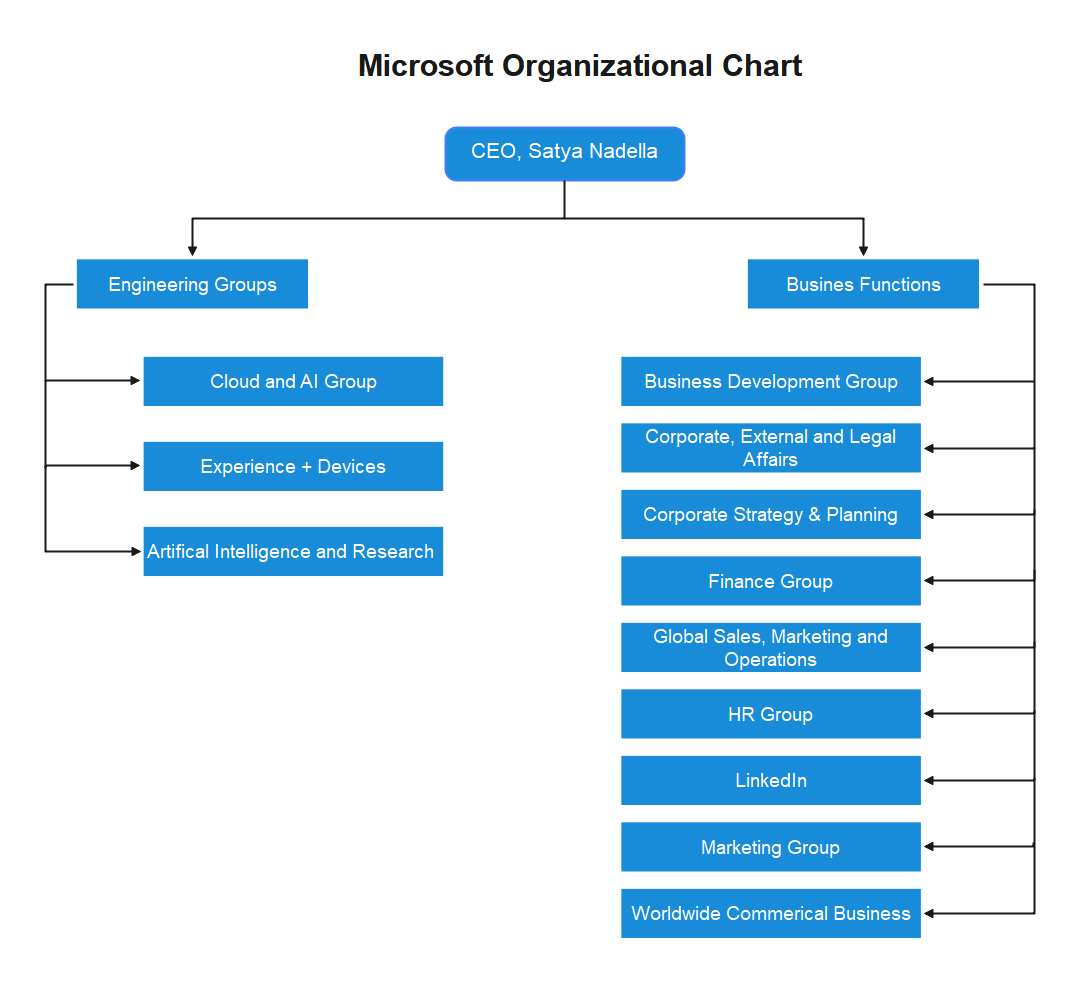
Example 3: Microsoft Organizational Chart
Microsoft has both divisional and functional type organizational structures. The Microsoft organizational chart pinned here shows the same information. Although it looks more functional, in reality, these departments are spread across multiple locations. If your company follows the same case, you can take this chart as a guide to make your chart. Microsoft has divisions like:
- Business Development and Evangelism
- Finance
- Human Resources
- Legal and Corporate Affairs
- Engineering (operating systems, devices, studios, applications, services, and cloud and enterprise units)
- Dynamics
- Advanced Strategy and Research
Example 4: Mcdonald's Organizational Chart
Mcdonald's Organizational Chart pinned here shows how big the Mcdonald's is. The company organizational chart can be made of all four organizational charts because Macdonald's has departments working globally, and a company like this usually works cross-functionally. You can take ideas from here for research purposes. The exciting thing about the structure is that it is so in the high-level overview that all the vice presidents of multiple divisions report to a single president or Chief Operating Officer (CEO).

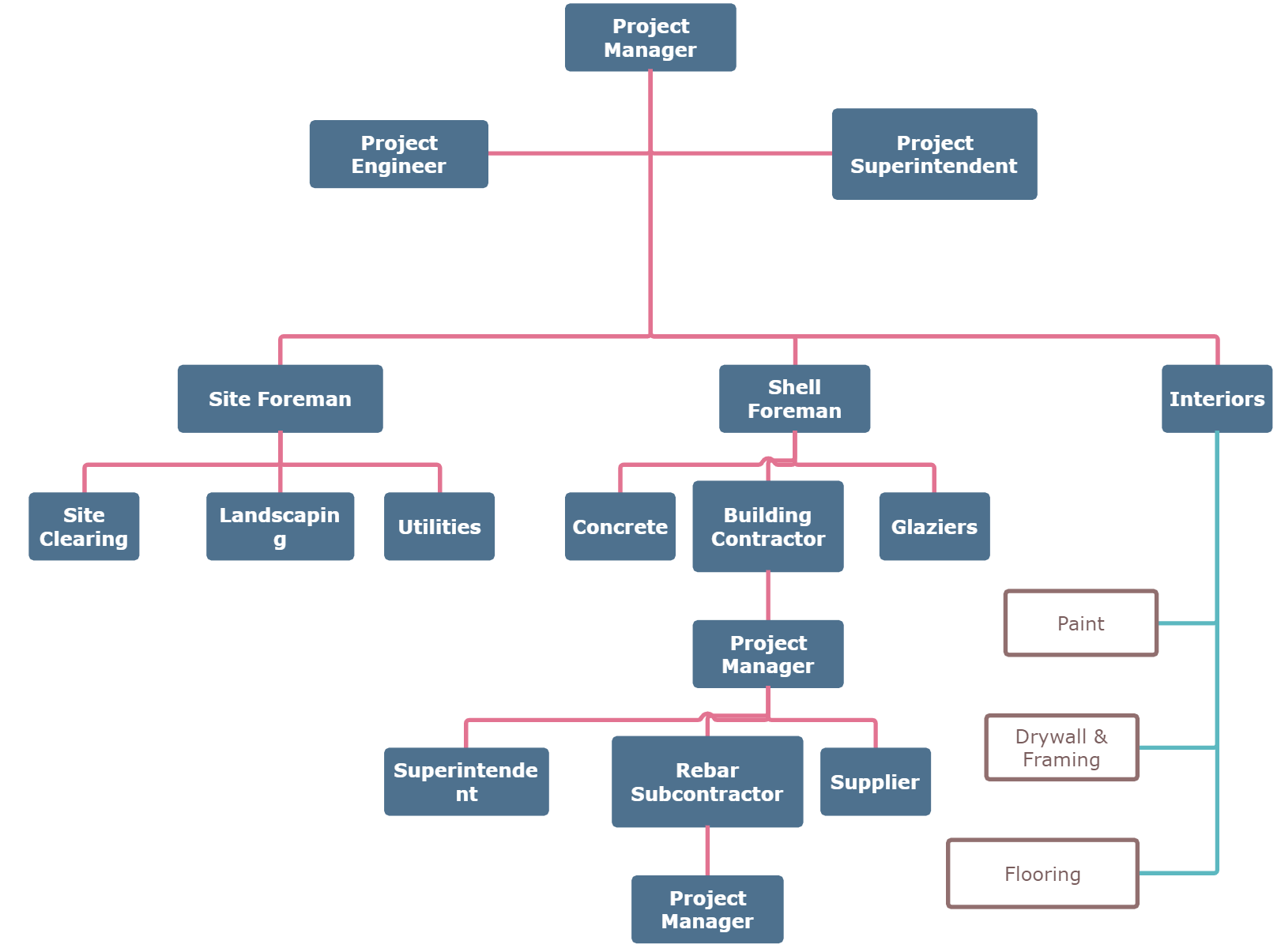
Example 5: Construction Company Organizational Chart
It is the construction company's organizational chart. The chart uses the hierarchical organizational chart model because construction companies don't have divisions spread across multiple locations. The chart can also be made using the matrix or functional organizational chart because some departments in the construction company work cross-functionally. So to handle them, you can take ideas from this chart and make yours. The chart does not include the business leadership positions, and so the diagram only depicts the department's managers working together.
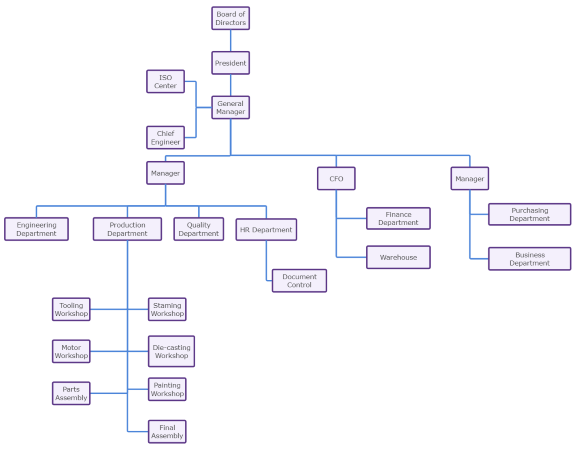
Example 6: Manufacturing Company Organizational Chart
Manufacturing can be of anything, but there is always a company that provides this service. The above manufacturing organizational chart shows that there can also be outside services, both public and private, that work with the organization. Like here in the manufacturing company organizational chart. The ISO department, a regulatory body, also works here in the manufacturing company to check if all functions are done according to the predefined standards. The structure can be made with matrix and divisional models, too, because in a manufacturing company, there can be some departments spread across the globe.
AI Diagram Generator
Enter your prompt. Upload files if needed. Generate diagrams, charts, or slides instantly.


What are the main types of company organizational charts?
Common structures include hierarchical, functional, divisional, matrix, flat, and team-based charts. The best choice depends on how authority and collaboration work in the company.Should a company org chart show names or job titles?
Use job titles for a durable role-based chart and add names when the chart supports current communication or onboarding. Showing both is often most useful, provided it is maintained.


