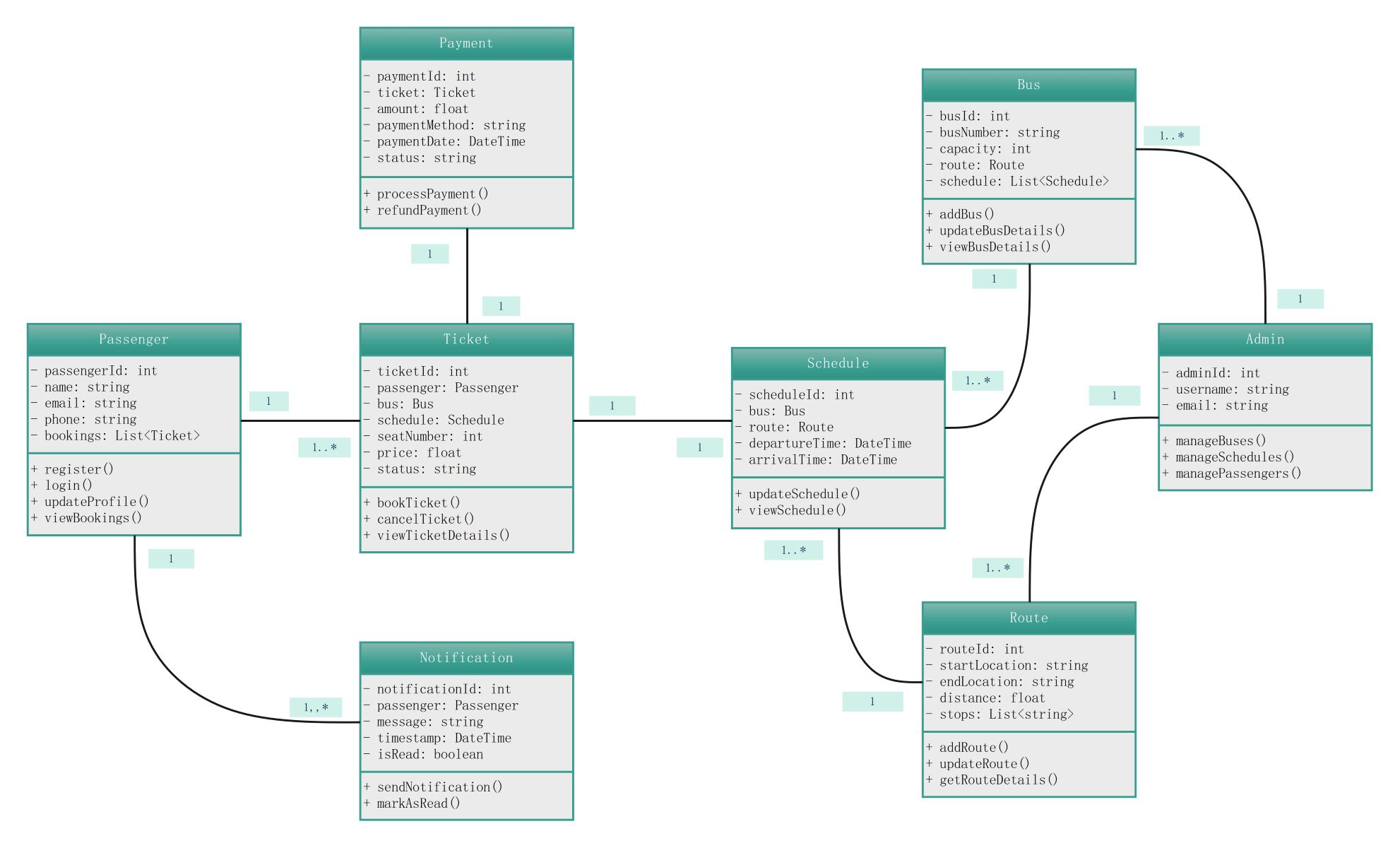
About this Class Diagram for Bus Reservation System template
This template offers a professional UML structure for designing bus booking software. It includes core classes like passengers, schedules, and payments. You can use it to visualize data flow and simplify complex backend development tasks quickly.
Passenger and Ticket Management
This section defines how users interact with the booking system. It stores personal details and links users to their specific travel tickets. This setup is vital for tracking active bookings and managing individual user profiles effectively.
- Passenger registration and login methods
- Booking history tracking and profile updates
- Ticket status and seat number assignment
- Booking and cancellation operations
Payment and Notifications
These classes handle the financial aspects and user communications within the system. They ensure that every ticket purchase is recorded and confirmed. This logic helps maintain secure transactions and keeps travelers informed about their trips.
- Processing and refunding ticket payments
- Transaction date and payment method tracking
- Automated notification alerts for passengers
- Message timestamps and read status indicators
Bus, Schedule, and Route Details
This core component manages the physical assets and timing of the transportation service. It organizes routes and connects specific buses to departure times. Developers use this to prevent overbooking and ensure route accuracy.
- Bus capacity and identification numbering
- Departure and arrival time scheduling
- Route distance and specific location stops
- Dynamic schedule and route detail updates
Administrative Control
The admin class provides the necessary tools for backend oversight and system maintenance. It allows staff to manage the entire fleet and customer base. This ensures the system remains updated with new routes and schedules.
- Fleet management and bus detail oversight
- Schedule organization and passenger data control
- Centralized administrative access for system updates
FAQs about this Template
-
How does a class diagram improve a bus reservation system?
A class diagram acts as a blueprint for the entire software architecture. It clearly defines the attributes and behaviors of objects like buses and passengers. By visualizing these relationships early, developers can spot logic errors and avoid data conflicts. This leads to a more stable system that handles ticket bookings and seat availability without any technical glitches during high-traffic periods.
-
What are the essential classes for a bus booking model?
The most critical classes include Passenger, Bus, Route, and Ticket. The Passenger class tracks user info, while the Bus and Route classes define the travel logistics. The Ticket class acts as the bridge, linking a specific person to a specific seat and time. Including a Payment class is also vital for processing transactions and maintaining financial records within the booking application.
-
Can I customize this class diagram for other transport systems?
Yes, this class diagram is highly flexible and serves as a great starting point for various transportation apps. You can easily adapt the Bus class into a Train or Flight class. The core logic for scheduling, seat management, and payment processing remains the same. By modifying the attributes like distance or stops, you can tailor the system to fit specific travel industry needs.

 (AI & Web)