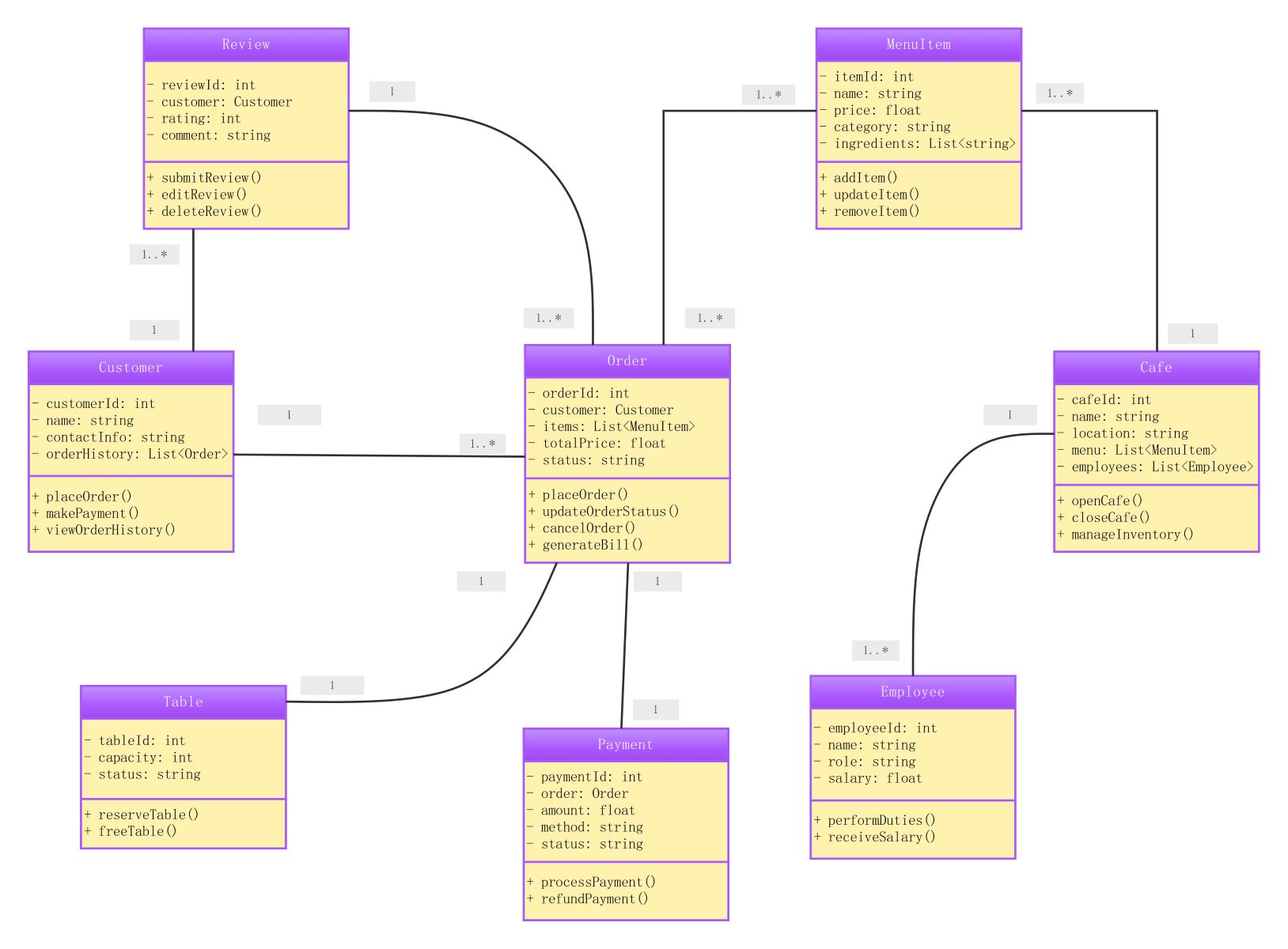
About this class diagram for cafe management system template
This template provides a comprehensive blueprint for building a cafe software system. It illustrates how different entities like menu items, orders, and payments interact to create a functional business application for cafe owners.
Customer and Employee Entities
The system manages two primary types of users: customers and employees. Customers interact with the system to place orders and leave reviews, while employees handle daily operations and receive compensation for their roles.
- Customer: Tracks user contact details and order history.
- Employee: Manages staff records including roles and salary information.
- Review: Allows customers to rate their experience with comments.
Ordering and Payment System
At the core of the cafe management system are the order and payment classes. These modules ensure that customer requests are recorded accurately and financial transactions are processed securely through specific payment methods.
- Order: Contains specific menu items and monitors order status.
- Payment: Handles billing amounts and tracks refund processes.
- MenuItem: Defines the price and ingredients for cafe products.
Cafe Operations and Infrastructure
This section focuses on the physical and organizational structure of the business. It includes the cafe's overall management and the physical seating arrangements available for guests to ensure efficient resource allocation.
- Cafe: Oversees the general location, menu lists, and employees.
- Table: Tracks seating capacity and reservation availability status.
FAQs about this Template
-
What are the main benefits of using a class diagram for a cafe management system?
Using a class diagram helps developers organize complex business logic into manageable parts. It clearly defines relationships between customers, orders, and staff, which prevents coding errors during the development phase. This visual map ensures that all team members understand how data flows through the system, making it easier to scale the application as the cafe grows or adds new features.
-
How does the MenuItem class interact with the Order class in this system?
The MenuItem class acts as a reference for the Order class to determine what is being purchased. An order consists of a list containing multiple menu item objects. This relationship allows the system to calculate the total price based on individual item costs. It also ensures that the inventory is correctly updated whenever a specific item is sold to a customer.
-
Why is the Table class included in the cafe management system diagram?
The Table class is essential for managing physical space within the cafe environment. It tracks the availability and seating capacity of every table to help staff manage guest arrivals efficiently. By including this class, the system can support reservation features and provide real-time updates on which tables are currently occupied or free for new customers to sit and enjoy their coffee.

 (AI & Web)