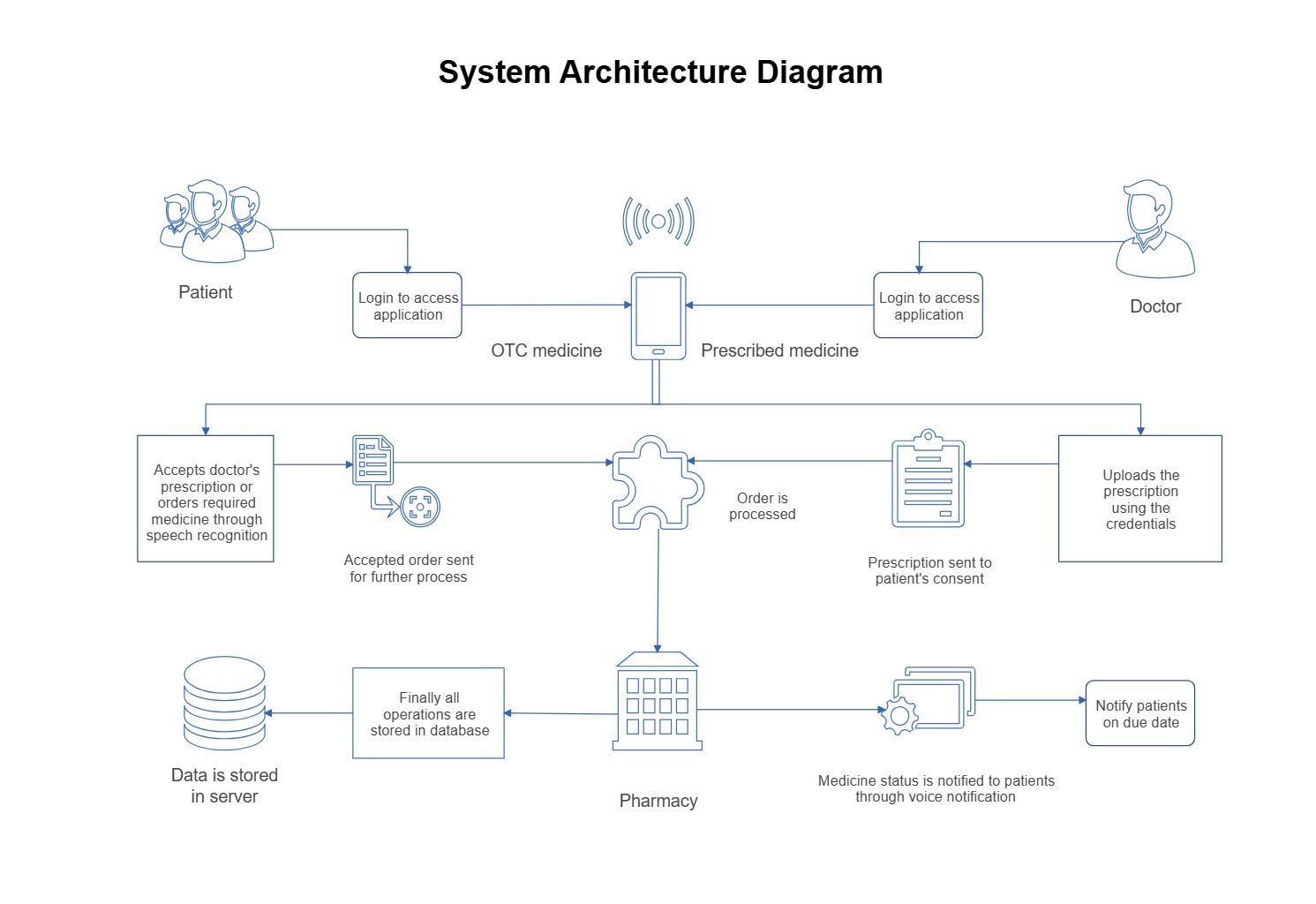
About this Patient–Doctor System Architecture Diagram
This diagram shows the main structure of a patient–doctor system architecture diagram, with the visible layers or blocks separated so each part of the system can be explained more clearly.
Patient and Doctor Access
The Patient and Doctor Access section groups the visible components in this part of the diagram. In this layout, it includes Patient, Doctor, Login to access application, which helps define what this block is responsible for in the wider architecture.
- Patient
- Doctor
- Login to access application
Prescription and Pharmacy Workflow
The Prescription and Pharmacy Workflow section groups the visible components in this part of the diagram. In this layout, it includes Uploads the prescription using the credentials, OTC medicine, Prescribed medicine, Pharmacy, which helps define what this block is responsible for in the wider architecture.
- Uploads the prescription using the credentials
- OTC medicine
- Prescribed medicine
- Pharmacy
- Accepted order sent for further process
- Order is processed
Storage and Notifications
The Storage and Notifications section groups the visible components in this part of the diagram. In this layout, it includes Data is stored in server, Finally all operations are stored in database, Prescription sent to patient's consent, Medicine status is notified to patients through voice notification, which helps define what this block is responsible for in the wider architecture.
- Data is stored in server
- Finally all operations are stored in database
- Prescription sent to patient's consent
- Medicine status is notified to patients through voice notification
- Notify patients on due date
FAQs about this Template
-
How do teams document Patient–Doctor System data architecture?
Teams usually document Patient–Doctor System data architecture with a diagram that separates ingestion, processing, storage, access, and control layers. This makes it easier to review how information moves through the platform, where data is transformed, and how analytics, governance, reporting, compliance, or downstream systems depend on the same structure.
-
What is the difference between data architecture and application architecture?
Data architecture focuses on how information is collected, processed, stored, secured, and consumed, while application architecture describes the broader software structure around it. Data diagrams are more useful when teams need to explain pipelines, databases, warehouses, analytics layers, governance controls, compliance checkpoints, audit visibility, or the movement of records between systems.
-
What should a Patient–Doctor System data architecture diagram include?
A strong Patient–Doctor System data architecture diagram should include the main data sources, processing flow, storage layers, and access or reporting points. It should also show where governance, security, integration, transformation, quality checks, or lineage steps connect, so readers can understand the lifecycle of data from entry to operational or analytical use.
-
Can AI generate Patient–Doctor System data architecture diagrams automatically?
Yes, AI can generate a draft data architecture diagram, but it still needs technical validation. AI can help suggest pipeline stages and system groupings, while engineers should confirm the real data sources, processing order, ownership boundaries, storage design, compliance controls, and support assumptions before using the diagram for planning or review.
-
Which diagram type is best for documenting data pipelines?
A data architecture diagram is usually the best starting point for documenting data pipelines because it shows sources, transformation stages, storage, and consumption paths in one view. Teams may add flowcharts or sequence diagrams later when they need more detail for pipeline execution order, failure handling, alerting, operational troubleshooting, or support ownership.

 (AI & Web)