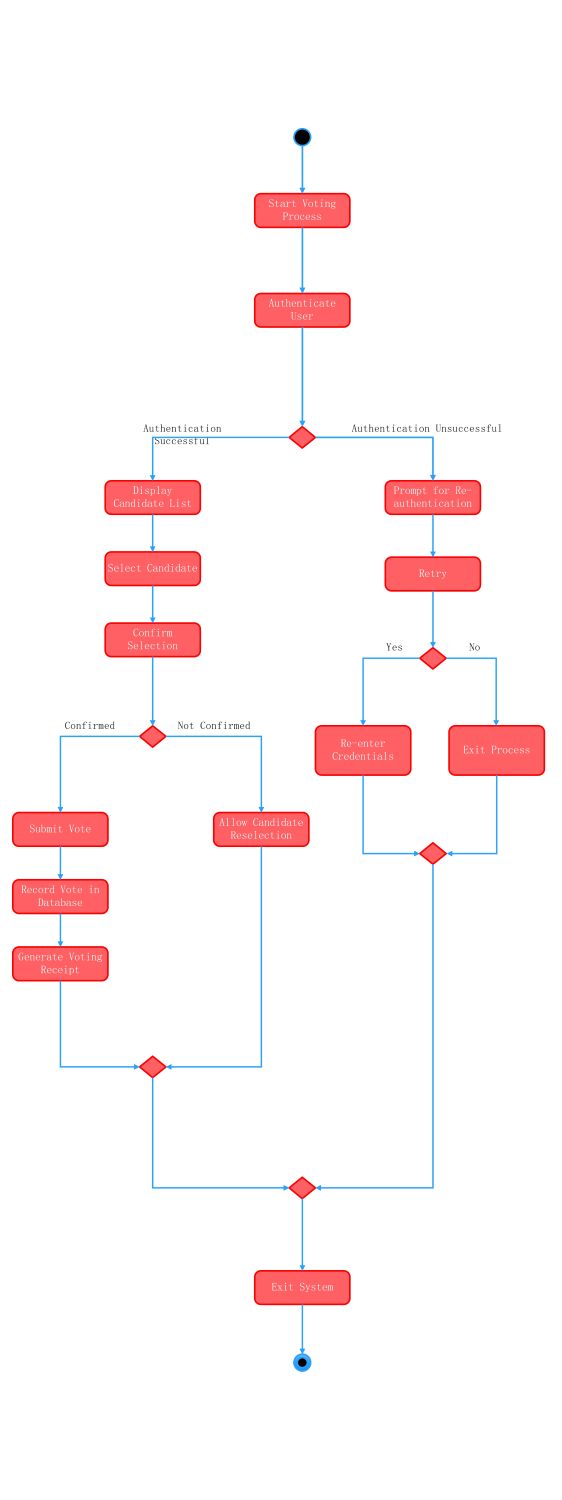
About this Activity Diagram for E-Voting System template
This template provides a clear visual guide for designing digital voting platforms. It outlines the essential steps needed to verify voter identity and process ballots securely. Use this map to build robust, user-friendly election software that maintains high integrity standards.
User Authentication Phase
This initial stage focuses on verifying the identity of the voter before allowing access. It ensures that only registered individuals can cast a ballot. Security checks here prevent fraud and maintain the overall election integrity.
- Start Voting Process
- Authenticate User
- Authentication Successful Path
- Authentication Unsuccessful Path
- Prompt for Re-authentication
- Retry or Exit Options
Candidate Selection Process
Once logged in, the voter interacts with the interface to choose their preferred representative. This section highlights the user interface flow. It allows voters to review their choices carefully before making a final commitment to the ballot.
- Display Candidate List
- Select Candidate
- Confirm Selection
- Allow Candidate Reselection
Vote Submission and Confirmation
The final phase handles the data processing and storage of the cast vote. It ensures the ballot is counted accurately within the central database. Providing a receipt gives the voter confidence that their action was successful.
- Submit Vote
- Record Vote in Database
- Generate Voting Receipt
- Exit System
FAQs about this Template
-
Why is authentication critical in an e-voting activity diagram?
Authentication is the foundation of a secure electronic voting system. It ensures that each participant is a valid, registered voter. By modeling this phase, developers can implement multi-factor verification or biometric checks. This prevents unauthorized access, double voting, and identity theft. Without clear authentication steps, the entire election process loses its credibility and trustworthiness among the public and governing bodies.
-
What happens if a voter wants to change their selection?
The diagram includes a specific Not Confirmed branch for this scenario. If a voter is unsatisfied with their choice during the confirmation step, the system triggers the Allow Candidate Reselection node. This ensures the user can return to the candidate list and modify their pick. Such flexibility is vital for reducing user errors and improving the overall voting experience during high-stakes elections.
-
How does the system confirm the vote was successfully recorded?
After the user submits their choice, the process moves to recording the data in a central database. Once the record is saved, the system generates a voting receipt. This receipt serves as digital proof of the transaction. It allows for future audits and provides the voter with immediate feedback that their ballot was received and processed correctly by the software backend.

 (AI & Web)