About this E-Commerce Platform Architecture Diagram
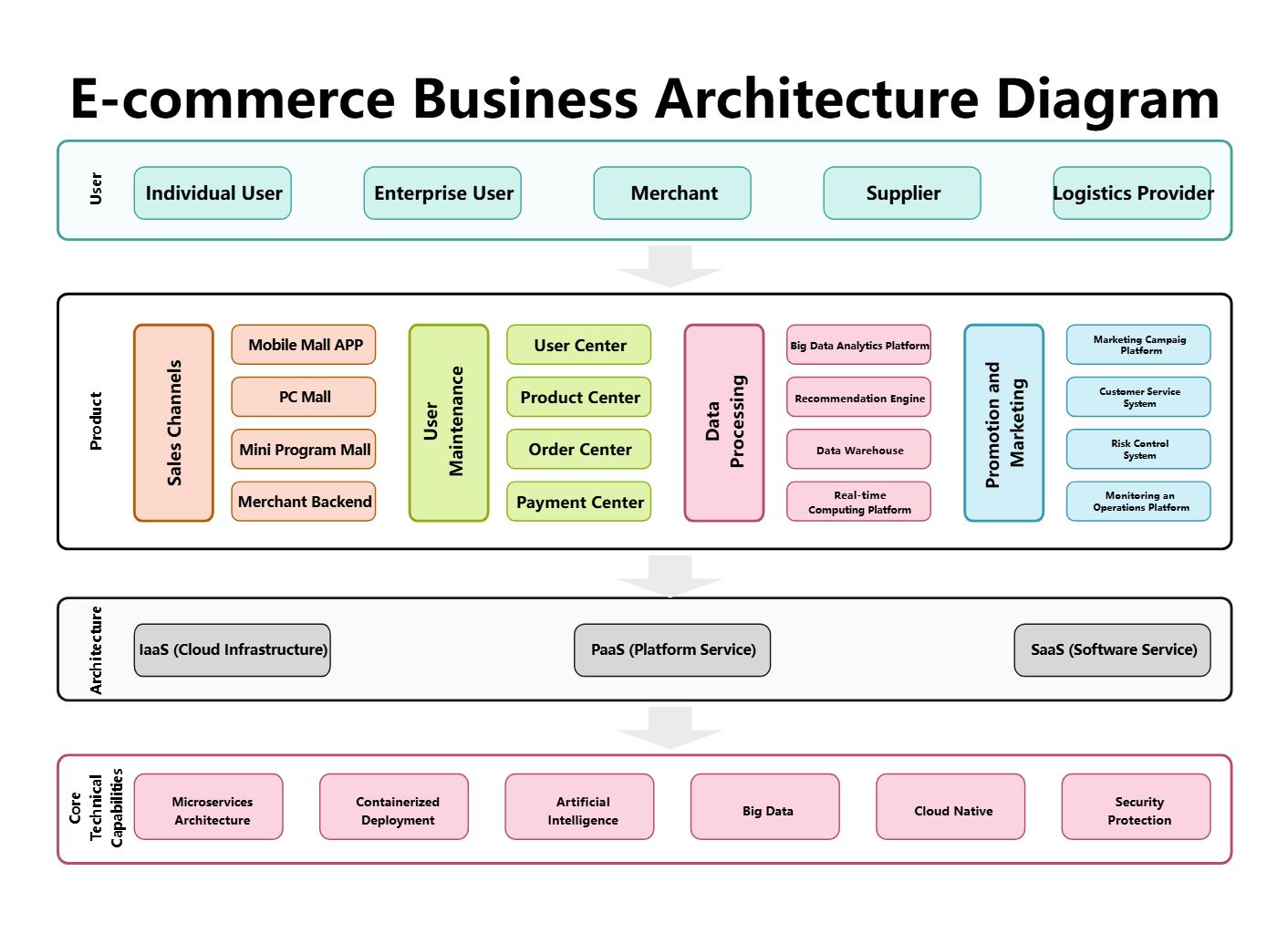
This diagram shows e commerce platform architecture diagram in a clearer structure, so the main layers or modules are easier to explain.
Recommendation Engine
The Recommendation Engine section marks one visible part of the architecture. In this diagram, it includes Big Data Analytics Platform, Data Warehouse, Real-time Computing Platform, Data Processing, so the section reads as a specific functional block rather than a generic label.
- Big Data Analytics Platform
- Data Warehouse
- Real-time Computing Platform
- Data Processing
- Product Center
- Supplier
- User Center
- Order Center
System
The System section marks one visible part of the architecture. In this diagram, it includes Risk Control System, Monitoring an Operations Platform, Customer Service System, Marketing Campaig Platform, so the section reads as a specific functional block rather than a generic label.
- Risk Control System
- Monitoring an Operations Platform
- Customer Service System
- Marketing Campaig Platform
- Promotion and Marketing
- SaaS (Software Service)
- Logistics Provider
- Security Protection
Microservices
The Microservices section marks one visible part of the architecture. In this diagram, it includes Microservices Architecture, Core Technical Capabilities, Containerized Deployment, IaaS (Cloud Infrastructure), so the section reads as a specific functional block rather than a generic label.
- Microservices Architecture
- Core Technical Capabilities
- Containerized Deployment
- IaaS (Cloud Infrastructure)
- Architecture
- Sales Channels
- Artificial Intelligence
- Merchant Backend
FAQs about this Template
-
Which diagram type is best for documenting microservices?
A high-level microservices architecture diagram is usually the best starting point because it shows service boundaries, gateways, data stores, and supporting infrastructure in one view. It helps teams explain how independent services relate to each other before they add lower-level sequence, event flow, deployment, observability, or support diagrams for implementation detail.
-
How do teams visualize microservices architecture clearly?
Teams usually visualize microservices architecture by separating client entry points, service layers, data stores, and messaging or infrastructure support. This makes it easier to review ownership, service boundaries, and dependencies across sections such as Recommendation Engine, System, and Microservices, especially when many small services need to cooperate without becoming one tightly coupled system.
-
What is the difference between microservices architecture and monolithic architecture?
Microservices architecture breaks a system into smaller independent services, while monolithic architecture keeps most application logic inside one larger codebase or deployment unit. Microservices diagrams are more useful when teams need to explain service boundaries, API relationships, data separation, scaling decisions, operational ownership, and failure isolation across a distributed application environment.
-
What should a microservices architecture diagram include?
A strong microservices architecture diagram should include service boundaries, API gateways or entry points, data stores, and the main request or event flow. It should also show where authentication, messaging, monitoring, deployment infrastructure, or support tooling fit, so readers can understand how the distributed system is coordinated and where operational responsibilities sit.
-
Can AI generate microservices architecture diagrams automatically?
Yes, AI can generate a draft microservices architecture diagram, but the result still needs engineering review. AI is useful for proposing service groupings and flow structure, while architects should confirm real domains, APIs, data ownership, failure boundaries, infrastructure dependencies, and support assumptions before the diagram is used in delivery planning or design review.

 (AI & Web)