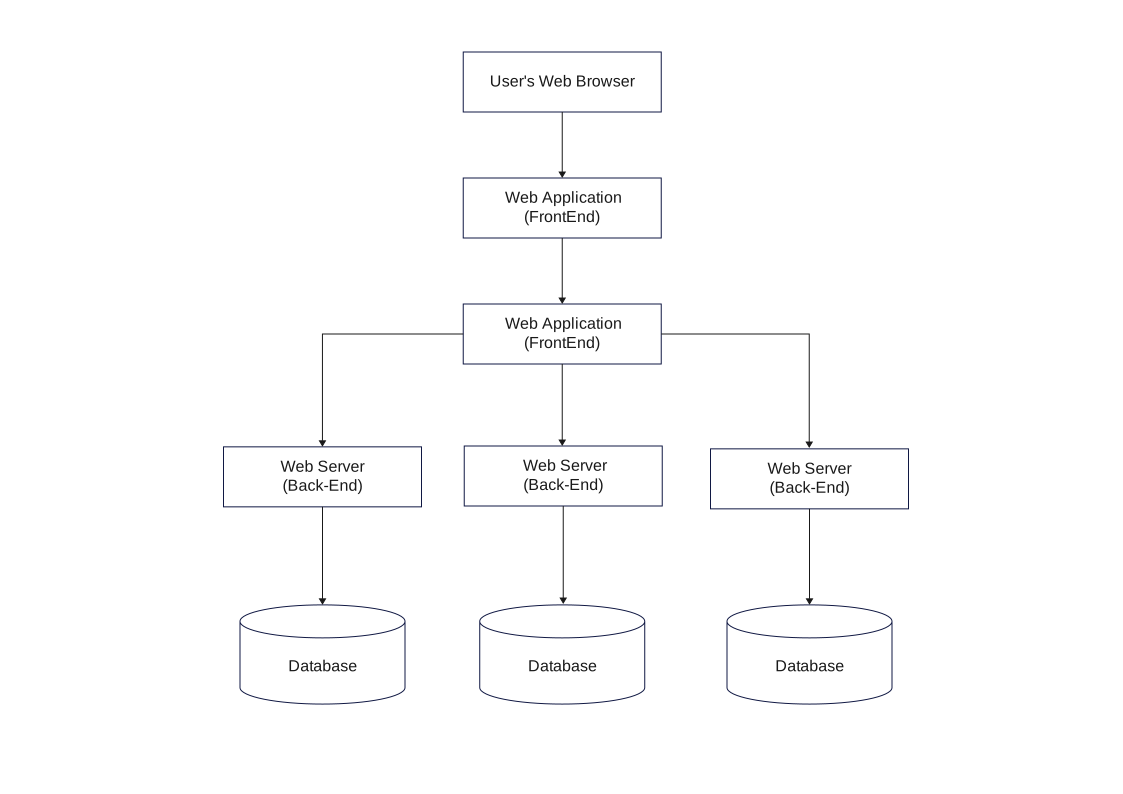
About Frontend, Backend, and Database Workflow
This frontend, backend, and database workflow lays out the visible sequence of steps, decisions, and outcomes in one process view. It is most useful when a reader...
Starting Point and Inputs
The flow begins with labels such as User's Web Browser, Web Application (FrontEnd), and Web Server (Back-End). These first nodes establish where the process starts and what information or action triggers the rest of the diagram.
- User's Web Browser
- Web Application (FrontEnd)
- Web Server (Back-End)
- Database
Process Steps and Decisions
The middle of the diagram is built around steps such as Web Server (Back-End) and Database. That sequence is what gives the template its value as a working process map instead of a static concept chart.
- Web Server (Back-End)
- Database
End State and Practical Use
By keeping the steps in a visible order, the flowchart helps readers review process logic, discuss exceptions, and spot where decisions or handoffs happen before the workflow reaches its final outcome.
FAQs about this Template
-
What makes this frontend, Backend, and Database Workflow easier to review than plain instructions?
It turns a working routine into visible stages, handoffs, and decision points. That matters because workflows often involve several steps or roles, and the chart lets readers see the structure of the process instead of reconstructing it from prose.
-
Why are branch points important in a workflow-style diagram?
Branch points show where the process changes based on a condition, decision, or result. Without them, the page loses the logic that explains why different cases follow different routes through the same overall workflow.
-
When is a workflow template better than documenting the process in text?
It is better when several people, steps, or conditional paths are involved. A workflow chart gives readers a faster understanding of order, responsibility, and variation than a text block that has to be read line by line.
-
What should be checked before a workflow diagram is finalized?
Before finalizing it, the creator should confirm step order, decision wording, ownership of each stage, and whether the end states are clearly shown. It also helps to test the chart against the real workflow to make sure no branch has been skipped.





 (AI & Web)