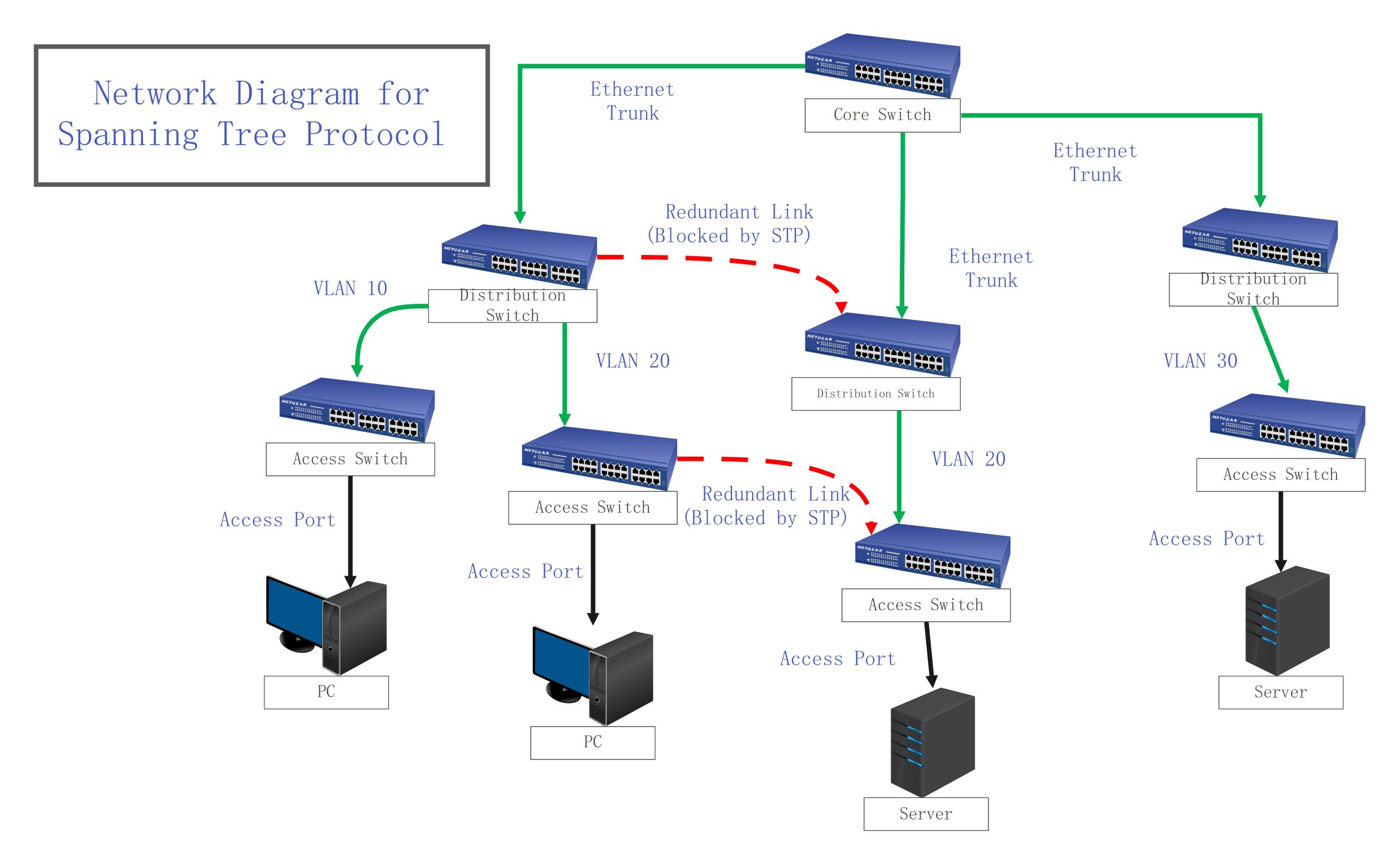
About this Network Diagram for STP template
This comprehensive template illustrates the hierarchical structure of a switched network using Spanning Tree Protocol. It highlights the connections between core, distribution, and access layers, providing a clear roadmap for managing redundancy and VLAN traffic efficiently.
Core Switch Layer
The core switch acts as the high-speed backbone of the entire network. It handles massive data transfers and connects directly to distribution switches using robust Ethernet trunks for maximum reliability and throughput performance.
- Core Switch
- Ethernet Trunk Connections
- High-Speed Backbone Routing
Distribution Switch Layer
Distribution switches serve as the central policy engine for the network hierarchy. They aggregate traffic from access layers and implement STP to identify and block redundant physical links, ensuring a logical loop-free path.
- Multiple Distribution Switches
- Redundant Link (Blocked by STP)
- VLAN 10, 20, and 30 Distribution
- Ethernet Trunking
Access Switch Layer
The access layer is the entry point where end-user devices connect to the network fabric. Access switches use dedicated ports to link workstations and servers, delivering essential connectivity while maintaining local security policies.
- Access Switches
- Access Ports
- End-user PCs
- Enterprise Servers
FAQs about this Template
-
Why does STP block redundant links in a network diagram?
Redundant links provide essential backup paths, but they can create physical loops if left active. Without Spanning Tree Protocol, data frames would circulate endlessly, causing a broadcast storm that crashes the entire network. STP identifies these loops and logically blocks specific ports to ensure only one active path exists between any two points at any time.
-
How does the network recover when a primary link fails?
When a primary link or switch fails, the Spanning Tree Protocol detects the loss of communication through Bridge Protocol Data Units. It then recalculates the network topology and automatically unblocks the previously disabled redundant link. This transition restores connectivity in seconds, providing seamless fault tolerance and high availability for all connected users without manual intervention.
-
What is the difference between an access port and an Ethernet trunk?
An access port typically connects a single end-device, like a PC or server, to a specific VLAN. In contrast, an Ethernet trunk is a high-bandwidth connection between switches that carries traffic for multiple VLANs simultaneously. Trunks are vital in STP diagrams because they form the main communication lines between the core, distribution, and access switch layers.

 (AI & Web)