About this Network Diagram for UDP template
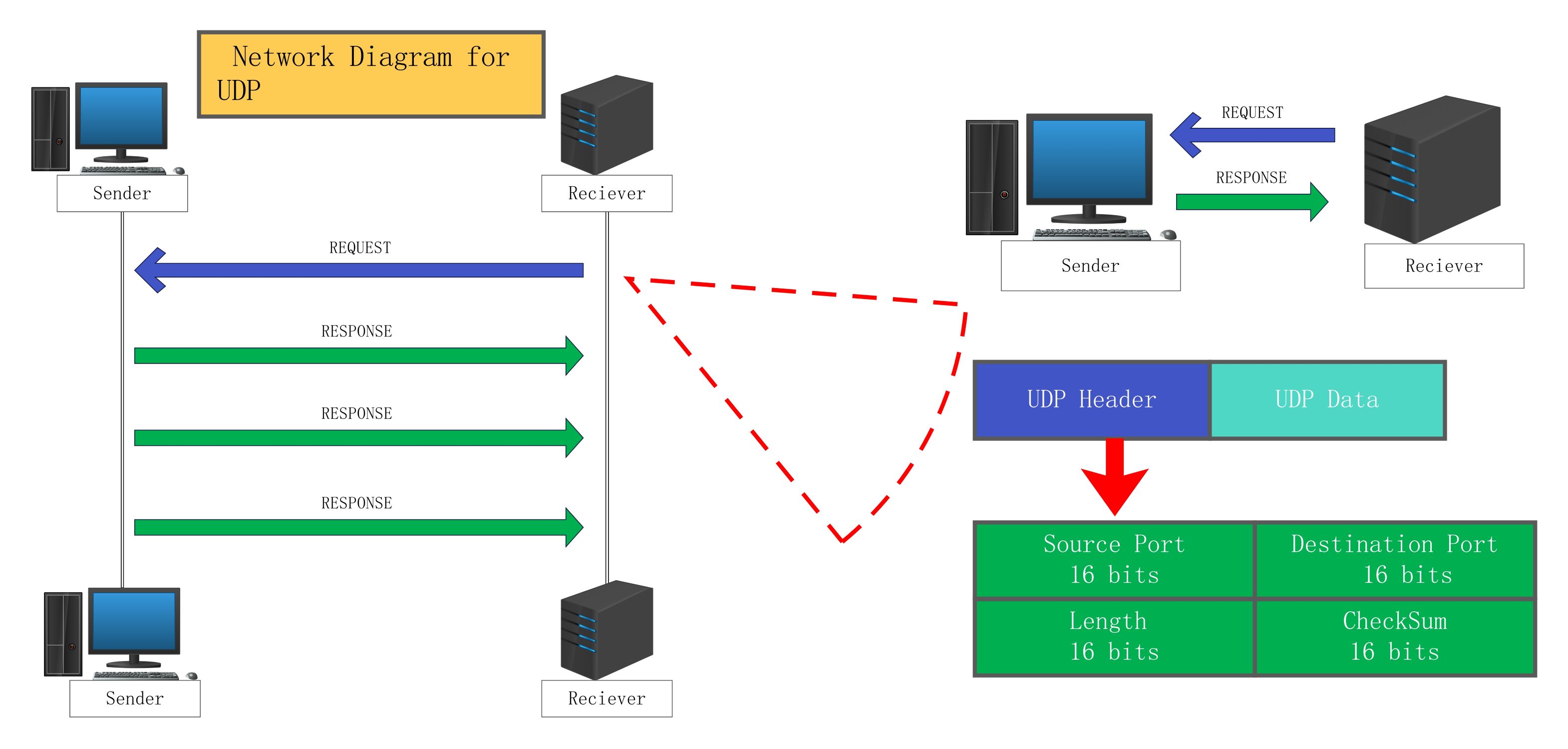
This template provides a clear visual breakdown of the User Datagram Protocol. It covers the basic interaction between a sender and receiver. You can use it to teach networking concepts or design efficient communication systems for real-time applications like streaming and gaming.
Request and Response Flow
The diagram depicts the exchange of data packets between the sender and receiver. It shows how requests are initiated and followed by multiple responses. This visualizes the fast, connectionless nature of UDP communication in real-time scenarios.
- Sender Host
- Receiver Host
- Request Data Flow
- Multiple Response Data Streams
UDP Header Architecture
This section details the internal structure of a UDP packet. Every packet contains a specific header followed by the actual data payload. Understanding these bit-sized fields is crucial for network troubleshooting and protocol analysis during development.
- Source Port (16 bits)
- Destination Port (16 bits)
- Length (16 bits)
- CheckSum (16 bits)
- UDP Data Payload
FAQs about this Template
-
What is the main purpose of a network diagram for UDP?
A network diagram for UDP helps engineers visualize how data moves across a network without established connections. It highlights the simplicity of the protocol compared to TCP. By mapping out the header structure and the flow of requests and responses, teams can better understand latency. This visual aid is essential for designing high-speed systems like video streaming or online gaming platforms.
-
How does the UDP header structure ensure data delivery?
The UDP header contains four critical fields that occupy sixteen bits each. The source and destination ports direct the data to the correct application on a device. The length field specifies the total size of the datagram. Finally, the checksum provides basic error detection to ensure data integrity. While it lacks recovery features, this structure minimizes overhead for faster transmission speeds.
-
Why is UDP preferred over TCP for certain applications?
UDP is preferred because it is a connectionless protocol that does not require a formal handshake. This reduces the time spent setting up a session. It is ideal for time-sensitive tasks where losing a few packets is better than waiting for retransmissions. Applications like Voice over IP, live broadcasts, and multiplayer games rely on this speed to maintain a seamless user experience.

 (AI & Web)