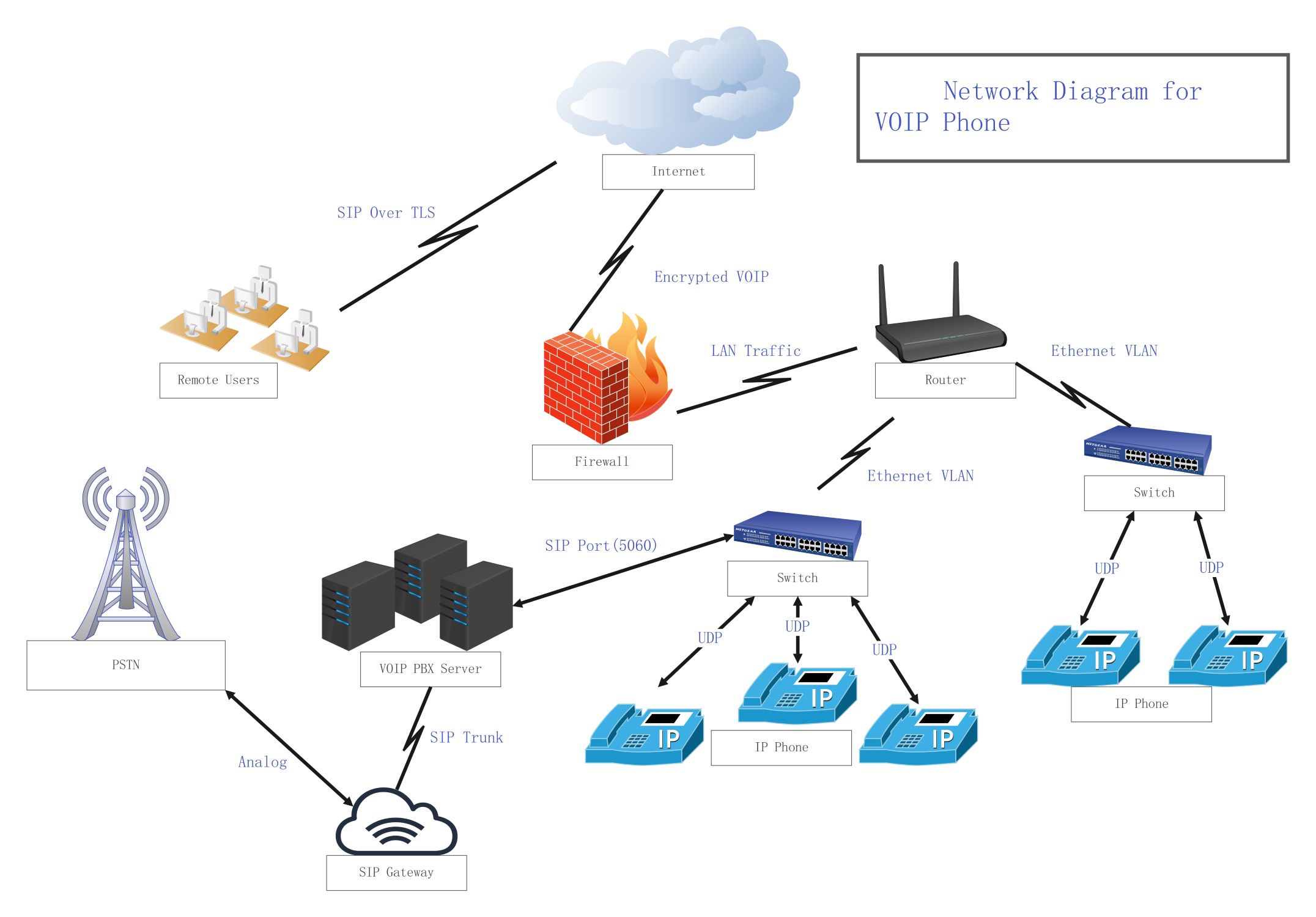
About this VOIP Phone Network Architecture Diagram template
This template provides a professional layout for designing and documenting Voice over IP systems. It covers critical pathing from local handsets to the public telephone network. Use this guide to ensure your hardware, servers, and security layers are correctly integrated for seamless business communication.
Internet and External Access
The internet serves as the primary gateway for remote employees and cloud services. A robust firewall ensures that encrypted VOIP traffic remains protected from outside threats. This section maps how external users connect to the core system securely.
- Internet (Cloud Network)
- Firewall (Encrypted VOIP Protection)
- Remote Users (SIP Over TLS)
Network Core and Switching
Routers and switches form the backbone of the internal network infrastructure. They manage data flow between devices using Ethernet VLANs to prioritize voice traffic. This organization helps prevent packet loss and ensures high-quality audio across the office.
- Router (Traffic Management)
- Ethernet VLAN (Network Segmentation)
- Switch (Local Device Connectivity)
VOIP Management and Integration
The PBX server acts as the central control for all internal calls and features. It connects to the SIP Gateway via a SIP Trunk to bridge digital calls. This setup allows the digital network to communicate with traditional analog phone lines.
- VOIP PBX Server (Call Control)
- SIP Trunk (Virtual Connection)
- SIP Gateway (Analog Bridge)
- PSTN (Public Switched Telephone Network)
End-Point Hardware and Protocols
IP phones are the physical tools users use to make calls on the network. These devices use the UDP protocol and specific SIP ports to send voice data packets. The diagram shows how handsets link directly to the local switching layer.
- IP Phone (Hardware Interface)
- UDP (User Datagram Protocol)
- SIP Port 5060 (Standard Signaling)
FAQs about this Template
-
What is the primary role of a VOIP PBX server in this network?
A VOIP PBX server serves as the brain of the communication system, managing internal call routing and advanced features like voicemail or automated attendants. It coordinates how internal extensions talk to each other and manages external connections through SIP trunks. This centralized control ensures that every call is directed to the right person or department efficiently within the business network.
-
Why is a SIP gateway necessary in a modern VOIP architecture?
A SIP gateway is essential because it bridges the gap between digital IP networks and traditional analog telephone systems. While modern offices use digital data for calls, they still need to connect with the global Public Switched Telephone Network (PSTN). The gateway converts digital voice packets into analog signals, ensuring your business can reach any standard landline or mobile phone worldwide.
-
How does the firewall handle VOIP traffic without affecting quality?
A firewall protects the network but must be configured for VOIP to avoid audio issues or dropped calls. It uses specialized settings to allow encrypted traffic and SIP signaling through specific ports like 5060. By identifying and prioritizing voice packets, the firewall ensures that security measures do not cause high latency or jitter, maintaining clear and consistent voice communication for all users.

 (AI & Web)