About this WebSocket Network Communication Diagram template
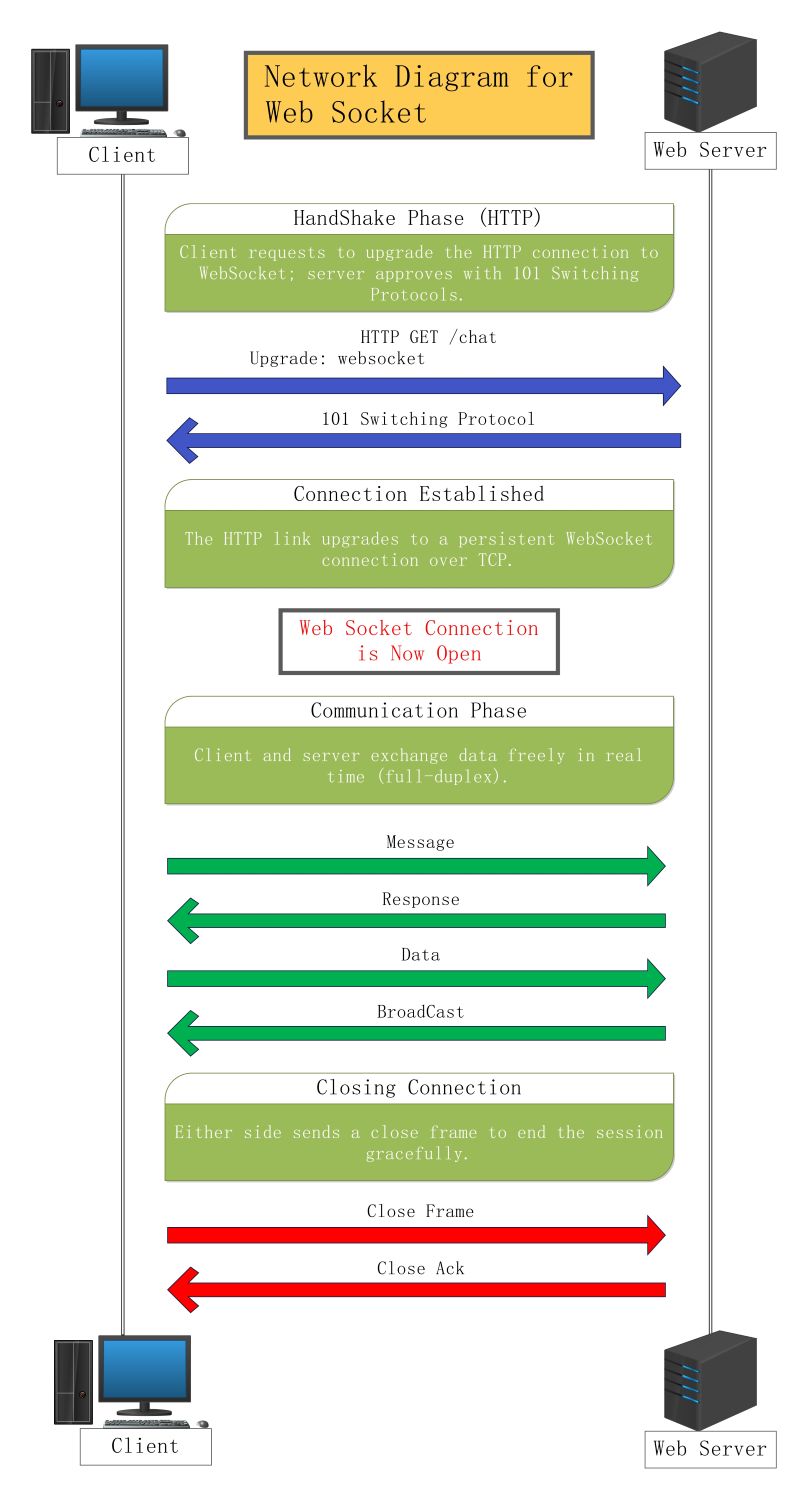
This template provides a clear visual flow of the WebSocket protocol. It covers everything from the initial handshake to the final closing of the session. Use it to document your network architecture and explain technical processes to your team or stakeholders effectively.
Handshake Phase (HTTP)
The handshake phase begins with an HTTP request to switch protocols. The client asks to upgrade the connection. If the server agrees, it sends back a specific response code to start the WebSocket session.
- HTTP GET /chat request
- Upgrade: websocket header
- 101 Switching Protocols response
- Initial protocol negotiation
Connection Established
Once the handshake succeeds, the standard HTTP link upgrades to a persistent WebSocket connection. This connection runs over TCP. It allows for a stable and continuous flow of data without needing frequent reconnects.
- Protocol upgrade confirmation
- Persistent TCP connection
- Bi-directional channel setup
- Active connection state
Communication Phase
During the communication phase, the client and server exchange data freely in real-time. This full-duplex interaction means both sides can send messages simultaneously. It is ideal for apps that need instant updates and high-speed data transfers.
- Direct message exchange
- Server response handling
- Data frame transmission
- Broadcast messages to clients
Closing Connection
The closing phase ensures the session ends gracefully without losing data. Either the client or the server can initiate this process by sending a close frame. Once acknowledged, the network resources are freed up for other tasks.
- Close frame initiation
- Close acknowledgment (ACK)
- Resource cleanup
- Session termination
FAQs about this Template
-
What is the primary difference between HTTP and WebSocket communication?
HTTP is a request-response protocol where the client must always initiate communication to receive data from the server. In contrast, WebSockets provide a persistent, full-duplex connection. This means both the client and server can send data at any time once the connection is established. It significantly reduces latency and overhead for real-time applications like live sports updates or chat.
-
Why is the handshake phase necessary for a WebSocket connection?
The handshake phase is critical because it allows the WebSocket protocol to remain compatible with existing web infrastructure. By starting as an HTTP request, the connection can pass through standard firewalls and proxies without being blocked. Once the server accepts the 'Upgrade' header, the protocol switches from HTTP to WebSocket. This ensures a seamless transition while maintaining security and connectivity across different networks.
-
How does a WebSocket connection handle data broadcasting?
In a WebSocket environment, the server can broadcast data to multiple connected clients simultaneously. This is highly efficient for collaborative tools or social media feeds. Unlike traditional polling, the server pushes updates only when new information is available. This reduces unnecessary network traffic and ensures that all users receive the same data at nearly the same time, providing a smooth user experience.

 (AI & Web)