About this Bus Reservation System template
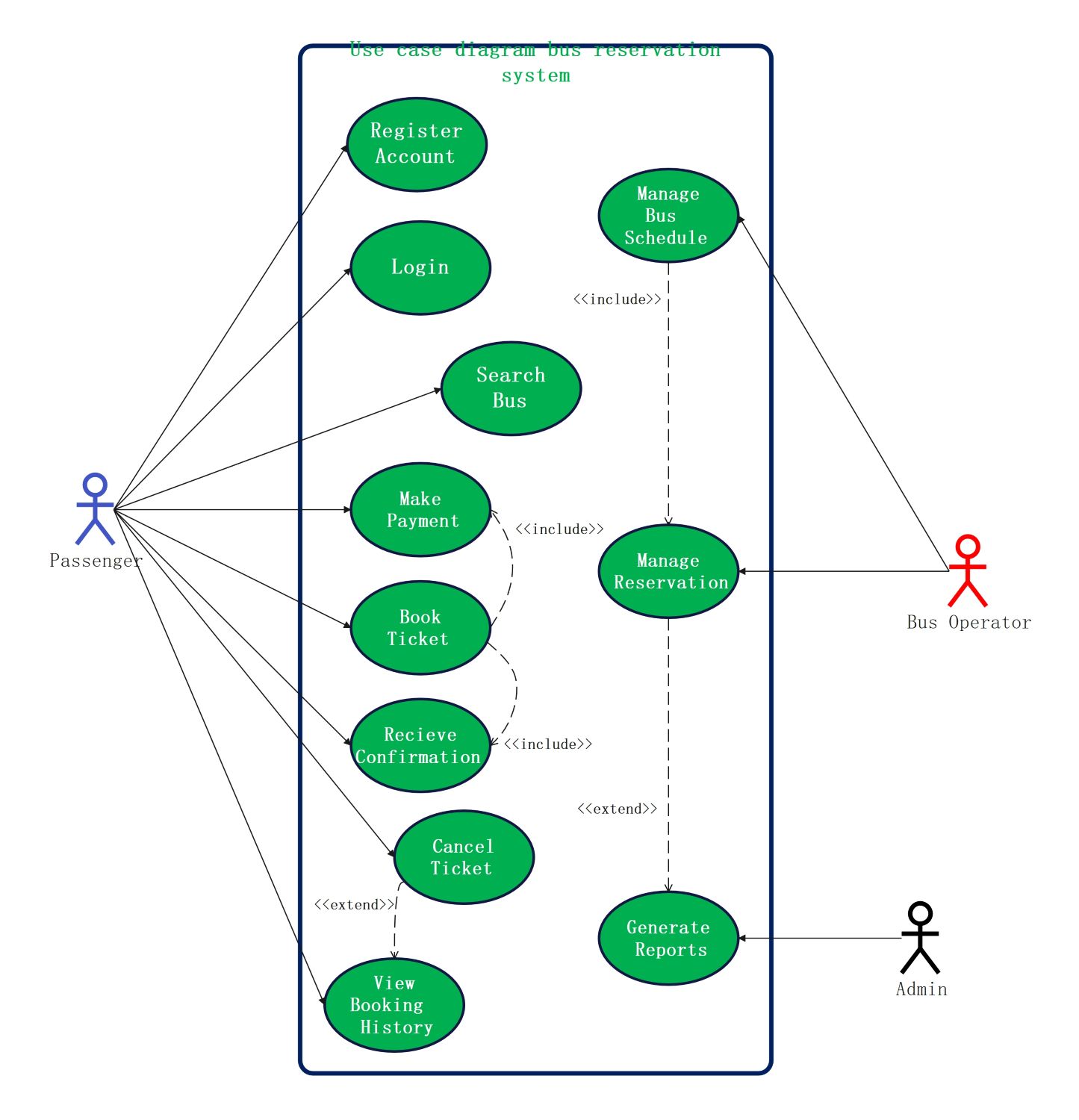
This UML use case diagram provides a clear visual blueprint of a digital bus booking platform. It maps the essential interactions between passengers, operators, and administrators to ensure a functional and user-centric system design.
Passenger Workflow
The passenger actor represents the primary users who navigate the system to secure travel. They interact with front-end features ranging from account creation and route searching to final payment and managing their personal booking history.
- Register Account and Login
- Search for Available Buses
- Book Ticket and Make Payment
- Receive Confirmation and View History
- Cancel Ticket if Necessary
Bus Operator Management
Bus operators focus on the logistical and operational aspects of the system. They ensure that bus schedules remain accurate and oversee all passenger reservations to maintain high efficiency and resolve any potential booking conflicts manually.
- Manage Bus Schedules
- Update Route Information
- Manage Daily Reservations
- Include Reservation Oversight
System Administration
The administrator is responsible for the overall health and business intelligence of the reservation system. By generating comprehensive reports, they analyze performance metrics and ensure that both passengers and operators have a stable environment.
- Generate Operational Reports
- Monitor System Analytics
- Handle High-Level Data Management
- Extend Reporting Capabilities
FAQs about this Template
-
How does an online bus reservation system benefit travelers?
An online bus reservation system offers travelers the convenience of booking tickets anytime and anywhere via mobile or web. It provides real-time access to seat availability, routes, and pricing comparisons. Secure payment gateways ensure safe transactions, while instant digital confirmations eliminate the need for physical tickets. Additionally, users can easily manage their schedules by canceling or rescheduling trips online without visiting a counter.
-
What are the core security features in a bus booking system?
Core security features include encrypted payment processing to protect sensitive financial data and secure user authentication through encrypted logins. The system also utilizes data backups to prevent information loss and role-based access control to ensure that only authorized personnel can view sensitive passenger details. SSL certificates and regular software updates further safeguard the platform against external cyber threats and unauthorized data breaches.
-
Why is the 'Manage Bus Schedule' use case critical for operators?
The 'Manage Bus Schedule' use case is critical because it allows operators to dynamically update routes, departure times, and bus assignments. Accurate scheduling prevents overbooking and ensures that passengers see live data during their search. This functionality helps operators respond to changing travel demands, adjust for maintenance, and optimize fleet utilization, which directly impacts the profitability and reliability of the transport service.

 (AI & Web)