About this Coffee Management System template
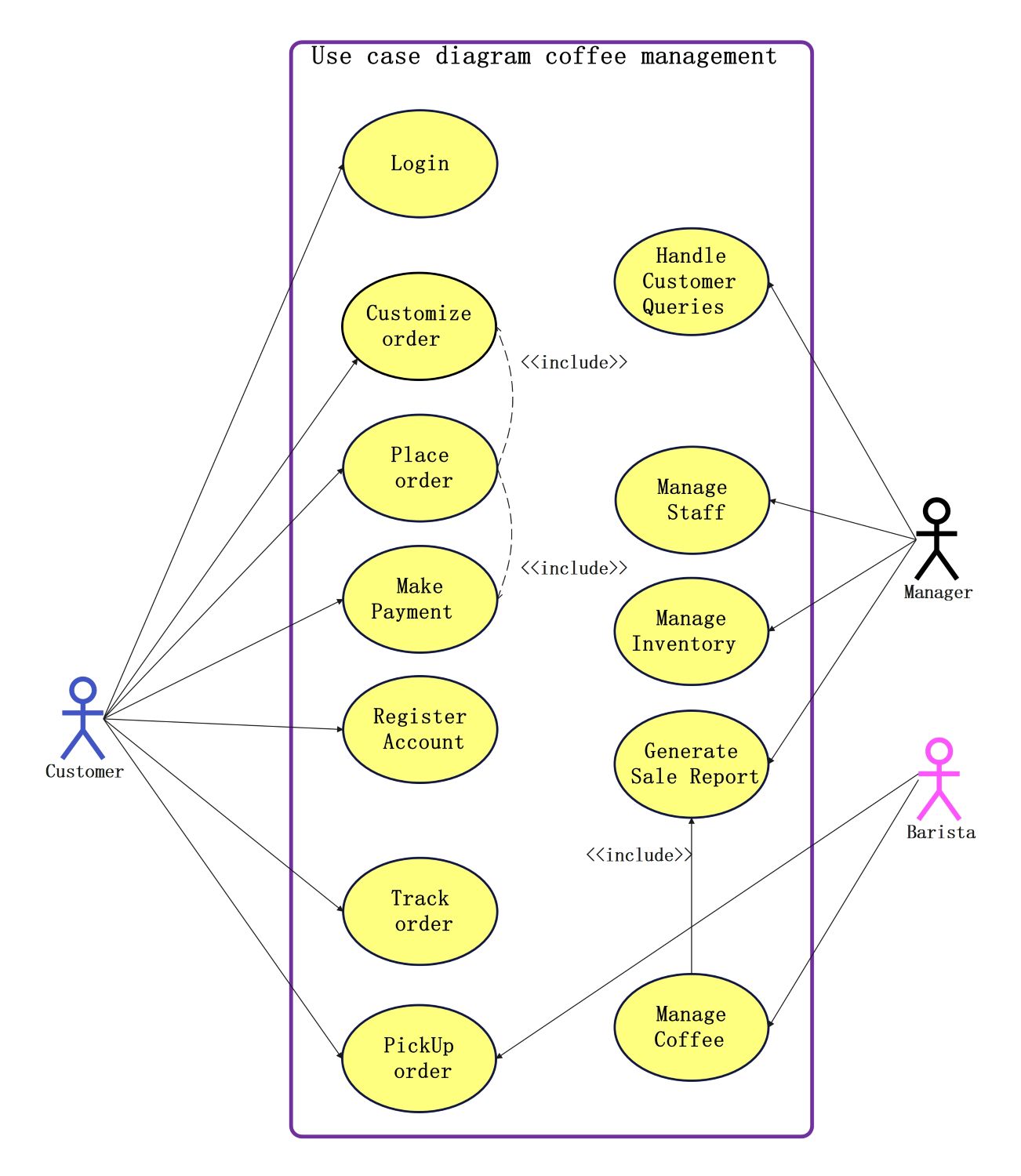
This UML use case diagram template outlines the essential interactions within a coffee shop application. It identifies three primary users—Customer, Manager, and Barista—and maps their specific roles to help developers visualize system requirements and business processes effectively.
Customer Interactions
The customer is the primary user who initiates most transactions. This section details how customers interact with the platform to register, place orders, and track their beverage progress for a seamless purchasing experience.
- Register Account
- Login
- Place order
- Customize order
- Make Payment
- Track order
- PickUp order
Managerial Operations
The manager handles high-level administrative tasks to ensure the business runs smoothly. This section focuses on back-end management, staff oversight, and inventory control necessary for maintaining the shop's operational standards and efficiency.
- Handle Customer Queries
- Manage Staff
- Manage Inventory
- Generate Sale Report
Barista Functions
The Barista role is centered on production and reporting. They ensure the quality of coffee being managed and contribute to sales data, allowing for accurate tracking of daily output and inventory usage.
- Generate Sale Report
- Manage Coffee
FAQs about this Template
-
How does a coffee management system improve customer service?
A coffee management system significantly improves customer service by reducing wait times and minimizing human error during order entry. Features like digital order tracking and customization allow customers to receive exactly what they want. By automating routine tasks, staff can focus more on beverage quality and providing a welcoming environment, which boosts overall satisfaction.
-
What are the core features of a digital coffee system?
The core features include secure user authentication, an intuitive ordering interface with customization options, and integrated payment processing. On the management side, the system must offer inventory tracking to prevent shortages and staff management tools. Generating detailed sales reports is also crucial for business owners to analyze performance and make data-driven decisions.
-
Why use a UML use case diagram for this system?
Using a UML use case diagram is essential for identifying all functional requirements and user roles before development begins. It provides a visual map of how different actors, like managers and baristas, interact with the system's features. This clarity helps prevent missed features and ensures that the final software meets the practical needs of the business.

 (AI & Web)