About this Insurance Management System template
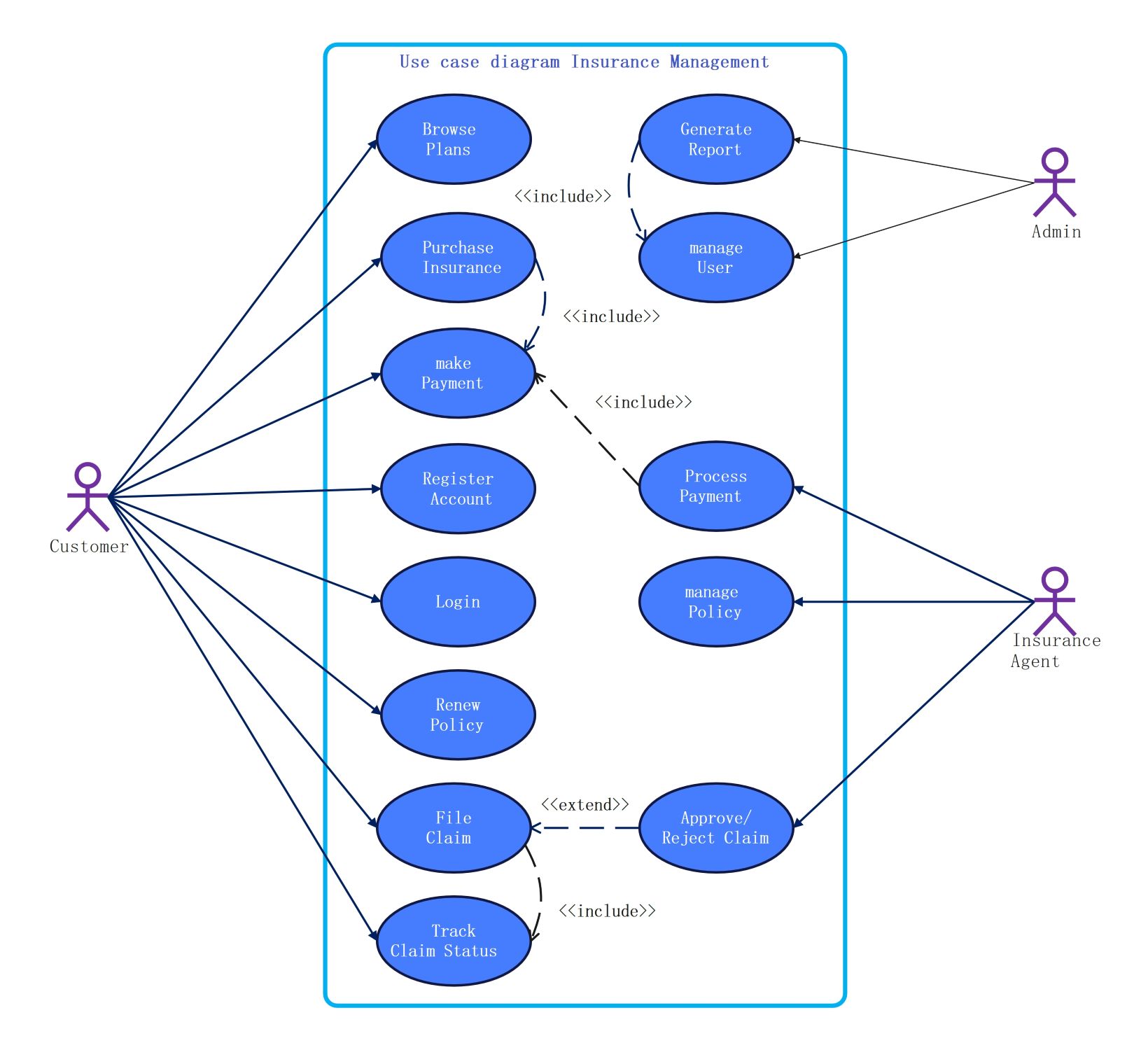
This Insurance Management System UML use case diagram acts as a visual guide for building robust insurance software. It defines the core interactions between policyholders, agents, and administrators to ensure every step of the insurance lifecycle is efficiently automated and secure.
Customer Role Functions
The customer node represents the primary end-user who manages their own insurance journey. This section outlines essential self-service features that allow users to handle their policies and claims independently without needing direct agent assistance.
- Register Account
- Login
- Browse Plans
- Purchase Insurance
- Make Payment
- Renew Policy
- File Claim
- Track Claim Status
Insurance Agent Responsibilities
Insurance agents play a critical role in verifying and processing customer requests within the system. This node focuses on the backend tasks required to maintain policy accuracy and ensure that claims meet all regulatory requirements.
- Process Payment
- Manage Policy
- Approve/Reject Claim
Administrative Management Controls
The admin section covers high-level management functions necessary for total system oversight. Administrators focus on maintaining user security and generating business intelligence reports to monitor the overall health and performance of the insurance platform.
- Generate Report
- Manage User
About this Insurance Management System template
This Insurance Management System UML use case diagram acts as a visual guide for building robust insurance software. It defines the core interactions between policyholders, agents, and administrators to ensure every step of the insurance lifecycle is efficiently automated and secure.
Customer Role Functions
The customer node represents the primary end-user who manages their own insurance journey. This section outlines essential self-service features that allow users to handle their policies and claims independently without needing direct agent assistance.
- Register Account
- Login
- Browse Plans
- Purchase Insurance
- Make Payment
- Renew Policy
- File Claim
- Track Claim Status
Insurance Agent Responsibilities
Insurance agents play a critical role in verifying and processing customer requests within the system. This node focuses on the backend tasks required to maintain policy accuracy and ensure that claims meet all regulatory requirements.
- Process Payment
- Manage Policy
- Approve/Reject Claim
Administrative Management Controls
The admin section covers high-level management functions necessary for total system oversight. Administrators focus on maintaining user security and generating business intelligence reports to monitor the overall health and performance of the insurance platform.
- Generate Report
- Manage User
FAQs about this Template
-
How does a UML diagram benefit insurance software development?
A UML use case diagram acts as a vital communication tool between stakeholders and developers. It defines the system's boundaries and identifies the interactions between various actors and functions. By visualizing these relationships early, teams can identify missing requirements, prevent logic errors, and ensure the final software meets the specific needs of customers, agents, and administrators efficiently.
-
What is the significance of the include relationship in this template?
In this insurance template, the include relationship signifies a mandatory sub-task that must occur for a primary process to complete. For example, purchasing insurance includes making a payment because a policy cannot be finalized without a financial transaction. This ensures the system architecture maintains strict logic flow, preventing incomplete data entries and ensuring all necessary steps are always followed by users.
-
Can this insurance management template be customized for specific niches?
Yes, this template is highly flexible and can be adapted for various insurance sectors like health, auto, or life insurance. Developers can add specific nodes for medical history checks, vehicle inspections, or beneficiary management. The modular nature of UML diagrams allows for easy expansion, making it a perfect starting point for building a tailored system that meets unique industry regulations.

 (AI & Web)