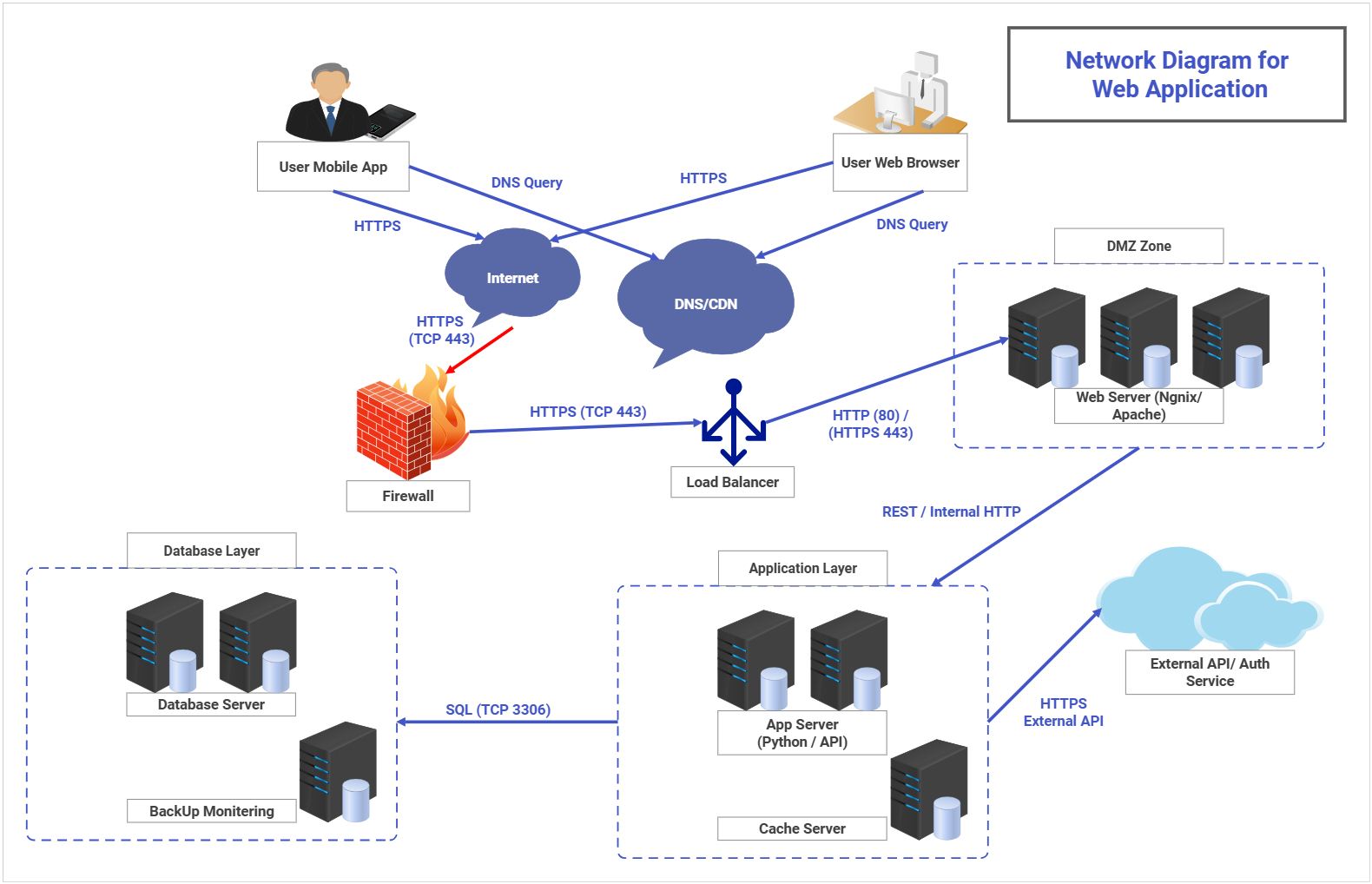
About this Web Application Network Architecture Diagram
This diagram shows the main structure of a web application network architecture diagram, with the visible layers or blocks separated so each part of the system can be explained more clearly.
Client and Internet Entry
The Client and Internet Entry section groups the visible components in this part of the diagram. In this layout, it includes User Mobile App, User Web Browser, Internet, DNS Query, which helps define what this block is responsible for in the wider architecture.
- User Mobile App
- User Web Browser
- Internet
- DNS Query
- HTTPS
Edge and Security Boundary
The Edge and Security Boundary section groups the visible components in this part of the diagram. In this layout, it includes DNS/CDN, Firewall, DMZ Zone, Load Balancer, which helps define what this block is responsible for in the wider architecture.
- DNS/CDN
- Firewall
- DMZ Zone
- Load Balancer
- HTTPS (TCP 443)
Application and Data Layers
The Application and Data Layers section groups the visible components in this part of the diagram. In this layout, it includes Application Layer, App Server (Python / API), Cache Server, Database Layer, which helps define what this block is responsible for in the wider architecture.
- Application Layer
- App Server (Python / API)
- Cache Server
- Database Layer
- Database Server
- REST / Internal HTTP
External Services and Operations
The External Services and Operations section groups the visible components in this part of the diagram. In this layout, it includes External API/ Auth Service, HTTPS External API, BackUp Monitering, which helps define what this block is responsible for in the wider architecture.
- External API/ Auth Service
- HTTPS External API
- BackUp Monitering
FAQs about this Template
-
How do teams map Web Application Network network architecture?
Teams usually map Web Application Network network architecture with a diagram that separates endpoints, traffic paths, security zones, and core infrastructure. This makes it easier to review routing logic, access boundaries, and failure points across sections such as Client and Internet Entry, Edge and Security Boundary, and Application and Data Layers, especially when the network has to support both connectivity and controlled access.
-
What is the difference between network architecture and system architecture?
Network architecture focuses on connectivity, traffic flow, security zones, and how devices or services communicate, while system architecture describes the broader application or platform structure. Teams use network diagrams when they need to explain routing, segmentation, VPN paths, firewall boundaries, infrastructure relationships, and traffic control that are not obvious in a general system view.
-
What should a Web Application Network network diagram include?
A strong Web Application Network network diagram should include the main nodes, traffic routes, trust boundaries, and key access points. It should also show how firewalls, gateways, VPN links, user endpoints, cloud segments, monitoring controls, or identity checks connect, so the topology can be reviewed for both connectivity and risk exposure.
-
Which diagram type is best for documenting Web Application Network connectivity?
A network architecture diagram is usually the best choice for documenting Web Application Network connectivity because it shows endpoints, routes, and control points in one view. If a team also needs application behavior or deployment detail, they often pair it with sequence, infrastructure, or system diagrams instead of forcing performance, security, and deployment concerns into one topology map.
-
Can AI generate Web Application Network network diagrams automatically?
Yes, AI can generate a draft network diagram, but technical review is still essential. AI can help suggest topology structure and common network groupings, while engineers should validate the real routing logic, segmentation, firewall rules, VPN paths, device relationships, and traffic assumptions before using the diagram for operations or security review.

 (AI & Web)